Exchange | Exchange Server | Management
The administration and maintenance of Microsoft Exchange Server to ensure secure, reliable, and efficient email and collaboration services across an organization.
This browser is no longer supported.
Upgrade to Microsoft Edge to take advantage of the latest features, security updates, and technical support.
' cx='32' cy='32' r='32' /%3E%3Ctext x='50%25' y='55%25' dominant-baseline='middle' text-anchor='middle' fill='%23FFF' %3EMH%3C/text%3E%3C/svg%3E)
Hi Experts,
I need the script :
How to extract List of all Users Who Have Full Access, Send As and Send on Behalf to Other Exchange Mailboxes.
It is Okay, if there is separate command for these access.
Thank you.
The administration and maintenance of Microsoft Exchange Server to ensure secure, reliable, and efficient email and collaboration services across an organization.
' cx='32' cy='32' r='32' /%3E%3Ctext x='50%25' y='55%25' dominant-baseline='middle' text-anchor='middle' fill='%23FFF' %3ELL%3C/text%3E%3C/svg%3E)
Hi @Mohammad Haque ,
According to my research, we cannot directly obtain the permissions of the user's mailbox to other mailboxes.We can know whether each user mailbox contains the "Full Access", "Send As" and "Send on Behalf" permissions of other mailboxes through the permissions assigned to other users on each user's mailbox.
We could run the following script to get the permission between user mailbox:
Full Access:
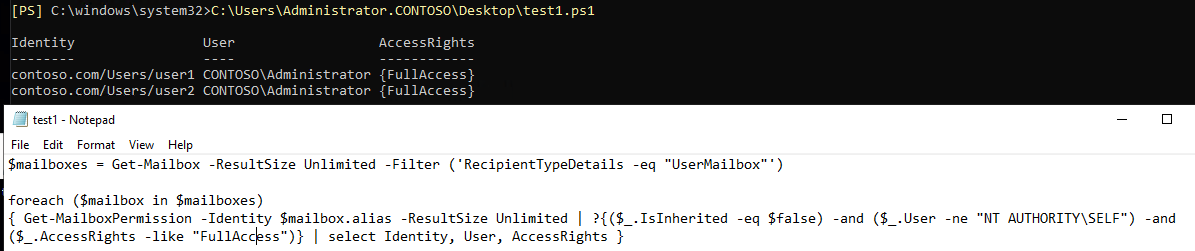
$mailboxes = Get-Mailbox -ResultSize Unlimited -Filter ('RecipientTypeDetails -eq "UserMailbox"')

foreach ($mailbox in $mailboxes)
{ Get-MailboxPermission -Identity $mailbox.alias -ResultSize Unlimited | ?{($_.IsInherited -eq $false) -and ($_.User -ne "NT AUTHORITY\SELF") -and ($_.AccessRights -like "FullAccess")} | select Identity, User, AccessRights }
Send As:
$mailboxes = Get-Mailbox -ResultSize Unlimited -Filter ('RecipientTypeDetails -eq "UserMailbox"')

foreach ($mailbox in $mailboxes)
{ Get-ADPermission -Identity $mailbox.alias | ? { $_.ExtendedRights -like "*send*" -and -not ($_.User -match "NT AUTHORITY") -and ($_.IsInherited -eq $false)} | select Identity,User,ExtendedRights }
Send On Behalf:
Get-Mailbox -ResultSize Unlimited -Filter ('RecipientTypeDetails -eq "UserMailbox"') | select Alias, GrantSendOnBehalfTo
The following screenshots in the test in lab environment:
Full Access:
Send As:

Send On Behalf:

----------
If the response is helpful, please click "Accept Answer" and upvote it.
Note: Please follow the steps in our documentation to enable e-mail notifications if you want to receive the related email notification for this thread.
Hi @Mohammad Haque ,
I am writing here to confirm with you how thing going now?
----------
If the response is helpful, please click "Accept Answer" and upvote it.
Note: Please follow the steps in our documentation to enable e-mail notifications if you want to receive the related email notification for this thread.
Hi @Mohammad Haque ,
I am writing here to confirm with you how thing going now?
----------
If the response is helpful, please click "Accept Answer" and upvote it.
Note: Please follow the steps in our documentation to enable e-mail notifications if you want to receive the related email notification for this thread.
' cx='32' cy='32' r='32' /%3E%3Ctext x='50%25' y='55%25' dominant-baseline='middle' text-anchor='middle' fill='%23FFF' %3EBG%3C/text%3E%3C/svg%3E)
Anyway of getting the original mailbox user name? The Identity field is too long since the users are buried in OU's in my AD.
' cx='32' cy='32' r='32' /%3E%3Ctext x='50%25' y='55%25' dominant-baseline='middle' text-anchor='middle' fill='%23FFF' %3EMD%3C/text%3E%3C/svg%3E)
can we export to a report in csv format?
' cx='32' cy='32' r='32' /%3E%3Ctext x='50%25' y='55%25' dominant-baseline='middle' text-anchor='middle' fill='%23FFF' %3ET%3C/text%3E%3C/svg%3E)
Hello @Lucas Liu-MSFT , I found this old post but really needed for my task today. Thanks a lot for your commands, but quick question, how could I export it as a csv file ? just adding the export-csv command at the end of it doesn't seems to work.
Thanks in advance
' cx='32' cy='32' r='32' /%3E%3Ctext x='50%25' y='55%25' dominant-baseline='middle' text-anchor='middle' fill='%23FFF' %3EWV%3C/text%3E%3C/svg%3E)
$path="c:\temp\list.csv"
$list | export-csv -path $path
add -useculture if you are on azerty keyboard and need it in an excel column format
Hello @Wouter Victor , thank you very much for your answer. I'm on a local environement, not exchange online. Can this apply for my situation ?
Also where should I add your cmplementary commands ? In the exchange shell prompt ? or in a powershell prompt ?
Thank you very much.
powershell will need the exchange addon, exchange shell accepts export-csv. Its been a while since i used an exchange on prem. some commands are different, but thats something you can test or ask an AI (chatgpt)
The one for SendAs in Exchange online is the following. Code below for shared mailboxes
$mailboxes = Get-Mailbox -ResultSize Unlimited -Filter ('RecipientTypeDetails -eq "SharedMailbox"')
foreach ($mailbox in $mailboxes)
{ Get-RecipientPermission -Identity $mailbox.alias | Where-Object { $_.AccessRights -like "*send*" -and -not ($_.Trustee -match "NT AUTHORITY") -and ($_.IsInherited -eq $false)} | select Identity,Trustee,AccessRights }
How can we then export to csv.
Melvi