Share via

RDGW settings - RDGClientTransport

crawn23 41 Reputation points
2021-05-08T12:35:19.477+00:00

Hello
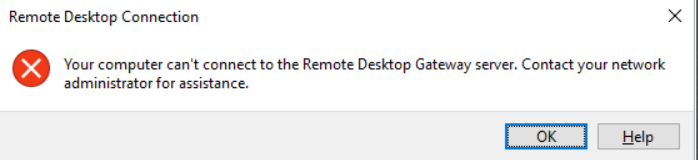
We' re using RDSH terminal servers for users (on Windows Server 2019), where users are connecting through gateway (UDP enabled). On many users we have problem with error message
![94907-image.png]1

Only workaround is to set registry
HKCU\Software\Microsoft\Terminal Server Client\RDGClientTransport DWORD 0x00000001

first problem is that we need to set this for users manually (sometimes it happened for users at home office - nondomain pc), sometimes on domain computers, - i dont want to set this to GPO.
second problem is that we loose UDP benefits when set this.

I cant figure out what may create this error messages and how to solve this on RDGW side. Can someone help me with this case ? Many computers are working without this registry without problems.

Windows for business | Windows Client for IT Pros | User experience | Remote desktop services and terminal services
0 comments No comments

4 answers

Sort by: Most helpful
  1. crawn23 41 Reputation points
    2021-05-12T07:51:32.107+00:00

    Hello,
    There is firewall between RDGW and client and also KEMP load balancer. But, if client is inside company network -on some computer its working, and on some not - computers are in same network so i dont think that firewall or KEMP blocks. From outside company network there are maybe 10% clients which cant connect (need to set this registry) - so hard to say, but i think something is wrong on rdgw side.

    Logs from RDGW:
    The user "xxxxxxxx", on client computer "xxxxxx", has initiated an outbound connection. This connection may not be authenticated yet.
    and thats all

    Logs from client:
    I cat find any logs regarding this. Can you maybe specify on which logs should i focus (ID or path)?

    RDS environment - 8 rdgw servers, 4 rdcb servers, 6 rd session host servers - all on Windows Server 2019, same build. We have also collection with VDI and some remoteapps, but it doesnt matter to which resource client trying to connect

    1 person found this answer helpful.

  2. Anonymous
    2021-05-17T11:59:21.183+00:00

    Hi,

    Haven't received your message a few days, was your issue resolved?

    Best Regards.

    0 comments No comments

  3. Anonymous
    2021-05-13T07:10:53.557+00:00

    Hi,

    From your description, I can see that this issue revolves around the external network and only affects a small number of users, and with randomness. Moreover, it’s tough for us to determine the conclusion of this issue based on the events you provided. In common parlance, it needs to use a tracing/log tool to capture the log for find the root cause. Please understand due to security policy and from our professional level, we could not provide log analysis. In addition, if this problem is more urgent for you, I still recommend that you open a case to Microsoft for further professional help.

    Before that, you still can try to Patch RDGW fully with Windows Update, then decide what to do next. If feasible, it is recommended that you perform a narrow down on the gateway to confirm whether the problem occurs in a specific gateway.

    Best regards

    0 comments No comments

  4. Anonymous
    2021-05-10T12:32:29.343+00:00

    Hi,

    First of all, let's consider whether there are protection settings between Remote Desktop Gateway and client (such as TMG, firewall). If there is one, it may be set by rule or block.

    Secondly, we need to collect Log & event, both client and Remote Desktop Gateway server, to see if there is an obvious error (see the detailed RDS event).

    In addition, please describe the configuration of your RDS environment, including how many RDS server and their versions, which roles are configured.

    Looking forward your reply.

    Best regards

    0 comments No comments

Your answer

Answers can be marked as 'Accepted' by the question author and 'Recommended' by moderators, which helps users know the answer solved the author's problem.