' cx='32' cy='32' r='32' /%3E%3Ctext x='50%25' y='55%25' dominant-baseline='middle' text-anchor='middle' fill='%23FFF' %3EA%3C/text%3E%3C/svg%3E)

Hi,
Thanks for posting your query to Microsoft forum. I will certainly help you with this.
First download and install VLC player from VideoLAN
Make sure that it is configured as "Network disk" in the setup menu.
Press Windows + R key on the keyboard
Type: cmd and click Ok.
In the consol type: ipconfig /all
Look at the IP address and the DHCP Server address for the network device.
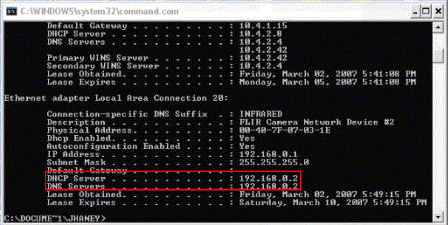
Open VLC player and go to file --> open network stream. Choose RTSP and type in the DHCP server address (normally one number higher in the last section than the IP address). Click the OK button. This should start steaming video to the PC.
To save the stream as a file, check the Stream/Save box in the advanced options then click on the Settings button before you start the stream.
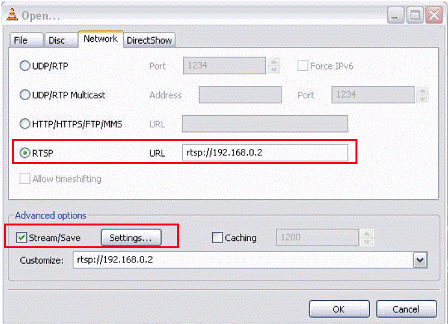
In the settings for the stream output choose file, the encapsulation method that determines the file format (user Preference) and video codec (user preference).
Click the browse button at the end of the Filename window and choose the location and file name you want to save the video output.
Let us know if you need further assistance. We will be glad to help you further.
___________________
Thanks & Regards,
Isha Soni