ok, got the answer here.
http://freewindowsvistatutorials.com/backupExportSaveCursorsSchemesMousePointersThemesInWindows7.php
I have not yet tried it, but sharing as I find it, maybe someone can add on this information.
it reads:
--
Backup or export a custom cursor scheme (mouse pointers theme) in Windows 7
What happens to custom mouse pointer schemes (cursor themes) you saved? Windows 7 doesn't create a file that contains a scheme: instead, it saves them to the "Registry", a large database of settings and options you have saved over time. In this tutorial, we will
explain how you can backup or export you cursor schemes (to use them on a new computer, or
transfer and import these cursor schemes on another, to spare you from having to manually re-create a mouse pointer theme from scratch).
--
and then it elaborates method for doing the same. Run Regedit -
--
- Go to "
HKEY_CURRENT_USER", then double-click on "Control Panel", and finally double-click on "Cursors". Then, click on "Schemes".
- Windows 7 will load in the right pane all the custom mouse pointer schemes you have create on the computer you are using.
- To export or backup all your cursor themes, right-click on "Schemes", and choose from the context menu:
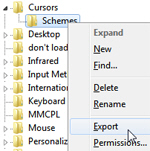
- Type a name for the file to which you are going to backup / export your cursor scheme, and click on the "Save" button. Windows will create that file in the folder you selected. You are done!
--
then, on a new installation, just double click on this saved .reg file and it will be integrated into the registry, or you can run regedit and do a import of this file.
then, the theme is visible in the mouse window drop down box of themes and you can just select it.
Of course, it only have the names of the cursor files for each pointer gesture, so you have to copy/ move actual 12 .cur or .ani files to the said location, that is Cursors folder.
only if you MS Wise men have simple common sense to allow this to be done in the control panel - mouse - pointers window itself.
Thanks.
--
Rawat
' cx='32' cy='32' r='32' /%3E%3Ctext x='50%25' y='55%25' dominant-baseline='middle' text-anchor='middle' fill='%23FFF' %3EA%3C/text%3E%3C/svg%3E)

