Share via

Microsoft Edge Virus Windows 10

Anonymous
2015-08-23T22:42:06+00:00

I am new to Windows 10, and Microsoft Edge has been my go to browser.  With school starting soon I have no idea what to do.  This image is a screenshot of what happens every time I open up Microsoft Edge.  You can hit the OK button but it does nothing, I cannot even access the settings in Microsoft Edge.  The only way to close the browser is to use task manager. 

How can I get rid of this virus??  I want to be able to use Microsoft Edge again.

Anything that is easy to do would be great...  I am not great with computers and just really need this working before school starts!

Windows for home | Other | Security and privacy

Locked Question. This question was migrated from the Microsoft Support Community. You can vote on whether it's helpful, but you can't add comments or replies or follow the question.

0 comments No comments

Answer accepted by question author

Anonymous
2015-08-23T22:51:59+00:00

Have you sought assistance from your antimalware provider (Avast, AVG, Avira, McAfee, Norton, Trend Micro, etc)?

See http://malwaretips.com/blogs/remove-tech-support-scam-popups/

Alternatively - - -

If the malware popup is in your Edge browser and you cannot remove it, see Answerof RenePeerboom in this thread: http://answers.microsoft.com/en-us/protect/forum/protect\_other-protect\_scanning/how-to-remove-softwareupdateproductcom-from/ad19b030-e2f5-43de-ae5b-70bf8b24fa2e

Good luck…
Was this answer helpful?

10+ people found this answer helpful.
0 comments No comments

16 additional answers

Sort by: Most helpful
  1. Anonymous
    2015-09-16T00:53:17+00:00

    Remove Microsoft Edge Virus

    STEP 1:

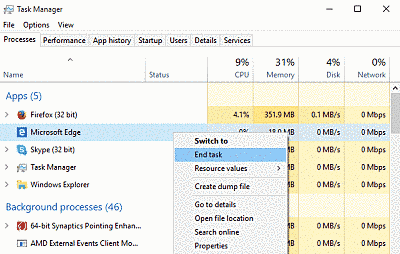
    Open the Task Manager by right clicking on the Taskbar and choosing Start Task Manager. Once it opens, choose the Processes Tab. Locate and terminate theMicrosoft Edge process by choosing End Task.

    STEP 2: 

    Stop your internet connection. It doesn’t matter exactly in what way you do it.

    STEP 3:

    Navigate to the following directory:

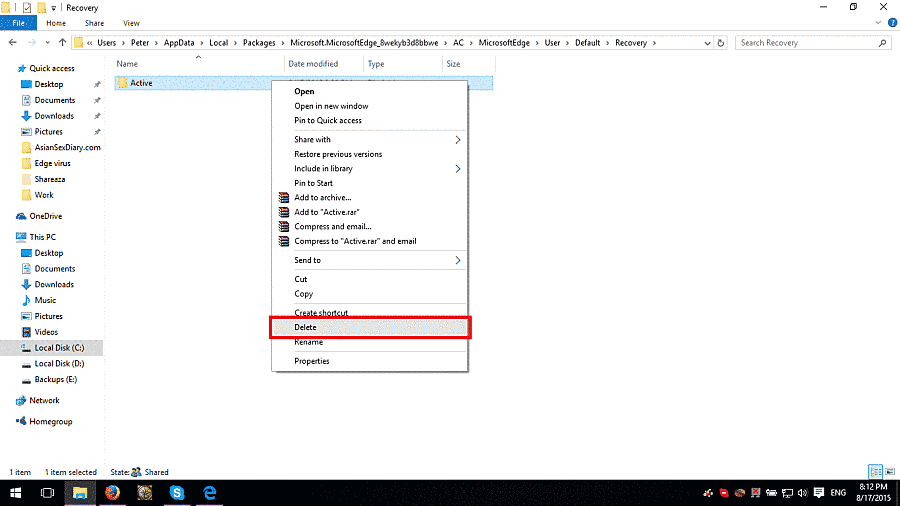
     C:\Users<users>\AppData\Local\Packages\Microsoft.MicrosoftEdge_xxxxxx\AC\MicrosoftEdge\User\Default\Recovery\Active .The XXXX after Microsoft Edge is different for every user, a succession of numbers and/or symbols. Delete the last folder.

    Empty recycle bin and that's it.

    Was this answer helpful?

    40+ people found this answer helpful.
    0 comments No comments
  2. Anonymous
    2015-10-05T19:59:11+00:00

    User Scott_Ki has provided this solution.

    ************************************************

    When this happened to me, I closed Microsoft Edge using the Task Manager.

    Then in the search bar next to the Windows 10 logo on the bottom off the screen (I call it the "Cortana Search"), I typed in google.com and hit enter.

    Microsoft Edge opened up with a new tab for Google.  You can see the offending site still opens in a tab that doesn't have focus.  Click the "X" to close Edge. Do not click on the offending site tab or it will get focus again.

    When Edge closes nicely, it won't "Restore" the sessions and the offending site tab will be gone.

    Source: http://answers.microsoft.com/en-us/protect/forum/protect_other-protect_scanning/edge-frozen-with-virus-warning-popup/7212a393-90ad-48d0-ab55-4ffe1f21a554?page=2&msgId=7618ae67-bf16-4155-bf90-d8a7405ee199

    Was this answer helpful?

    8 people found this answer helpful.
    0 comments No comments
  3. Anonymous
    2016-09-06T21:16:45+00:00

    I went to a website and got the whole "virus" screen pictured above. I closed the page with the task manager. I restarted my laptop, even though it told me not to. I lost no data because we all know that is nothing but BS. The page still came back when I opened the browser.

    I have always had two search engines installed so I used the other to find this solution on Bing. I followed the instructions above, and within five minutes, everything was back to normal. All it took was turning off my internet connection to my laptop (when you do this and then open Edge, it will come up a nice clean screen), and then the deletion of a back up folder. I didn't have to install an malware anything and go through all those steps to get it to be gone. Easy peasy.

    Was this answer helpful?

    3 people found this answer helpful.
    0 comments No comments
  4. Anonymous
    2017-05-11T17:38:10+00:00

    Was this answer helpful?

    2 people found this answer helpful.
    0 comments No comments