
I am experiencing this issue as well. I have the latest cumulative patch installed, yet my ntoskrnl.exe shows as an old version (10.0.17763.316).
I have observed this in server 2008r2 and in windows10 2019 LTSC.
This browser is no longer supported.
Upgrade to Microsoft Edge to take advantage of the latest features, security updates, and technical support.
' cx='32' cy='32' r='32' /%3E%3Ctext x='50%25' y='55%25' dominant-baseline='middle' text-anchor='middle' fill='%23FFF' %3EGS%3C/text%3E%3C/svg%3E)
How can i update ntoskrnl.exe version?
Current remote version : 6.3.9600.16422 need to update be: 6.3.9600.19761
' cx='32' cy='32' r='32' /%3E%3Ctext x='50%25' y='55%25' dominant-baseline='middle' text-anchor='middle' fill='%23FFF' %3EM%3C/text%3E%3C/svg%3E)
Same problem here.
Server 2016 but I also have some 2012 with the same problem, all the latest updates and service packs are installed, but ntoskrnl was not updated, we are receiving Tennable reports of vulnerabilities about missing a Microsoft update, you check the server all the updates are installed, you check the version of ntoskrnl still at 10.0.14393.3442 when it should be 10.0.14393.3564.
I have schedule the MS20-Aug : cumulative Update (KB4571694), as per the Microsoft CSV file it should update it to 10.0.14393.3866, hope it will work this time !!!
Started having this problem on a some servers a few months ago, now it's each month. Hope Microsoft will work on this issue or at least give us a message about a failed installation when it can't update this very important file.
' cx='32' cy='32' r='32' /%3E%3Ctext x='50%25' y='55%25' dominant-baseline='middle' text-anchor='middle' fill='%23FFF' %3EC%3C/text%3E%3C/svg%3E)
I am experiencing this issue as well. I have the latest cumulative patch installed, yet my ntoskrnl.exe shows as an old version (10.0.17763.316).
I have observed this in server 2008r2 and in windows10 2019 LTSC.

Hi,
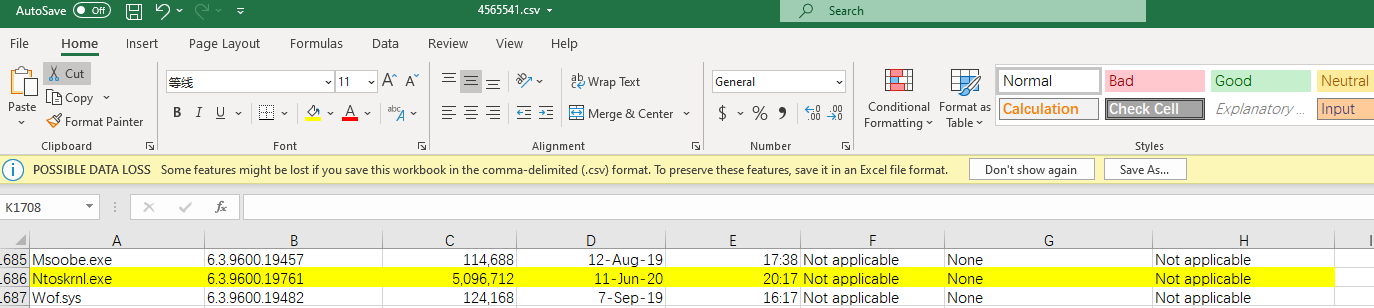
It not available to update a single system file. If want to update system file, we could install the latest update July 14, 2020—KB4565541 (Monthly Rollup) through Windows Update Catalog. I have checked the included ntoskrnl.exe version is 6.3.9600.19761.
Hi,
Any update?
If any reply is useful for you, please accept it as answer.
If you have any other issue or confuse, please reply to us directly.
Bests,

Hi @Ganesh SHINDE ,
Have you installed the latest updates to the server?
You don't need to worry about the ntoskrnl.exe version if all windows updates have been installed.
' cx='32' cy='32' r='32' /%3E%3Ctext x='50%25' y='55%25' dominant-baseline='middle' text-anchor='middle' fill='%23FFF' %3EJF%3C/text%3E%3C/svg%3E)
Wow you arent very smart, is the exe is vulnerable so is the rest of the OS.