i installed legit fifa16 into my pc. while i tried to play it always says that unhandled exception.
I am using windows 10. All drivers are updated.
please anybody help. TIA
Error messege :
just-in-time (JIT) debugging instead of this dialog box.
************** Exception Text **************
System.ComponentModel.Win32Exception (0x80004005): Window class name is not valid.
at System.Windows.Forms.NativeWindow.WindowClass.RegisterClass()
at System.Windows.Forms.NativeWindow.WindowClass.Create(String className, Int32 classStyle)
at System.Windows.Forms.NativeWindow.CreateHandle(CreateParams cp)
at System.Windows.Forms.Control.CreateHandle()
at System.Windows.Forms.Control.CreateControl(Boolean fIgnoreVisible)
at System.Windows.Forms.Control.CreateControl(Boolean fIgnoreVisible)
at System.Windows.Forms.Control.CreateControl()
at System.Windows.Forms.Control.WmShowWindow(Message& m)
at System.Windows.Forms.Control.WndProc(Message& m)
at System.Windows.Forms.Form.WmShowWindow(Message& m)
at System.Windows.Forms.NativeWindow.Callback(IntPtr hWnd, Int32 msg, IntPtr wparam, IntPtr lparam)
************** Loaded Assemblies **************
mscorlib
Assembly Version: 4.0.0.0
Win32 Version: 4.6.96.0 built by: NETFXREL2STAGE
CodeBase: file:///C:/Windows/Microsoft.NET/Framework64/v4.0.30319/mscorlib.dll
fifaconfig
Assembly Version: 1.0.0.0
Win32 Version: 1.0.0.0
CodeBase: file:///F:/Program%20Files%20(x86)/Origin%20Games/FIFA%2016/fifasetup/fifaconfig.exe
System.Core
Assembly Version: 4.0.0.0
Win32 Version: 4.6.79.0 built by: NETFXREL2
CodeBase: file:///C:/WINDOWS/Microsoft.Net/assembly/GAC_MSIL/System.Core/v4.0_4.0.0.0__b77a5c561934e089/System.Core.dll
System
Assembly Version: 4.0.0.0
Win32 Version: 4.6.79.0 built by: NETFXREL2
CodeBase: file:///C:/WINDOWS/Microsoft.Net/assembly/GAC_MSIL/System/v4.0_4.0.0.0__b77a5c561934e089/System.dll
System.Windows.Forms
Assembly Version: 4.0.0.0
Win32 Version: 4.6.79.0 built by: NETFXREL2
CodeBase: file:///C:/WINDOWS/Microsoft.Net/assembly/GAC_MSIL/System.Windows.Forms/v4.0_4.0.0.0__b77a5c561934e089/System.Windows.Forms.dll
System.Drawing
Assembly Version: 4.0.0.0
Win32 Version: 4.6.93.0 built by: NETFXREL2STAGE
CodeBase: file:///C:/WINDOWS/Microsoft.Net/assembly/GAC_MSIL/System.Drawing/v4.0_4.0.0.0__b03f5f7f11d50a3a/System.Drawing.dll
DXHelper
Assembly Version: 1.0.5689.26117
Win32 Version: 1.0.0.0
CodeBase: file:///F:/Program%20Files%20(x86)/Origin%20Games/FIFA%2016/fifasetup/DXHelper.DLL
System.Xml
Assembly Version: 4.0.0.0
Win32 Version: 4.6.79.0 built by: NETFXREL2
CodeBase: file:///C:/WINDOWS/Microsoft.Net/assembly/GAC_MSIL/System.Xml/v4.0_4.0.0.0__b77a5c561934e089/System.Xml.dll
************** JIT Debugging **************
To enable just-in-time (JIT) debugging, the .config file for this
application or computer (machine.config) must have the
jitDebugging value set in the system.windows.forms section.
The application must also be compiled with debugging
enabled.
For example:
<configuration>
<system.windows.forms jitDebugging="true" />
</configuration>
When JIT debugging is enabled, any unhandled exception
will be sent to the JIT debugger registered on the computer
rather than be handled by this dialog box.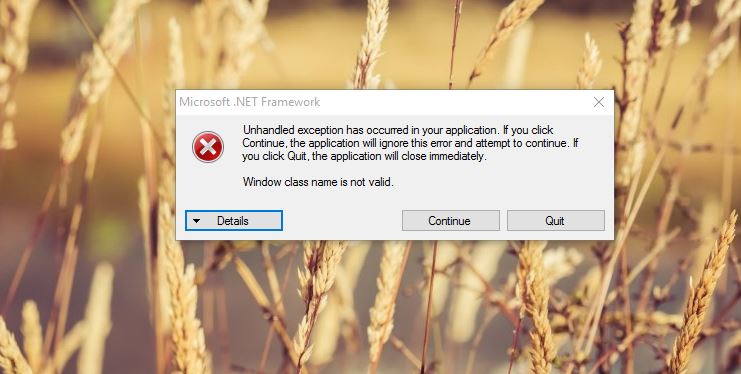
' cx='32' cy='32' r='32' /%3E%3Ctext x='50%25' y='55%25' dominant-baseline='middle' text-anchor='middle' fill='%23FFF' %3EA%3C/text%3E%3C/svg%3E)
