I have seen this on several of my clients' computers. The solution I found that works is to uninstall java. You have to be prepared to do it quickly as Windows starts. The problem takes 30 seconds or so to get going. It may take several attempts to do it quickly enough.
Should I be concerned about javaws.exe running 1000's of Image Names?
Do you think this issue may be causing some hidden problems or longer term system degradation that I'm not aware of?
It's odd that this issue has actually benefited my machine's operation :
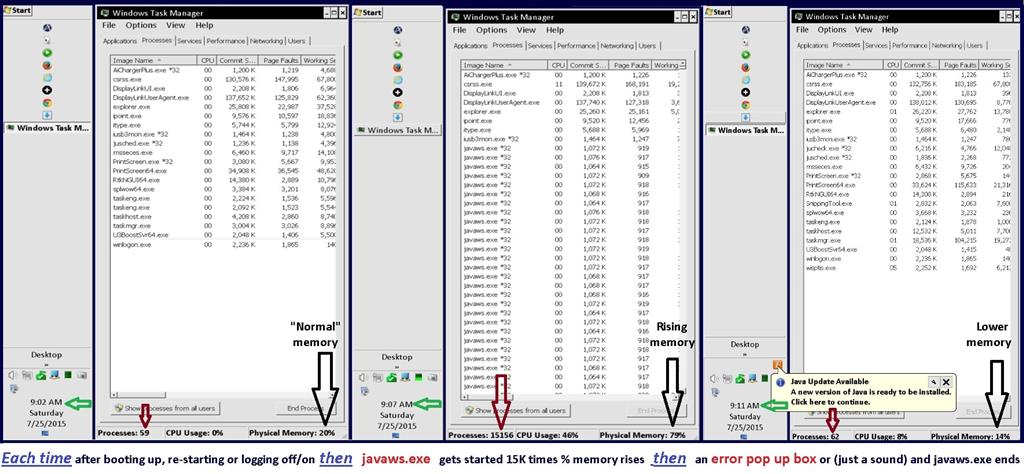
About 5 minutes after every Start, Restart or Log-off/log-on, jsched.exe*32 will start javaws.exe, up to 15,000 Image Names build in Task Manager's Process tab...Physical Memory will approach 100% before an error message window pops up or a warning sound is heard. Then the extra Image Names and high Physical Memory percentages start to decline..this takes a total of 4 to 5 minutes to complete...
Afterwards, Task Manager shows my "normal" number of Processes and "normal" CPU Usage BUT it shows a 30% LOWER Physical Memory percentage than before...AND CPU core temperatures run about 10% lower.
I have been running my machine this way for the past two weeks, 10 to 12 hours a day...I have noticed no ill effects - I can still run multiple programs, browsers etc with a the added benefit of not having to deal with closing and reopening one of my 64-bit programs that used to "slow down" after a few hours...
I can prevent the above from happening by right clicking jsched.exe and selecting End Process or by unchecking the box for Java Platform SE Auto Updater on the Startup tab in System Configuration...
I'm also reluctant to take the Java Update that's available as it might "fix" the multiple javaws.exe issue...the few minutes it takes to do it's thing does not bother me as long as my machine continues to perform great...
This link goes to a page on one of my blogs where I document the issue further...Weird Windows Stuff .
The picture shows the Task Manager before, during and after javaws.exe has done it's thing:
System Specs:
BUILD CONFIGURATION July 2012
CPU.........................Intel Core i5 3570K Ivy Bridge 3.4 GHz LGA
Motherboard............ASUS P8Z77-V LK LGA Intel z88 SATA 6Gb/s
SSD drive................OCZ Vertex 128G 2.5" SATA III
Memory...................GSKILL Sniper 8GB (2x4GB) DDR3 SDRAM 1600
Power Supply............CORSAIR/TX650 V2 (650W)
GPU.........................2 EVGA GeForce GT 520 1024MB dual DVI out
add'l adapters.....4 Sabrient USB-1612 video display adapters
Operating System....Windows 7 Home Premium SP1 64-bit
Case..............HEC steel ATX mid tower 2 x 120mm fans
Components from previous trade stations set ups
UPS...................three 4 outlet APC Uninterrupted Power Supplies *
Monitors...........3 AOC 24" LED and 3 AOC 22" LED
1 SOYO 20" LCD and 1 HP 20" LCD
Screen resolutions are set to 1920 x 1080
( The older SOYO and HP LCDs have lower maximums...
The SOYO is set to 1680x1050 and the HP is set to 1600 x 90
Windows for home | Previous Windows versions | Windows update
Locked Question. This question was migrated from the Microsoft Support Community. You can vote on whether it's helpful, but you can't add comments or replies or follow the question.
Answer accepted by question author
-
Anonymous
2015-10-13T13:08:26+00:00
12 additional answers
Sort by: Most helpful
-
Anonymous
2015-10-13T15:44:50+00:00 So far I haven' t re-installed java (that I know of anyway)...
I've been running without it since Aug and have not seen anything that I use that needs it so far...
(unless I do have it somewhere but it's completely hidden from me)
My view is why have another thing that's always running - If it's not broke, don't fix it..
-
Anonymous
2015-10-13T15:24:00+00:00 You can and probably should install a fresh version of Java, now. That is what I have been doing to my client computers.
Glad to hear you got it stopped.
-
Anonymous
2015-10-13T15:19:52+00:00 Thanks Canadian Tech,
I thought about uninstalling java and should have done that...
But I put it off because I thought I was getting some performance benefit from letting it continue...
(It was like NOT looking a gift horse in the mouth)
In retrospect, had I just uninstalled java I could have prevented the need to re-install everything...
-
Anonymous
2015-10-13T10:48:00+00:00 Quote:
You may have already fixed your problem...
Well...yes and no...
Two things prevented the 1000's of javaws.exe's from starting:..
- Entering System Configuration (msconfig) and un-checking Java Platform SE Auto Updater
- After booting up, I could open Task Manager and use "End Process" on jsched.exe
But ultimately, The fix turned out to having to reload the operating system...
...because:
My machine finally stopped booting into Windows...it got stuck in a blue screen message loop
that would only let it run "Fix it" or "memory fix" (or something like that)... I ran all the built in "fixes" but
eventually it even stopped trying to run "Restore to an earlier time" and then it stopped being able to enter
safe mode altogether...
By then I could not even enter UEFI BIOS mode...
BTW - After re-installing Windows*** from my DVD, re-adding all the programs I use and re-updating all "important" Win Updates (NO "recommended or optional updates) - Java does not show up anywhere...not in Task Manager, not in my startup menu and not in any Program Folders on C:/.
I don't miss Java at all...
***Even though I had a recent, complete Windows backup with System Image on an external drive, I was reluctant to use it because I thought it would contain the stuff that caused the problem in the first place...
