Share via

Accu-chek 360 and Windows 10

Anonymous
2015-07-23T01:43:20+00:00

I use this program with Windows 7 64 bit version and have reserved the Windows 10 upgrade. I'm trying to find out if I will have a problem once I do the upgrade. Nothing is listed in the Compatibility report for Windows 10 on this machine. Does anyone know if it will work or not? Thanks.

Windows for home | Previous Windows versions | Apps

Locked Question. This question was migrated from the Microsoft Support Community. You can vote on whether it's helpful, but you can't add comments or replies or follow the question.

0 comments No comments
Answer accepted by question author
  1. Anonymous
    2015-08-01T15:24:23+00:00

    I've done the upgrade to windows 10 and initially the AccuChek 360 wouldn't start.  It reported that the database did not exist or was not available.

    I had to uninstall all of the software published by roche and also all software that had SQL server 2012 in the title (be careful not to unistall any Visual C++ 2012 modules).

    Then when I ran the install disc it recreated all of the SQL modules and allowed Accu Chek to recreate it's database.  I had to redownload all of the data from the blood monitor but it did at least work.

    10+ people found this answer helpful.
    0 comments No comments

23 additional answers

Sort by: Most helpful
  1. Anonymous
    2017-03-23T03:44:16+00:00

    As per the entry "WitoXC replied on December 18, 2015

    https://www.accu-chekconnect.com/ui/guest/landing-page.jsf

    2 people found this answer helpful.
    0 comments No comments
  2. Anonymous
    2016-08-13T09:28:37+00:00

    I just contacted Accu check and still no go on the 360 upgrade. They do have a web based system that will work on IMacs and PCs. I have started using that , it seems to work ok.

    https://www.accu-chekconnect.com/ui/guest/landing-page.jsf

    2 people found this answer helpful.
    0 comments No comments
  3. Anonymous
    2015-12-17T14:06:36+00:00

    Hi all,

    I have been having the same issues with AccuCheck 360 with Win10 as all in this forum have indicated.

    Been through the Uninstall/Reinstall of SQL & AccuChek as well. I am unaware of a fix for this being provide so I had a bit of a look myself.

    I found that on occasion the Uninstall/Reinstall process would work, but then when I logged out of AccuChek and logged back in, eventually I would get the database did not exist or was not available message. I was not able to identify why this was happening until I decided to check to see if the related services were running. 

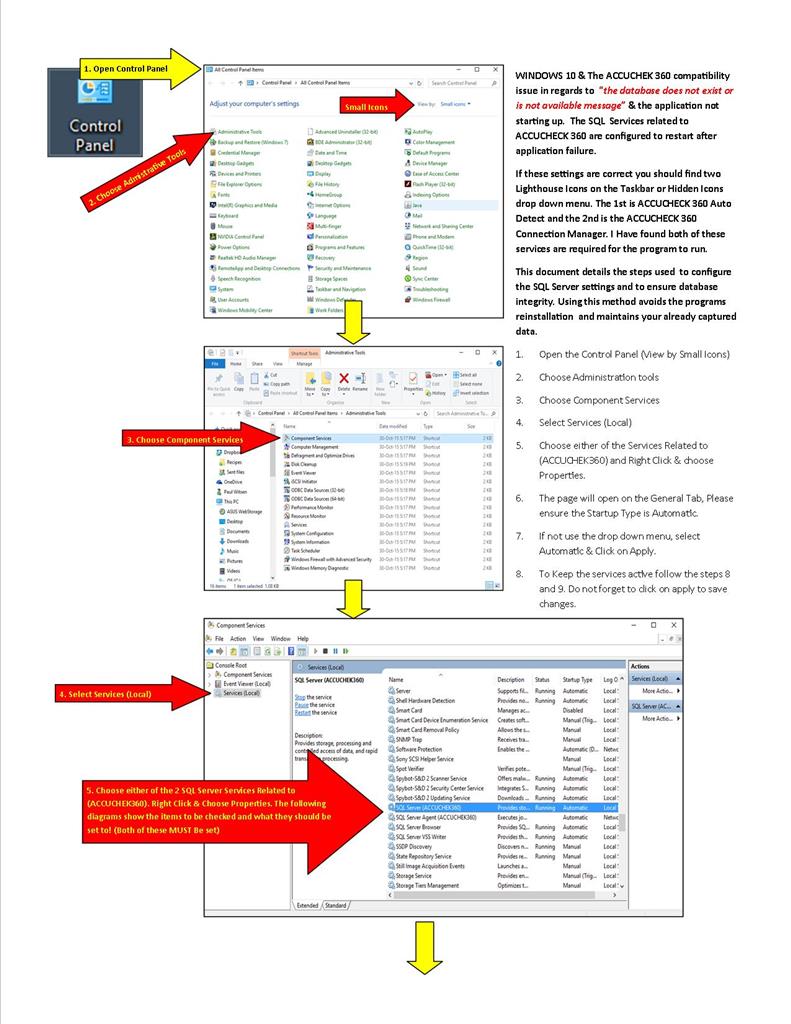
    I found 2 services, both stopped, as follows;

    SQL Server (ACCUCHEK360)

    SQL Server Agent (ACCUCHEK360)

    After ENABLING/STARTING both Services, ACCUChek 360 Started up with all of my data intact.

    ACCUCHEK360 & Windows 10 still has a problem, why the services continue to be disabled sporadically, I am not sure, but I NO LONGER Uninstall/Reinstall SQL & ACCUCHEK360 - Just enable the services for now until Roche come up with a fix.

    The Following diagrams fix all, including keeping the services running.
    2 people found this answer helpful.
    0 comments No comments
  4. Anonymous
    2015-08-11T14:15:30+00:00

    I contacted Roche about the problem.  I was told they had not started working on a W10 version of the software.  He said that Roche was not aware that the version did not work.  I have been manually tracking (using Excel) my insulin times so I can fill in the records when the new version comes out.  Good luck, all!

    1 person found this answer helpful.
    0 comments No comments