Share via

Group policy editor falsely rejects winzip self-extractor installation

Anonymous
2015-12-04T05:34:19+00:00

Group policy editor falsely rejects winzip self-extractor installation.

I am trying to install an Epson multifunction printer driver to work with my daughter's unit using Wi-Fi home network. Its driver package is epson13779.exe.

I get error: "This program is blocked by group policy. For more information, contact your system administrator."

I am the system administrator for my PC. I have never edited my group policy at any time since I bought my Dell Inspiron 660 new from Dell.

I use Windows 7 64-bit OS. All Microsoft updates are current.

Windows for home | Previous Windows versions | Devices and drivers

Locked Question. This question was migrated from the Microsoft Support Community. You can vote on whether it's helpful, but you can't add comments or replies or follow the question.

0 comments No comments

6 answers

Sort by: Most helpful
  1. Anonymous
    2016-02-19T02:12:38+00:00

    I ran into the same problem. Here's how I got around it.

    I used 7-Zip to unzip the installer executable epson16387.exe. WinZip and other tools may be able to do this, too. I extracted the files to a new folder, which looked like this:

    Now right click on Setup.exe and choose "Run as administrator". Everything went fine after that.

    Was this answer helpful?

    10+ people found this answer helpful.
    0 comments No comments
  2. Anonymous
    2015-12-13T14:24:58+00:00

    It would be good to know more about how your system became afflicted because if you did not apply a restrictive policy yourself, somebody or something did it for you.

    However here is the brute force method to reset/clear any policies that may have been applied to your system if those polices have been applied by Group Policy Editor or Local Security Policy.  If a policy has been applied some other way, from a Microsoft Fixit, a direct registry edit, malicious software, etc. this method will not work.

    The information on policies are stored in two folders on your system (assuming Windows is installed on your C drive):

    c:\windows\system32\GroupPolicy

    c:\windows\system32\GroupPolicyUsers

    Navigate to the c:\windows\system32 folder and rename the folders to something that you can remember - maybe with a .bak extension:
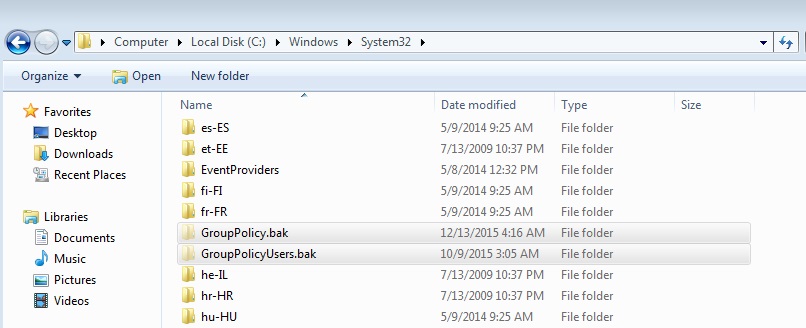
    Then click the Start orb, All Programs, Accessories, right click Command Prompt, Run as administrator and respond with an administrator password if prompted:
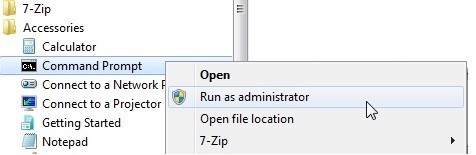
    Then from the Command Prompt window enter the following command to make Windows aware of the changes:

    gpupdate   /force
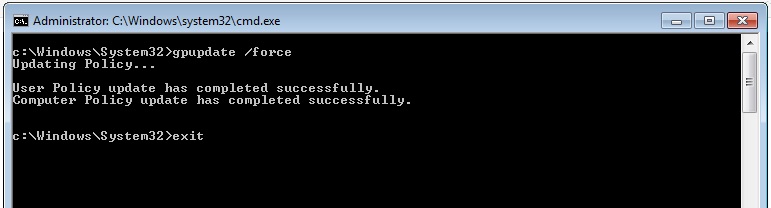
    Then enter 'exit' to close the Command Prompt window and see how your system behaves now.

    Restart your system to be sure the changes "stick".

    When you are satisfied your system is working properly you can delete the renamed folders from before.

    Was this answer helpful?

    2 people found this answer helpful.
    0 comments No comments
  3. Anonymous
    2015-12-13T05:32:34+00:00

    I posted to the suggestion that I received Dec 4, 2015. Those answers did not solve my problem, unfortunately.

    It seems I had a similar problem a couple of years ago when group policy improperly interfered with Firefox installation. Same computer - group policy editor had never been invoked.

    Anybody else have some experience here?

    Was this answer helpful?

    1 person found this answer helpful.
    0 comments No comments
  4. Anonymous
    2015-12-05T07:33:36+00:00

    Group policy editor falsely rejects WinZip self-extractor installation.

    I am trying to install an Epson multifunction printer driver to work with my daughter's unit using Wi-Fi home network. Its driver package is epson13779.exe.

    I get error: "This program is blocked by group policy. For more information, contact your system administrator."

    I am the system administrator for my PC. I have never edited my group policy at any time since I bought my Dell Inspiron 660 new from Dell.

    I use Windows 7 64-bit OS. All Microsoft updates are current.

    The first advice item says to install the printer without WinZip. I don't know how to do this when Epson's driver installer's executable epson13779.exe tells my computer to unzip a bunch of files.

    The "Fix printer problems" links offered nothing to help.

    The "Install a printer" link ultimately led me to Windows Update with an expanded list of Epson printers to consider. This list included Epson Workforce 435 Series and Epson Workforce 545 Series. The machine I want to install is Epson Workforce 520, which is between these items in the list. So this is no help.

    Was this answer helpful?

    0 comments No comments
  5. Anonymous
    2015-12-04T19:31:46+00:00

    Ho Norman,

    Thank you for posting the query on Microsoft Community.

    Try to install the driver without WinZip and check if it works fine.

    Refer the links below and check if it helps.

    Fix printer problems:

    http://windows.microsoft.com/en-us/windows/printer-problems-in-windows-help#fix-printer-problems=windows-7&v1h=win8tab1&v2h=win7tab1&v3h=winvistatab1&v4h=winxptab1

    Install a printer:

    http://windows.microsoft.com/en-us/windows/install-printer#install-printer=windows-7 

    Hope this helps in resolving the issue. If the issue persists, do get back to us. We will be happy to assist you.

    Was this answer helpful?

    0 comments No comments
