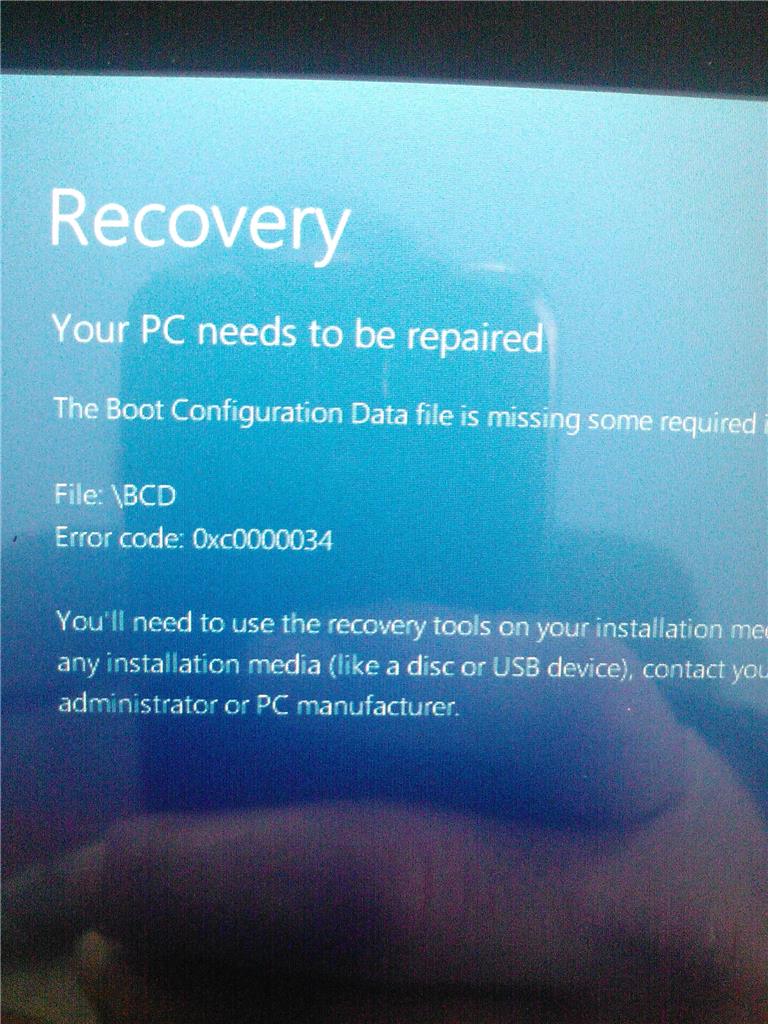
I am attempting to recovery the windows on nextbook tablet nxw8qc16G . I try to follow the suggested button depressing method to access the recovery . It is taking too long to restart . and it gives me this message. I have added an image of the message.
So my question is how can I restore the os if the recovery options are inaccessible. Can I boot to an external device like a memory card or a external boot disk and if so how ? thank you. One more thing this is a tablet. not a desktop or a laptop so no keyboard
options for a start up possible. only the power , volume and windows button exist. so please no f options for they do not apply. Unless you know how to make them apply then please educate me on this , again I thank you.
' cx='32' cy='32' r='32' /%3E%3Ctext x='50%25' y='55%25' dominant-baseline='middle' text-anchor='middle' fill='%23FFF' %3EA%3C/text%3E%3C/svg%3E)
