Developer technologies | .NET | Xamarin
A Microsoft framework for building cross-platform mobile apps using .NET and C# with native performance and user interfaces.
This browser is no longer supported.
Upgrade to Microsoft Edge to take advantage of the latest features, security updates, and technical support.

With the help of @JessieZhang-MSFT and @Anonymous , I have a working app that reads a short list of people ("Operators"), each of whom have a few properties: OperatorID, OperatorName, OperatorPhone, OperatorEmail and OperatorAvatar. At the moment, these are read in from the app but my goal is to have them populate a locally stored SQLite database table called Operators. Currently there is CRUD functionality, but it is spread around a number of different classes in the app.
To make the app more readable and logical, I would like to bring the CRUD functionality into the OperatorViewModel.cs program where the Create (or Add), Read, Update and Delete functions can then be amended to cater to the SQLite database.
The structure at the moment is that MainPage (level 1) calls MenuPage (level 2) which calls OperatorsPage (level 3) where the CRUD functionality occurs in a number of other pages (level 4).
The data model is set up in OperatorModel.cs and the list is populated in OperatorViewModel.cs, where I'd eventually like the CRUD methods to reside.
I have started to code the database in HFNDatabase.cs but am running into all sorts of difficulties.
I'll include the code here...
OperatorModel.cs
using System;
using System.Collections.Generic;
using System.ComponentModel;
using System.Runtime.CompilerServices;
using System.Text;
using SQLite;

namespace HandsFreeNotes.Model
{
    //    public class OperatorModel
    // The line above changed to the line below at the behest of JessieZhang-2116 (Microsoft Q&A) 01/05/2021
    public class OperatorModel: INotifyPropertyChanged
    {
        public int OperatorID { get; set; }
        //        public string OperatorName { get; set; }
        // The 1 line above changed to the 6 lines below at the behest of JessieZhang-2116 (Microsoft Q&A) 01/05/2021
        string _operatorName;
        public string OperatorName
        {
            set { SetProperty(ref _operatorName, value); }
            get { return _operatorName; }
        }

        public string OperatorPhone { get; set; }
        public string OperatorEmail { get; set; }
        public string OperatorAvatar { get; set; }

        // The 4 lines below added at the behest of JessieZhang-2116 (Microsoft Q&A) 01/05/2021
        public OperatorModel()
        {

        }

        public OperatorModel(int operatorID, string operatorName, string operatorPhone, string operatorEmail, string operatorAvatar)
        {
            OperatorID = operatorID;
            OperatorName = operatorName;
            OperatorPhone = operatorPhone;
            OperatorEmail = operatorEmail;
            OperatorAvatar = operatorAvatar;
        }
        // All the lines below added at the behest of JessieZhang-2116 (Microsoft Q&A) 01/05/2021
        bool SetProperty<T>(ref T storage, T value, [CallerMemberName] string propertyName = null)
        {
            if (Object.Equals(storage, value))
                return false;

            storage = value;
            OnPropertyChanged(propertyName);
            return true;
        }
        protected void OnPropertyChanged([CallerMemberName] string propertyName = null)
        {
            PropertyChanged?.Invoke(this, new PropertyChangedEventArgs(propertyName));
        }

        public event PropertyChangedEventHandler PropertyChanged;
    }


}
OperatorViewModel.cs
using HandsFreeNotes.Model;
using System;
using System.Collections.Generic;
using System.Collections.ObjectModel;
using System.ComponentModel;
using System.Text;
using System.Threading.Tasks;
using Xamarin.Forms;
using SQLite;

namespace HandsFreeNotes.ViewModel
{
    public class OperatorViewModel : INotifyPropertyChanged
    {
        private string _HFNName;

        public string HFNName
        {
            get
            {
                return _HFNName;
            }

            set
            {
                _HFNName = value;
                RaisePropertyChanged("HFNName");
            }
        }

        // public List<OperatorModel> OperatorList;
        // The line above replaced by the 5 lines below at the behest of LeonLu-MSFT (Microsoft Q&A) 06/05/2021
        public OperatorViewModel()
        {
            GetOperators();
        }
        public static ObservableCollection<OperatorModel> OperatorList;


        public OperatorModel SelectedOperator;

        public async Task<bool> GetOperators()
        {
            // OperatorList = await App.Database.GetOperatorsAsync();

            if (OperatorList == null)
            {
                // OperatorList = new List<OperatorModel>();
                // The line above replaced by the line below at the behest of LeonLu-MSFT (Microsoft Q&A) 06/05/2021
                OperatorList = new ObservableCollection<OperatorModel>();

                OperatorList.Add(new OperatorModel(1, "Grime", "61419659866", "******@grime.net", "gs300.png"));
                OperatorList.Add(new OperatorModel(2, "Brookey", "61419659866", "******@grime.net", "gmb.jpg"));
                OperatorList.Add(new OperatorModel(3, "CC", "61422192456", "******@gmail.com", "cc.jpg"));
                OperatorList.Add(new OperatorModel(4, "Monte", "61412595878", "******@aussieweb.com.au", "monte2a.jpg"));
                OperatorList.Add(new OperatorModel(5, "Jeff", "61409998197", "******@content2convert.com.au", "jeff.jpg"));
            }

            return true;
        }

        public bool UpdateOperator(OperatorModel opm)
        {
            SelectedOperator.OperatorID = opm.OperatorID;
            SelectedOperator.OperatorName = opm.OperatorName;
            SelectedOperator.OperatorPhone = opm.OperatorPhone;
            SelectedOperator.OperatorEmail = opm.OperatorEmail;
            SelectedOperator.OperatorAvatar = opm.OperatorAvatar;

            return true;
        }

        public event PropertyChangedEventHandler PropertyChanged;

        protected void RaisePropertyChanged(string prop)
        {
            if (PropertyChanged != null) { PropertyChanged(this, new PropertyChangedEventArgs(prop)); }
        }

    }
}
HFNDatabase.cs
using HandsFreeNotes.Model;
using SQLite;
using System;
using System.Collections.Generic;
using System.Text;
using System.Threading.Tasks;

// This class added according to Cary Baer:
// https://www.skillshare.com/classes/Mobile-Application-Development-With-Cross-Platform-Xamarin-Forms/984679771/projects

namespace HandsFreeNotes.Data
{
    public class HFNDatabase
    {
        readonly SQLiteAsyncConnection database;

        public HFNDatabase(string dbPath)
        {
            database = new SQLiteAsyncConnection(dbPath);
            database.CreateTableAsync<OperatorModel>().Wait();
        }

        public async Task<List<OperatorModel>> GetOperatorsAsync()
        {
            return await database.Table<OperatorModel>().ToListAsync();
        }

        public async Task<int> InsertOperator(OperatorModel om)
        {
            await database.InsertAsync(om);
            int ret = 1;
            return ret;
        }

        public async Task<int> DeleteOperator(OperatorModel om)
        {
            await database.ExecuteScalarAsync<OperatorModel>("DELETE FROM [OperatorModel] WHERE TITLE = ?", om.OperatorName);
            int ret = 1;
            return ret;
        }

        public async Task<int> UpdatOperator(OperatorModel om)
        {
            await database.ExecuteScalarAsync<OperatorModel>("UPDATE [OperatorModel] SET OPERATORID = ?, OPERATORPHONE = ?, OPERATOREMAIL = ?, OPERATORAVATAR = ? WHERE TITLE = ?", om.OperatorID, om.OperatorPhone, om.OperatorEmail, om.OperatorAvatar, om.OperatorName);
            int ret = 1;
            return ret;
        }
    }
}
MainPage.xaml
<?xml version="1.0" encoding="utf-8" ?>
<ContentPage xmlns="http://xamarin.com/schemas/2014/forms"
xmlns:x="http://schemas.microsoft.com/winfx/2009/xaml"
BackgroundColor="White"
Title="Hands Free Notes"
x:Class="HandsFreeNotes.MainPage">
<Grid BackgroundColor="White">
<Grid.RowDefinitions>
<RowDefinition Height="40"/>
<RowDefinition Height="40"/>
<RowDefinition Height="80"/>
<RowDefinition Height="*"/>
<RowDefinition Height="50"/>
</Grid.RowDefinitions>
<Grid.ColumnDefinitions>
<ColumnDefinition Width="50"/>
<ColumnDefinition Width="*"/>
<ColumnDefinition Width="50"/>
</Grid.ColumnDefinitions>
<Button
x:Name="AboutButton"
Text="About"
TextColor="Black"
FontSize="Medium"
FontAttributes="Bold"
Grid.Row="0"
Grid.Column="0"
Grid.ColumnSpan="2"
Margin="20, 0, 0, 0"
VerticalOptions="Center"
HorizontalOptions="Start"
Clicked="AboutButton_Clicked"/>
<Button
x:Name="MenuButton"
ImageSource="hbb32"
Grid.Row="0"
Grid.Column="1"
Grid.ColumnSpan="2"
Margin="0, 0, 20, 0"
VerticalOptions="Center"
HorizontalOptions="End"
BackgroundColor="Transparent"
Clicked="MenuButton_Clicked"/>
<Image
Source="hfn256"
Margin="0, 0, 0, 0"
Grid.Row="1"
Grid.Column="0"
Grid.ColumnSpan="3"
HorizontalOptions="Center"
VerticalOptions="Center"
BackgroundColor="Transparent"/>
<Label
Text="Home"
TextColor="Black"
Grid.Row="2"
Grid.Column="1"
FontSize="24"
FontAttributes="Bold"
HorizontalOptions="Center"
VerticalOptions="Center"/>
<ScrollView Orientation="Vertical"
Grid.Row="3" Grid.Column="0"
Grid.ColumnSpan="3">
<Grid BackgroundColor="White" >
<Grid.RowDefinitions>
<RowDefinition Height="50"/>
<RowDefinition Height="60"/>
<RowDefinition Height="60"/>
<RowDefinition Height="80"/>
<RowDefinition Height="60"/>
<RowDefinition Height="80"/>
<RowDefinition Height="80"/>
<RowDefinition Height="60"/>
<RowDefinition Height="60"/>
<RowDefinition Height="60"/>
<RowDefinition Height="60"/>
<RowDefinition Height="60"/>
<RowDefinition Height="60"/>
<RowDefinition Height="*"/>
</Grid.RowDefinitions>
<Grid.ColumnDefinitions>
<ColumnDefinition Width="150"/>
<ColumnDefinition Width="*"/>
<ColumnDefinition Width="*"/>
<ColumnDefinition Width="10"/>
</Grid.ColumnDefinitions>
<Label
x:Name="OperatorLabel"
Text="Operator:"
TextColor="Black"
FontAttributes="Bold"
Grid.Row="0"
Grid.Column="0"
BackgroundColor="Transparent"
Margin="10,0,0,0"
HorizontalOptions="End"
VerticalOptions="Center"/>
<Button
x:Name="OperatorButton"
Text="Click to SET Operator"
Grid.Row="0"
Grid.Column="1"
Grid.ColumnSpan="2"
TextColor="Gray"
FontAttributes="Italic"
FontSize="Small"
BackgroundColor="White"
Margin="10,0,0,0"
Clicked="OperatorButton_Clicked"
VerticalOptions="Center"/>
<Label
x:Name="RecipientLabel"
Text="Recipient:"
TextColor="Black"
FontAttributes="Bold"
Grid.Row="1"
Grid.Column="0"
BackgroundColor="Transparent"
Margin="10,20,0,0"
HorizontalOptions="End"
VerticalOptions="Center"/>
<Button
x:Name="RecipientButton"
Text="Click to SET Recipient"
Grid.Row="1"
Grid.Column="1"
Grid.ColumnSpan="2"
TextColor="Gray"
FontAttributes="Italic"
FontSize="Small"
Margin="10,20,0,0"
BackgroundColor="White"
VerticalOptions="Center"/>
<Label
x:Name="SubjectLabel"
Text="Subject:"
TextColor="Black"
FontAttributes="Bold"
Grid.Row="2"
Grid.Column="0"
BackgroundColor="Transparent"
Margin="10,20,0,0"
HorizontalOptions="End"
VerticalOptions="Center"/>
<Button
x:Name="SubjectButton"
Text="Click to SET Subject"
Grid.Row="2"
Grid.Column="1"
Grid.ColumnSpan="2"
TextColor="Gray"
FontAttributes="Italic"
FontSize="Small"
Margin="10,20,0,0"
BackgroundColor="White"
VerticalOptions="Center"/>
<Label
x:Name="InstanceStartLabel"
Text="Instance
 Start:"
TextColor="Black"
FontAttributes="Bold"
Grid.Row="3"
Grid.Column="0"
BackgroundColor="Transparent"
Margin="10,20,0,0"
HorizontalOptions="End"
VerticalOptions="Center"/>
<Button
x:Name="InstanceStartButton"
Text="Click to START Instance"
Grid.Row="3"
Grid.Column="1"
Grid.ColumnSpan="2"
TextColor="Gray"
FontAttributes="Italic"
FontSize="Small"
Margin="10,20,0,0"
BackgroundColor="White"
VerticalOptions="Center"/>
<Label
x:Name="AudioLabel"
Text="Audio:"
TextColor="Black"
FontAttributes="Bold"
Grid.Row="4"
Grid.Column="0"
BackgroundColor="Transparent"
Margin="10,20,0,0"
HorizontalOptions="End"
VerticalOptions="Center"/>
<Button
x:Name="AudioButton"
Text="Click to RECORD Audio Notes"
Grid.Row="4"
Grid.Column="1"
Grid.ColumnSpan="2"
TextColor="Gray"
FontAttributes="Italic"
FontSize="Small"
Margin="10,20,0,0"
BackgroundColor="White"
VerticalOptions="Center"/>
<Label
x:Name="MediaLabel"
Text="Photos
& Video:"
TextColor="Black"
FontAttributes="Bold"
Grid.Row="5"
Grid.Column="0"
BackgroundColor="Transparent"
Margin="10,20,0,0"
HorizontalOptions="End"
VerticalOptions="Center"/>
<Button
x:Name="MediaButton"
Text="Click to SELECT Media"
Grid.Row="5"
Grid.Column="1"
Grid.ColumnSpan="2"
TextColor="Gray"
FontAttributes="Italic"
FontSize="Small"
Margin="10,20,0,0"
BackgroundColor="White"
VerticalOptions="Center"/>
<Label
x:Name="InstanceStopLabel"
Text="Instance
 Stop:"
TextColor="Black"
FontAttributes="Bold"
Grid.Row="6"
Grid.Column="0"
BackgroundColor="Transparent"
Margin="10,20,0,0"
HorizontalOptions="End"
VerticalOptions="Center"/>
<Button
x:Name="InstanceStopButton"
Text="Click to STOP Instance"
Grid.Row="6"
Grid.Column="1"
Grid.ColumnSpan="2"
TextColor="Gray"
FontAttributes="Italic"
FontSize="Small"
Margin="10,20,0,0"
BackgroundColor="White"
VerticalOptions="Center"/>
<Button
x:Name="SendButton"
Text="Send Instance Now"
FontSize="Large"
FontAttributes="Bold"
Grid.Row="8"
Grid.Column="0"
Grid.ColumnSpan="3"
TextColor="DarkBlue"
Margin="10,0,0,0"
BackgroundColor="White"
VerticalOptions="Center"
Clicked="SendButton_Clicked"/>
</Grid>
</ScrollView>
</Grid>
</ContentPage>
MainPage.xaml.cs
using System;
using System.Collections.Generic;
using System.ComponentModel;
using System.Linq;
using System.Text;
using System.Threading.Tasks;
using Xamarin.Forms;
using SQLite;
using HandsFreeNotes.Model;
using HandsFreeNotes.View;
using HandsFreeNotes.ViewModel;
using Xamarin.Essentials;

namespace HandsFreeNotes
{
    public partial class MainPage : ContentPage
    {
        OperatorViewModel ovm;
        // The line below added at the behest of LeonLu-MSFT (Microsoft Q&A) 13/05/2021
        OperatorModel opm;

        public MainPage()
        {
            // add a bit of padding to cater to the "notch" on the iPhone.
            if (Device.RuntimePlatform == Device.iOS) {Padding = new Thickness(0, 40, 0, 0);}

            InitializeComponent();

            ovm = new OperatorViewModel();
            // The line below added at the behest of LeonLu-MSFT (Microsoft Q&A) 13/05/2021
            opm = new OperatorModel();

            BindingContext = ovm;
        }

        //protected override async void OnAppearing()
        //{
        //    base.OnAppearing();
        //    await RefreshOperatorListView();
        //}

        //public async Task<bool> RefreshOperatorListView()
        //{
        //    OperatorListView.ItemSource = null;
        //    await ovm.GetOperators()
        //    OperatorListView.ItemSource = ovm.OperatorList;
        //    return true;
        //}

        private async void OperatorButton_Clicked(object sender, EventArgs e)
        {
            // await Navigation.PushModalAsync(new OperatorsPage());
            // The line above changed to the lines below (including BackCall) at the behest of LeonLu-MSFT (Microsoft Q&A) 13/05/2021
            var page = new OperatorsPage(SelectModel);
            page.ReturnValue += delegate (object s, OperatorModel operatorModel)
            {
                BackCall(s, operatorModel);
            };
            await Navigation.PushModalAsync(page);
        }

        OperatorModel SelectModel;

        private void BackCall(object s, OperatorModel model)
        {
            SelectModel = model;
            opm.OperatorName = model.OperatorName;
            OperatorButton.Text = opm.OperatorName;
            OperatorButton.TextColor = Color.Green;
            OperatorButton.FontSize = 20;
        }

        private async void AboutButton_Clicked(object sender, EventArgs e)
        {
            await Navigation.PushModalAsync(new AboutPage());
        }

        private async void MenuButton_Clicked(object sender, EventArgs e)
        {
            var page = new MenuPage(SelectModel);
            page.ReturnValue += delegate (object s, OperatorModel operatorModel)
            {
                BackCall(s, operatorModel);
            };
            await Navigation.PushModalAsync(page);

        }

        private async void SendButton_Clicked(object sender, EventArgs e)
        {
            await Email.ComposeAsync();
        }
    }
}
MenuPage.xaml
<?xml version="1.0" encoding="utf-8" ?>
<ContentPage xmlns="http://xamarin.com/schemas/2014/forms"
             xmlns:x="http://schemas.microsoft.com/winfx/2009/xaml"
             x:Class="HandsFreeNotes.View.MenuPage">
    <ContentPage.Content>
        <Grid BackgroundColor="White">
            <Grid.RowDefinitions>
                <RowDefinition Height="40"/>
                <RowDefinition Height="40"/>
                <RowDefinition Height="60"/>
                <RowDefinition Height="*"/>
                <RowDefinition Height="50"/>
            </Grid.RowDefinitions>

            <Grid.ColumnDefinitions>
                <ColumnDefinition Width="50"/>
                <ColumnDefinition Width="*"/>
                <ColumnDefinition Width="50"/>
            </Grid.ColumnDefinitions>

            <Button
                x:Name="BackButton"
                Text="Back"
                Grid.Row="0"
                Grid.Column="0"
                Grid.ColumnSpan="3"
                TextColor="Black"
                FontAttributes="Bold"
                HeightRequest="40"
                VerticalOptions="Center"
                HorizontalOptions="End"
                Margin="0,0,20,0"
                Clicked="BackButton_Clicked"/>

            <Image
                Source="hfn256"
                Margin="2"
                Grid.Row="1"
                Grid.Column="0"
                Grid.ColumnSpan="3"
                HorizontalOptions="Center"
                BackgroundColor="Transparent"/>

            <Label
                Text="Menu"
                FontSize="Large"
                TextColor="Black"
                FontAttributes="Bold"
                Margin =" 0, 0, 0, 0"
                Grid.Row="2"
                Grid.Column="0"
                Grid.ColumnSpan="3"
                HorizontalOptions="Center"
                VerticalOptions="Center"
                BackgroundColor="Transparent"/>

            <ScrollView
                Orientation="Vertical"
                Grid.Row="3"
                Grid.Column="0"
                Grid.ColumnSpan="3">
                <Grid BackgroundColor="White" >
                    <Grid.RowDefinitions>
                        <RowDefinition Height="60"/>
                        <RowDefinition Height="60"/>
                        <RowDefinition Height="60"/>
                        <RowDefinition Height="60"/>
                        <RowDefinition Height="60"/>
                        <RowDefinition Height="60"/>
                    </Grid.RowDefinitions>

                    <Grid.ColumnDefinitions>
                        <ColumnDefinition Width="50"/>
                        <ColumnDefinition Width="*"/>
                        <ColumnDefinition Width="50"/>
                    </Grid.ColumnDefinitions>

                    <Button
                        x:Name="ManageOperatorsButton"
                        Text="Manage Operators"
                        FontSize="Medium"
                        Grid.Row="0"
                        Grid.Column="0"
                        Grid.ColumnSpan="3"
                        TextColor="Black"
                        FontAttributes="Bold"
                        BackgroundColor="White"
                        Margin="0,20,0,0"
                        HorizontalOptions="Center"
                        VerticalOptions="Start"
                        Clicked="ManageOperatorsButton_Clicked"/>

                    <Button
                        x:Name="ManageRecipientsButton"
                        Text="Manage Recipients"
                        FontSize="Medium"
                        Grid.Row="1"
                        Grid.Column="0"
                        Grid.ColumnSpan="3"
                        TextColor="Black"
                        FontAttributes="Bold"
                        BackgroundColor="White"
                        Margin="0,20,0,0"
                        HorizontalOptions="Center"
                        VerticalOptions="Start"/>

                    <Button
                        x:Name="ManageSubjectsButton"
                        Text="Manage Subjects"
                        FontSize="Medium"
                        Grid.Row="2"
                        Grid.Column="0"
                        Grid.ColumnSpan="3"
                        TextColor="Black"
                        FontAttributes="Bold"
                        BackgroundColor="White"
                        Margin="0,20,0,0"
                        HorizontalOptions="Center"
                        VerticalOptions="Start"/>

                    <Button
                        x:Name="ManageInstancesButton"
                        Text="Manage Instances"
                        FontSize="Medium"
                        Grid.Row="3"
                        Grid.Column="0"
                        Grid.ColumnSpan="3"
                        TextColor="Black"
                        FontAttributes="Bold"
                        BackgroundColor="White"
                        Margin="0,20,0,0"
                        HorizontalOptions="Center"
                        VerticalOptions="Start"/>

                    <Button
                        x:Name="ManageAudioRecordingsButton"
                        Text="Manage Audio Recordings"
                        FontSize="Medium"
                        Grid.Row="4"
                        Grid.Column="0"
                        Grid.ColumnSpan="3"
                        TextColor="Black"
                        FontAttributes="Bold"
                        BackgroundColor="White"
                        Margin="0,20,0,0"
                        HorizontalOptions="Center"
                        VerticalOptions="Start"/>

                </Grid>

            </ScrollView>

        </Grid>    </ContentPage.Content>
</ContentPage>
MenuPage.xaml.cs
using HandsFreeNotes.Model;
using HandsFreeNotes.ViewModel;
using System;
using System.Collections.Generic;
using System.Linq;
using System.Text;
using System.Threading.Tasks;

using Xamarin.Forms;
using Xamarin.Forms.Xaml;

namespace HandsFreeNotes.View
{
    [XamlCompilation(XamlCompilationOptions.Compile)]
    public partial class MenuPage : ContentPage
    {

        OperatorViewModel ovm;
        // The line below added at the behest of LeonLu-MSFT (Microsoft Q&A) 14/05/2021
        OperatorModel SelectModel;

        // public MenuPage()
        // The line above replaced with the line below at the behest of LeonLu-MSFT (Microsoft Q&A) 14/05/2021
        public MenuPage(OperatorModel SelectModel)
        {
            // add a bit of padding to cater to the "notch" on the iPhone.
            if (Device.RuntimePlatform == Device.iOS) {Padding = new Thickness(0, 40, 0, 0);}

            InitializeComponent();

            // The line below added at the behest of Leon
A Microsoft framework for building cross-platform mobile apps using .NET and C# with native performance and user interfaces.

Thanks for your code. But now I am not quite clear about the logic and navigating relationship between them for your app. Could you please post a basic demo to github or onedriver so that we can test on our side?
@JessieZhang-MSFT . I have a Git repo but choose not to share it globally. Can you let me know an email address that I can let you know?
I have started to code the database in HFNDatabase.cs but am running into all sorts of difficulties.
Can you elaborate on what the specific problem was?
Sorry,we only provide technical support on the forum. Email is not allowed.
I want to get the 4 CRUD functions working in OperatorViewModel.cs and be called from the various level 4 pages that require them.
I want to do this because eventually I have other SQLite tables (apart from the Operator table) that I want to build (see MainPage.xaml). So once the Operator model is working with an SQLite database from an Operator table and I can see how it works, I think I'm capable of extending to the other tables myself.
BTW I am happy to share my Git repo with you, but I am unfamiliar with how to share it without anyone else downloading and using it.
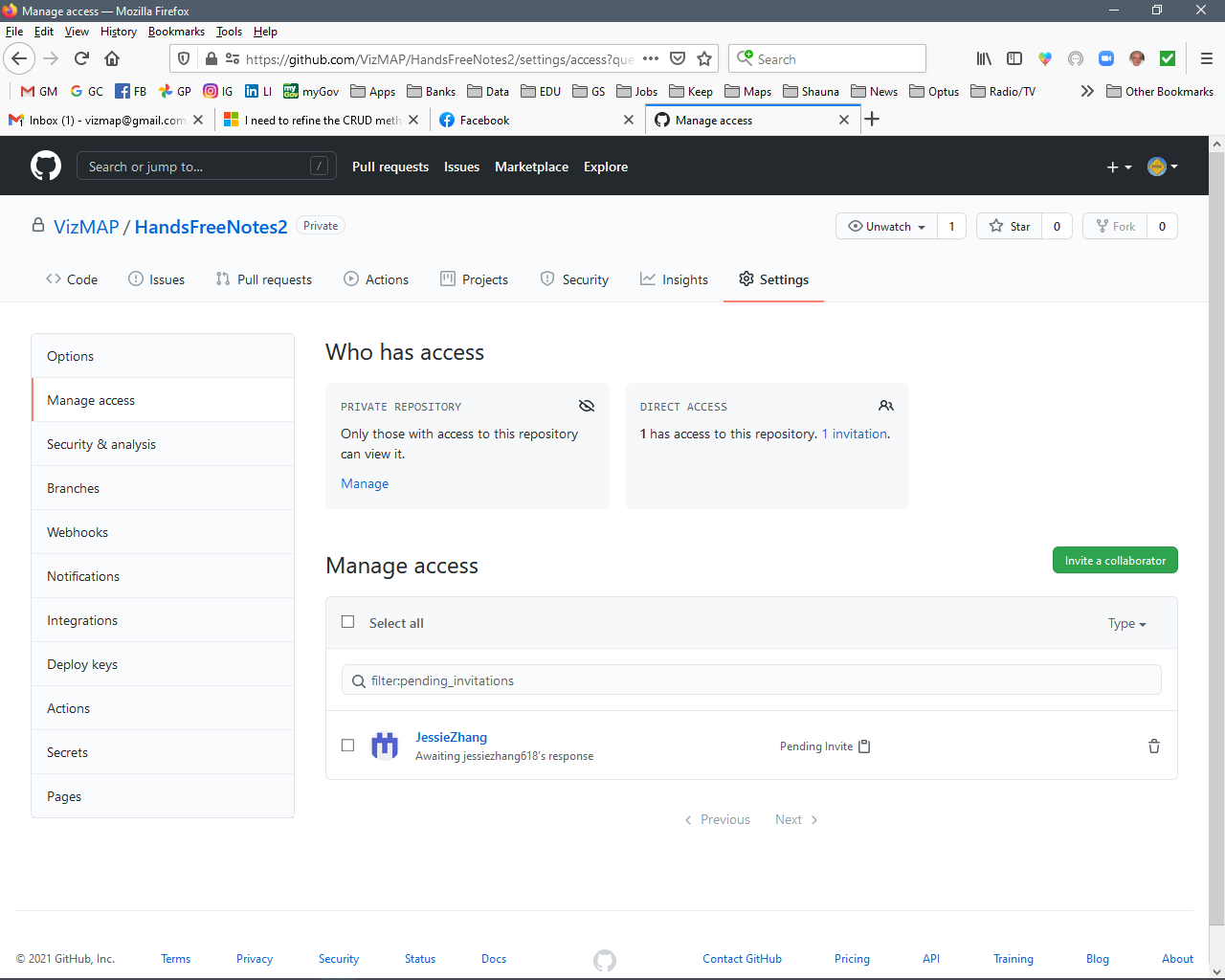
You can invite someone as a collaborator for your app in github. Steps : Settings ->Manage Access->Invite a collaborator. You can enter jessiezhang618. Please make sure to remove private information.
I have never done that before and just have. You are invited to HandsFreeNotes2.
I value your feedback. I have a meeting in two days time where I would like to show that SQLite is working.
@JessieZhang-MSFT Do you get notified that you are a collaborator and where to find the Repo?
Sorry,I couldn't open the link to the invitation you sent due to some reason.
You can try to invite again. In addition ,you can describe your problem in detail in this thread so that we can give you some advice.
@JessieZhang-MSFT I have re-invited you to my GitHub repo.
In a nutshell, I want to have an SQLite table (Operators) with the CRUD functions all in the OperatorViewModel.cs.
Realistically, @JessieZhang-MSFT , all the code is supplied above. Start a new project, add 4 new folders: Data, Model, View and ViewModel. Stick MainPage into View, HFNDatabase into Data, OperatorModel into Model, OperatorViewModel into ViewModel and the rest of the xaml content pages into View.
If you build that, it should compile, but the CRUD functions are spread around in the View content pages and I want them in the ViewModel class. And there is no database. I want to have a SQLite database with an Operator table in the data folder running the CRUD functions.
' cx='32' cy='32' r='32' /%3E%3Ctext x='50%25' y='55%25' dominant-baseline='middle' text-anchor='middle' fill='%23FFF' %3ENT%3C/text%3E%3C/svg%3E)
@Grime So many things wrong.
First why are you not using binding with with XamForms. Suggest you use Prism.
You should not be updating a list by accessing the index. Do a FirstOrDefault(x => x.OperatorName = name)
You need a viewmodel and don't put code in the page.cs
For styles use a ResourceDictionary in app.xaml
Dont use grids for spacing, use layouts like AbsoluteLayout
Organize the code, move onto a view model. Don't use the keyword static on your ObservableCollections. Create a repo for data access and use the TwinCoders SqlNetExtensions for data access
Then post it, so it's easier to use. https://prismlibrary.com/docs/dependency-injection/index.html
Sorry for the late reply. Off earning a living. This is all new to me and I'm floundering.
I am using binding and I have no idea what Prism is.
I have no idea what "FirstOrDefault(x => x.OperatorName = name)" would do.
I have a ViewModel folder and I'm pretty sure I didn't put any code in a page.cs.
I have no clue what a Resource Dictionary is.
I like grids! they make me feel structured and macro-ish.
"Move into a view model" - what does that mean? I have a ViewModel folder but that just houses the ViewModel.cs stuff.
ObservableCollections?
I haven't seen the TwinCoders SqlNetExtensions plugin for data access. What does it do?
Sorry to be so disappointing. I did a course in Mob App Dev at Uni as an extraordinarily mature age student and subsequently decided that I should teach myself to get to know Xamarin. I have only one published app.
Some stuff is quite logical. A lot is not.
Answer accepted by question author
Hello,
Welcome to our Microsoft Q&A platform!
Based on your code, I created a demo and modified your database HFNDatabase . The insert and
You can refer to the following code:
    public static readonly AsyncLazy<HFNDatabase> Instance = new AsyncLazy<HFNDatabase>(async () =>
    {
        var instance = new HFNDatabase();
        CreateTableResult result = await database.CreateTableAsync<Models.OperatorModel>();
        return instance;
    });

    public HFNDatabase()
    {
        database = new SQLiteAsyncConnection(Constants.DatabasePath, Constants.Flags);
    }

    public Task<List<Models.OperatorModel>> GetOperatorsAsync()
    {
        return database.Table<Models.OperatorModel>().ToListAsync();
    }

    public Task<int> DeleteItemAsync(Models.OperatorModel item)
    {
        return database.DeleteAsync(item);
    }

    public Task<int> SaveItemAsync(Models.OperatorModel item)
    {
        if (item.OperatorID != 0)
        {
            return database.UpdateAsync(item);
        }
        else
        {
            return database.InsertAsync(item);
        }
    }
}
Constants.cs
 public static class Constants
{
    public const string DatabaseFilename = "OperatorsSQLite.db3";

    public const SQLite.SQLiteOpenFlags Flags =
        // open the database in read/write mode
        SQLite.SQLiteOpenFlags.ReadWrite |
        // create the database if it doesn't exist
        SQLite.SQLiteOpenFlags.Create |
        // enable multi-threaded database access
        SQLite.SQLiteOpenFlags.SharedCache;

    public static string DatabasePath
    {
        get
        {
            var basePath = Environment.GetFolderPath(Environment.SpecialFolder.LocalApplicationData);
            return Path.Combine(basePath, DatabaseFilename);
        }
    }
}
AsyncLazy.cs
public class AsyncLazy<T> : Lazy<Task<T>>
{
    readonly Lazy<Task<T>> instance;

    public AsyncLazy(Func<T> factory)
    {
        instance = new Lazy<Task<T>>(() => Task.Run(factory));
    }

    public AsyncLazy(Func<Task<T>> factory)
    {
        instance = new Lazy<Task<T>>(() => Task.Run(factory));
    }

    public TaskAwaiter<T> GetAwaiter()
    {
        return instance.Value.GetAwaiter();
    }
}
OperatorModel.cs
public class OperatorModel: INotifyPropertyChanged
{
    [PrimaryKey, AutoIncrement]
    public int OperatorID { get; set; }

    string _operatorName;
    public string OperatorName
    {
        set { SetProperty(ref _operatorName, value); }

        get { return _operatorName; }
    }


    public string OperatorPhone { get; set; }
    public string OperatorEmail { get; set; }
    public string OperatorAvatar { get; set; }

    bool SetProperty<T>(ref T storage, T value, [CallerMemberName] string propertyName = null)
    {
        if (Object.Equals(storage, value))
            return false;

        storage = value;
        OnPropertyChanged(propertyName);
        return true;
    }

    protected void OnPropertyChanged([CallerMemberName] string propertyName = null)
    {
        PropertyChanged?.Invoke(this, new PropertyChangedEventArgs(propertyName));
    }

    public event PropertyChangedEventHandler PropertyChanged;
}
SelectOperatorPage.xaml, you can use data binding :
 <ContentPage.Content>
     <Grid BackgroundColor="White">
         <Grid.RowDefinitions>
             <RowDefinition Height="40"/>
             <RowDefinition Height="40"/>
             <RowDefinition Height="80"/>
             <RowDefinition Height="*"/>
             <RowDefinition Height="50"/>
         </Grid.RowDefinitions>

         <Grid.ColumnDefinitions>
             <ColumnDefinition Width="50"/>
             <ColumnDefinition Width="*"/>
             <ColumnDefinition Width="50"/>
         </Grid.ColumnDefinitions>

         <Button
              x:Name="BackButton"
              Text="Back"
              Grid.Row="0"
              Grid.Column="0"
              Grid.ColumnSpan="3"
              TextColor="Black"
              FontAttributes="Bold"
              HeightRequest="40"
              VerticalOptions="CenterAndExpand"
              HorizontalOptions="End"
              Margin="0,0,20,0"
              Clicked="BackButton_Clicked"/>

         <Image
              Source="hfn256"
              Margin="2"
              Grid.Row="1"
              Grid.Column="0"
              Grid.ColumnSpan="3"
              HorizontalOptions="Center"
              BackgroundColor="Transparent"/>

         <Label
              Text="Select Operator..."
              FontSize="Large"
              TextColor="Black"
              FontAttributes="Bold"
              Grid.Row="2"
              Grid.Column="0"
              Grid.ColumnSpan="3"
              HorizontalOptions="Center"
              VerticalOptions="Start"
              Margin="20"
              BackgroundColor="Transparent"/>

         <ListView
              x:Name="OperatorListView"
              Grid.Row="3"
              Grid.Column="0"
              Grid.ColumnSpan="3"
              RowHeight="140"
              ItemSelected="OperatorListView_ItemSelected">
             <ListView.ItemTemplate>
                 <DataTemplate>
                     <ViewCell>
                         <ContentView>
                             <Grid>
                                 <Grid.RowDefinitions>
                                     <RowDefinition Height="*"/>
                                 </Grid.RowDefinitions>
                                 <Grid.ColumnDefinitions>
                                     <ColumnDefinition Width="100"/>
                                     <ColumnDefinition Width="100"/>
                                     <ColumnDefinition Width="200"/>
                                 </Grid.ColumnDefinitions>

                                 <Image
                                      Source="{Binding OperatorAvatar}"
                                      Grid.Row="0"
                                      Grid.Column="0"
                                      HeightRequest="200"
                                      WidthRequest="100"/>

                                 <Label
                                      Text="{Binding OperatorName}"
                                      FontAttributes="Bold"
                                      HorizontalOptions="Start"
                                      VerticalOptions="Center"
                                      Grid.Row ="0"
                                      Grid.Column="1"/>

                                 <Label
                                      Text="{Binding OperatorEmail}"
                                      FontAttributes="Italic"
                                      FontSize="Micro"
                                      Grid.Row="0"
                                      Grid.Column="2"
                                      HeightRequest="30"
                                      HorizontalOptions="Start"
                                      VerticalOptions="Center"/>

                                 <Label
                                      Text="{Binding OperatorPhone}"
                                      FontAttributes="Italic"
                                      FontSize="Small"
                                      Grid.Row="0"
                                      Grid.Column="2"
                                      HeightRequest="30"
                                      HorizontalOptions="Start"
                                      VerticalOptions="End"/>

                             </Grid>
                         </ContentView>
                     </ViewCell>
                 </DataTemplate>
             </ListView.ItemTemplate>
         </ListView>

     </Grid>
 </ContentPage.Content>
SelectOperatorPage.xaml.cs
   public partial class SelectOperatorPage : ContentPage
    {
        OperatorViewModel ovm;
        public EventHandler<Models.OperatorModel> ReturnValue;

        public SelectOperatorPage()
        {
            // add a bit of padding to cater to the "notch" on the iPhone.
            if (Device.RuntimePlatform == Device.iOS)
            {
                Padding = new Thickness(0, 40, 0, 0);
            }

            InitializeComponent();
        }

        protected override async void OnAppearing()
        {
            base.OnAppearing();
            //await ovm.GetOperators();
            //OperatorListView.ItemsSource = OperatorViewModel.OperatorList;

            HFNDatabase database = await HFNDatabase.Instance;
            OperatorListView.ItemsSource = await database.GetOperatorsAsync();

        }

        private async void BackButton_Clicked(object sender, EventArgs e)
        {
            await Navigation.PopModalAsync();
        }

        private async void OperatorListView_ItemSelected(object sender, SelectedItemChangedEventArgs e)
        {
            if (e.SelectedItem != null)
            {

                Models.OperatorModel operatorModel = (Models.OperatorModel)e.SelectedItem;
                //ovm.SelectedOperator = operatorModel;
                EventHandler<Models.OperatorModel> handler = ReturnValue;
                if (handler != null)
                {
                    handler(this, operatorModel);
                }

                await Navigation.PopModalAsync();
            }
        }
    }
await database.SaveItemAsync(todoItem);
[XamlCompilation(XamlCompilationOptions.Compile)]
 public partial class NewOperatorPage : ContentPage
 {
     public NewOperatorPage()
     {
         // add a bit of padding to cater to the "notch" on the iPhone.
         if (Device.RuntimePlatform == Device.iOS)
         {
             Padding = new Thickness(0, 40, 0, 0);
         }

         InitializeComponent();
     }

     private async void BackButton_Clicked(object sender, EventArgs e)
     {
         await Navigation.PopModalAsync();
     }

     private async void OKButton_Clicked(object sender, EventArgs e)
     {
         //var name = NameEntry.Text;
         //var Phone = PhoneEntry.Text;
         //var Email = EmailEntry.Text;
         //var Avatar = AvatarEntry.Text;
         //OperatorViewModel.OperatorList.Add(new OperatorModel(OperatorViewModel.OperatorList.Count, name, Phone, Email, Avatar));
         //await Navigation.PopModalAsync();

         var todoItem = (Models.OperatorModel)BindingContext;
         HFNDatabase database = await HFNDatabase.Instance;
         await database.SaveItemAsync(todoItem);
         await Navigation.PopModalAsync();
     }

     private async void CancelButton_Clicked(object sender, EventArgs e)
     {
         await Navigation.PopModalAsync();
     }
 }
In NewOperatorPage.xaml, we can also use data binding for the several Entry.
<ContentPage.Content>
        <Grid BackgroundColor="White">
            <Grid.RowDefinitions>
                <RowDefinition Height="40"/>
                <RowDefinition Height="40"/>
                <RowDefinition Height="30"/>
                <RowDefinition Height="10"/>
                <RowDefinition Height="*"/>
                <RowDefinition Height="50"/>
            </Grid.RowDefinitions>

            <Grid.ColumnDefinitions>
                <ColumnDefinition Width="50"/>
                <ColumnDefinition Width="*"/>
                <ColumnDefinition Width="50"/>
            </Grid.ColumnDefinitions>

            <Button
                 x:Name="BackButton"
                 Text="Back"
                 Grid.Row="0"
                 Grid.Column="0"
                 Grid.ColumnSpan="3"
                 TextColor="Black"
                 FontAttributes="Bold"
                 HeightRequest="40"
                 VerticalOptions="CenterAndExpand"
                 HorizontalOptions="End"
                 Margin="0,0,20,0"
                 Clicked="BackButton_Clicked"/>

            <Image
                 Source="hfn256"
                 Margin="2"
                 Grid.Row="1"
                 Grid.Column="0"
                 Grid.ColumnSpan="3"
                 HorizontalOptions="Center"
                 BackgroundColor="Transparent"/>

            <Label
                 Text="Add Operator"
                 FontSize="Large"
                 TextColor="Black"
                 FontAttributes="Bold"
                 Padding =" 0, 0, 0, 0"
                 Grid.Row="2"
                 Grid.Column="0"
                 Grid.ColumnSpan="3"
                 HorizontalOptions="Center"
                 VerticalOptions="End"
                 BackgroundColor="Transparent"/>

            <ScrollView Orientation="Vertical"
             Grid.Row="4" Grid.Column="0"
             Grid.ColumnSpan="3">
                <Grid BackgroundColor="White" >
                    <Grid.RowDefinitions>
                        <RowDefinition Height="60"/>
                        <RowDefinition Height="50"/>
                        <RowDefinition Height="50"/>
                        <RowDefinition Height="50"/>
                        <RowDefinition Height="100"/>
                        <RowDefinition Height="50"/>
                    </Grid.RowDefinitions>

                    <Grid.ColumnDefinitions>
                        <ColumnDefinition Width="Auto"/>
                        <ColumnDefinition Width="80"/>
                        <ColumnDefinition Width="*"/>
                    </Grid.ColumnDefinitions>

                    <Label
                         x:Name="NameLabel"
                         Text="Name: "
                         TextColor="Black"
                         FontSize="Medium"
                         FontAttributes="Bold"
                         Grid.Row="0"
                         Margin="40, 0, 0, 0"
                         HorizontalOptions="Start"
                         VerticalOptions="Center"/>

                    <Entry
                         x:Name="NameEntry"
                         Text="{Binding OperatorName}"

                         Placeholder="Enter a name / callsign"
                         PlaceholderColor="LightGray"
                         TextColor="DarkBlue"
                         FontSize="Medium"
                         Keyboard="Text"
                         Grid.Row="0"
                         Grid.Column="1"
                         Grid.ColumnSpan="2"
                         Margin="0, 0, 30, 0"/>

                    <Label
                         x:Name="PhoneLabel"
                         Text="Phone:    +"
                         TextColor="Black"
                         FontSize="Medium"
                         FontAttributes="Bold"
                         Grid.Row="1"
                         Grid.Column="0"
                         Margin="40, 0, 0, 0"
                         HorizontalOptions="Start"
                         VerticalOptions="Center"/>

                    <!--                    <Entry
                         x:Name="PhoneCountryEntry"
                         Placeholder="Country"
                         PlaceholderColor="LightGray"
                         TextColor="DarkBlue"
                         FontSize="Medium"
                         Keyboard="Numeric"
                         Grid.Row="1"
                         Grid.Column="1"
                         Margin="0, 0, 0, 0"/> -->

                    <Entry
                         x:Name="PhoneEntry"
                         Text="{Binding OperatorPhone}"

                         Placeholder="Phone (no spaces)"
                         PlaceholderColor="LightGray"
                         TextColor="DarkBlue"
                         FontSize="Medium"
                         Keyboard="Numeric"
                         Grid.Row="1"
                         Grid.Column="1"
                         Grid.ColumnSpan="2"
                         Margin="0, 0, 30, 0"/>

                    <Label
                         x:Name="EmailLabel"
                         Text="Email: "
                         TextColor="Black"
                         FontSize="Medium"
                         FontAttributes="Bold"
                         Grid.Row="2"
                         Margin="40, 0, 0, 0"
                         HorizontalOptions="Start"
                         VerticalOptions="Center"/>

                    <Entry
                         x:Name="EmailEntry"
                         Text="{Binding OperatorEmail}"

                         Placeholder="Enter Email..."
                         PlaceholderColor="LightGray"
                         TextColor="DarkBlue"
                         FontSize="Medium"
                         Keyboard="Email"
                         Grid.Row="2"
                         Grid.Column="1"
                         Grid.ColumnSpan="2"
                         Margin="0, 0, 30, 0"/>

                    <Label
                         x:Name="AvatarLabel"
                         Text="Avatar: "
                         TextColor="Black"
                         FontSize="Medium"
                         FontAttributes="Bold"
                         Grid.Row="3"
                         Margin="40, 0, 0, 0"
                         HorizontalOptions="Start"
                         VerticalOptions="Center"/>

                    <Entry
                         x:Name="AvatarEntry"
                        Text="{Binding OperatorAvatar}"

                         Placeholder="Enter Avatar URL..."
                         PlaceholderColor="LightGray"
                         TextColor="DarkBlue"
                         FontSize="Medium"
                         Keyboard="Url"
                         Grid.Row="3"
                         Grid.Column="1"
                         Grid.ColumnSpan="2"
                         Margin="0, 0, 30, 0"/>

                    <Button
                         x:Name="OKButton"
                         Text="OK"
                         TextColor="Black"
                         FontAttributes="Bold"
                         HorizontalOptions="Start"
                         VerticalOptions="Center"
                         WidthRequest="100"
                         HeightRequest="40"
                         Margin="0, 20, 0, 0"
                         Grid.Row="4"
                         Grid.Column="1"
                         Clicked="OKButton_Clicked"/>

                    <Button
                         x:Name="CancelButton"
                         Text="Cancel"
                         TextColor="Black"
                         FontAttributes="Bold"
                         HorizontalOptions="End"
                         VerticalOptions="Center"
                         WidthRequest="100"
                         HeightRequest="40"
                         Margin="0, 20, 40, 0"
                         Grid.Row="4"
                         Grid.Column="2"
                         Clicked="CancelButton_Clicked"/>

                </Grid>
            </ScrollView>
        </Grid>
    </ContentPage.Content>
OperatorsPage.xaml.cs, I changed function AddOperatorButton_Clicked to the following code. In this page, you can also use data binding for SelectedOperatorEntry Entry .
 private async void AddOperatorButton_Clicked(object sender, EventArgs e)
 {
     await Navigation.PushModalAsync(new NewOperatorPage {

         BindingContext = new OperatorModel()
      });
 }
The whole code of OperatorsPage .xaml.cs
   public partial class OperatorsPage : ContentPage
    {
       // OperatorViewModel ovm;
        OperatorModel opm;
        public EventHandler<OperatorModel> ReturnValue;

        public OperatorsPage(OperatorModel SelectModel)

        {
            if (Device.RuntimePlatform == Device.iOS) { Padding = new Thickness(0, 40, 0, 0); }

            InitializeComponent();

            //if (SelectModel != null)
            //{
            //    opm = SelectModel;
            //}
            //else
            //{
            //    opm = new OperatorModel();
            //}

            opm = new OperatorModel();
            BindingContext = opm;
        }

        private async void BackButton_Clicked(object sender, EventArgs e)
        {
            // The if statements below added at the behest of JessieZhang-2116 (Microsoft Q&A) 13/05/2021
            if (SelectModel != null)
            {
                EventHandler<OperatorModel> handler = ReturnValue;
                if (handler != null)
                {
                    handler(this, opm);
                }
            }

            await Navigation.PopModalAsync();
            // The line above originally commented out at the behest of JessieZhang-2116 (Microsoft Q&A) 01/05/2021
        }

        private async void AddOperatorButton_Clicked(object sender, EventArgs e)
        {
            await Navigation.PushModalAsync(new NewOperatorPage {

                BindingContext = new OperatorModel()
             });
        }

        private async void SelectOperatorButton_Clicked(object sender, EventArgs e)
        {
            // The lines below added at the behest of JessieZhang-2116 (Microsoft Q&A) 01/05/2021
            SelectOperatorPage page = new SelectOperatorPage();
            page.ReturnValue += delegate (object s, OperatorModel operatorModel)
            {
                BackCall(s, operatorModel);
            };

            await Navigation.PushModalAsync(page);
        }
        // The line below added at the behest of LeonLu-MSFT (Microsoft Q&A) 06/05/2021
        OperatorModel SelectModel;


        // The lines below added at the behest of JessieZhang-2116 (Microsoft Q&A) 01/05/2021
        private void BackCall(object s, OperatorModel model)
        {
            SelectModel = model;
            opm.OperatorName = model.OperatorName;
        }

        // The lines included below in the DeleteOperatorButton_Clicked added at the behest of LeonLu-MSFT (Microsoft Q&A) 06/05/2021
        private async void DeleteOperatorButton_Clicked(object sender, EventArgs e)
        {
            if (SelectModel != null)
            {
                bool answer = await DisplayAlert("Warning!", "Do you really want to delete Operator " + SelectModel.OperatorName, "Yes", "No");

                if (answer == true)
                {
                    OperatorViewModel.OperatorList.Remove(SelectModel);
                    SelectModel = null;
                    SelectedOperatorEntry.Text = "";
                }
            }
            else
            {
                await DisplayAlert("Info", "Please select an Operator to delete", "OK");
            }
        }
        // The lines below in UpdateOperatorButton_Clicked added at the behest of LeonLu-MSFT (Microsoft Q&A) 11/05/2021
        private async void UpdateOperatorButton_Clicked(object sender, EventArgs e)
        {

            if (SelectModel != null)
            {
                var operatorInfoPage = new OperatorInfoPage(SelectModel);
                operatorInfoPage.ReturnValue += delegate (object s, OperatorModel operatorModel)
                {
                    BackCall(s, operatorModel);
                };
                await Navigation.PushModalAsync(operatorInfoPage);
            }
            else
            {
                await DisplayAlert("Info", "Please select an Operator", "OK");
            }
        }
    }
Note:
I just modified some of your code which is relative to the fuction of GetOperatorsAsync and SaveItemAsync in database HFNDatabase. It works on my side.
You can change above code according to your requirement.
Best Regards,
Jessie Zhang
---
If the response is helpful, please click "Accept Answer" and upvote it.
Note: Please follow the steps in our documentation to enable e-mail notifications if you want to receive the related email notification for this thread.
Hi @Grime , I have not heard from you for a couple of days. Please let me know if there is anything that I can help here.
Sorry @JessieZhang-MSFT - I have been tied up on another project with deadlines. I'll get onto it soon.
@JessieZhang-MSFT I have made another branch on the GitHub app. This is not working with two errors. See the screenshot.
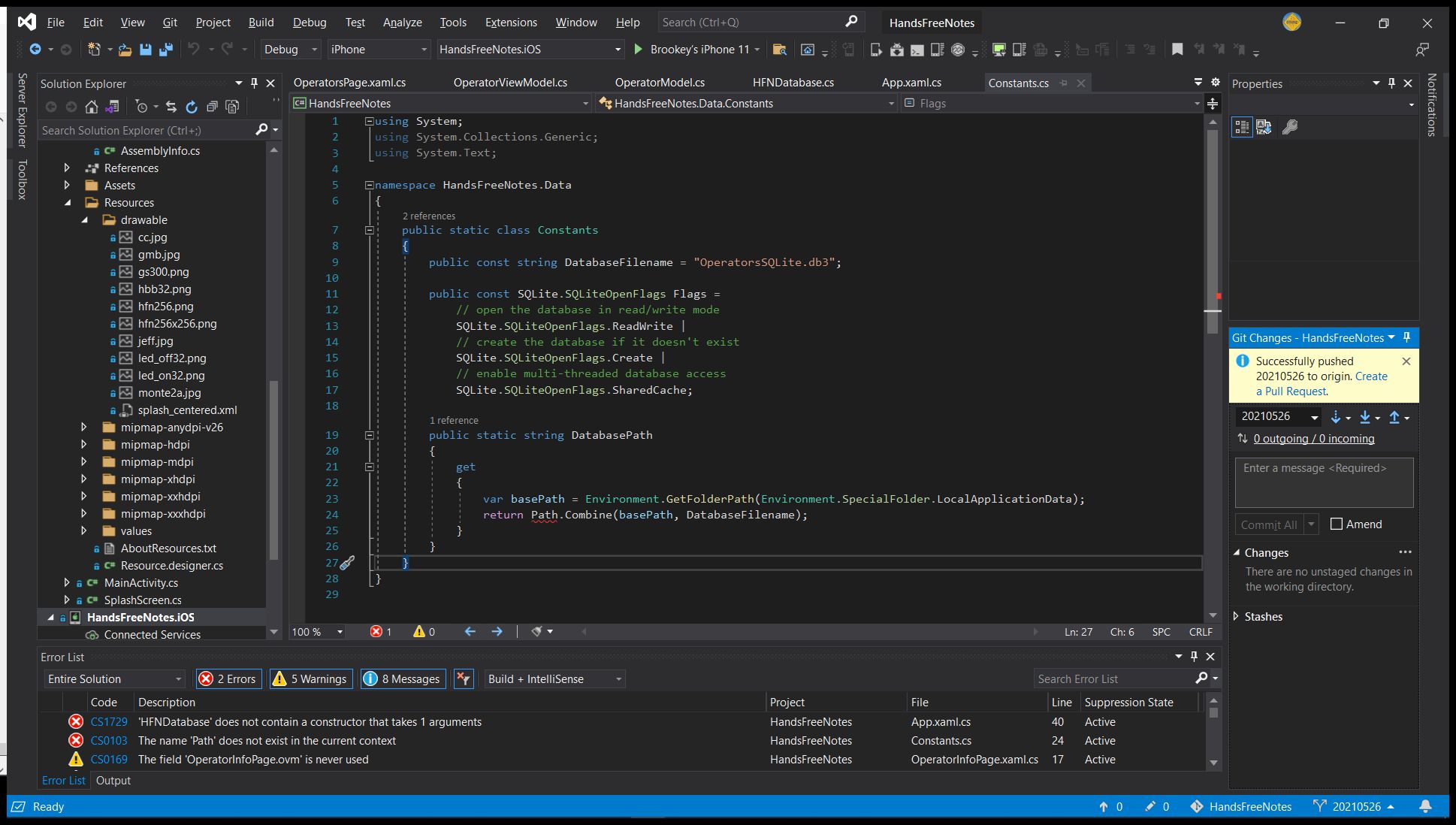
For the first error, you can refer to the class HFNDatabase.cs I posted above. There is no need for this parameter.
For the second error, you can add using System.IO; above class Constants ;
The app compiles but when I go to add an Operator by clicking the OK button in Add Operator, I get an Exception Unhandled error:
System.NullReferenceException
Message=Object reference not set to an instance of an object
What line of code reports this problem? Have you read through above code I posted. I tested on my side and it works properly.
View the stack trace from the exception. That just means you had a crash
There should be some problem in your app.please check the updated code .
@JessieZhang-MSFT Your solution works on my Android device which I am extremely happy about. I hadn't tried it on Android until just now.
Unfortunately it does NOT work on my iPhone11 where I am still getting the error in the screenshot above.
We are close. Thank you for your persistence.
You'll need to explain to me how to do that. What Jessie has provided me with works on my Android phone but I get the error above on my iPhone 11.
I tested the latest code on iphone 11 ios 14.5 emulator, the app works properly.
I rebooted both the PC and the Mac and it worked. You are wonderful. Thank you.
It's my pleasure to help you. Thanks for your support for xamarin.
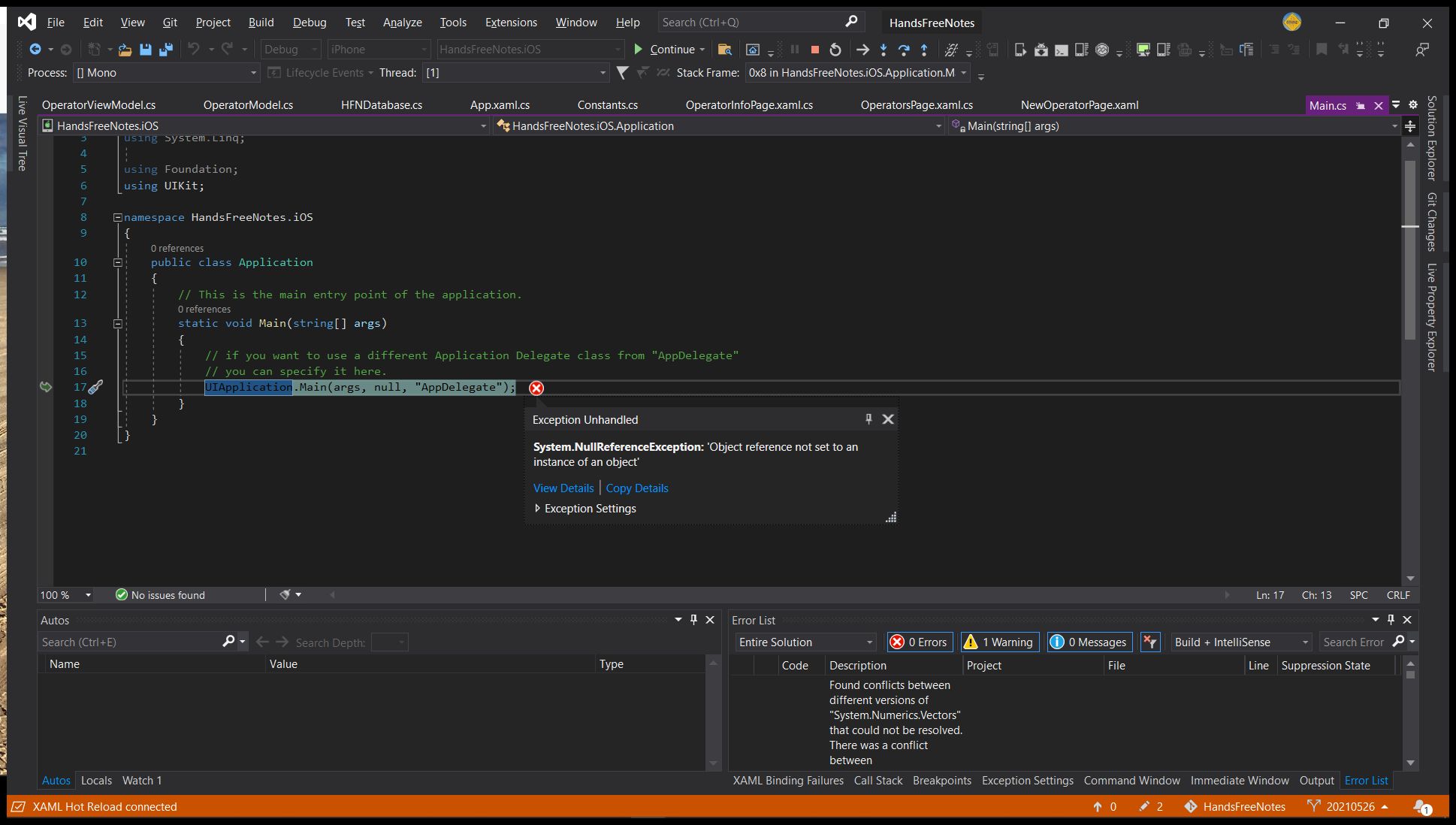 This is what I see.