I discovered this problem when Windows Security Center notified me that I had no virus protection. I have just (as in less than 24 hours ago) done a clean install of Windows 10 onto my ASUS X205TA notebook. The only applications
that have been installed since then have been Chrome and OneNote (desktop).
If I start the service while Windows Defender is open, I get the following error popup:
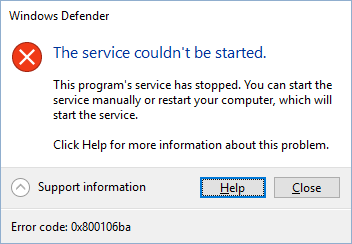
If Windows Defender is not open and I start the service I get the following error in the Message Logs:
Log Name: System
Source: Service Control Manager
Date: 16/06/11 18:50:30
Event ID: 7023
Task Category: None
Level: Error
Keywords: Classic
User: N/A
Computer: mycomputername
Description:
The Windows Defender Service service terminated with the following error:
General access denied error
Event Xml:
<Event xmlns="http://schemas.microsoft.com/win/2004/08/events/event">
<System>
<Provider Name="Service Control Manager" Guid="{555908d1-a6d7-4695-8e1e-26931d2012f4}" EventSourceName="Service Control Manager" />
<EventID Qualifiers="49152">7023</EventID>
<Version>0</Version>
<Level>2</Level>
<Task>0</Task>
<Opcode>0</Opcode>
<Keywords>0x8080000000000000</Keywords>
<TimeCreated SystemTime="2016-06-11T22:50:30.547593900Z" />
<EventRecordID>1114</EventRecordID>
<Correlation />
<Execution ProcessID="776" ThreadID="7800" />
<Channel>System</Channel>
<Computer>mycomputername</Computer>
<Security />
</System>
<EventData>
<Data Name="param1">Windows Defender Service</Data>
<Data Name="param2">%%2147942405</Data>
<Binary>570069006E0044006500660065006E0064000000</Binary>
</EventData>
</Event>
I followed the advice from http://answers.microsoft.problems-starting-windows-defender-in-windows/808253bb-db89-4db9-a4e5-1c91a86489e9 and
can report the following.
- PC has been rebooted.
- No antivirus software had been installed prior to the appearance of this problem. I subsequently installed MBAM as an additional screen to ensure I had not somehow picked up some malware.
- Scan with Microsoft Safety Scanner found nothing. I also installed and scanned with MBAM.
- SFC found no corrupted files.
- Restart of Security Center Service did not help.
I'm out of ideas now.
' cx='32' cy='32' r='32' /%3E%3Ctext x='50%25' y='55%25' dominant-baseline='middle' text-anchor='middle' fill='%23FFF' %3EA%3C/text%3E%3C/svg%3E)
