Developer technologies | Windows Presentation Foundation
A part of the .NET Framework that provides a unified programming model for building line-of-business desktop applications on Windows.
This browser is no longer supported.
Upgrade to Microsoft Edge to take advantage of the latest features, security updates, and technical support.
' cx='32' cy='32' r='32' /%3E%3Ctext x='50%25' y='55%25' dominant-baseline='middle' text-anchor='middle' fill='%23FFF' %3EI%3C/text%3E%3C/svg%3E)
I'm kinda new to WPF and I am having a few issues with the performance of my application (this is my program with a regular wrappanel: https://youtu.be/v5D2diycLnM). The solution should be a VirtualizingWrapPanel. I made some research and there are not many tutorials or documentations that explain how to use it correctly. I downloaded an example project and built a DLL (https://github.com/sbaeumlisberger/VirtualizingWrapPanel). I then referenced this in my program and tried this code:
<vwp:VirtualizingItemsControl VirtualizingPanel.CacheLengthUnit="Item" VirtualizingPanel.ScrollUnit="Pixel" VirtualizingPanel.VirtualizationMode="Recycling">
    <ItemsControl.ItemsPanel>
        <ItemsPanelTemplate>
            <vwp:VirtualizingWrapPanel Orientation="Vertical" SpacingMode="None" StretchItems="False"/>
        </ItemsPanelTemplate>
    </ItemsControl.ItemsPanel>

    <local:my_custom_control/>
    <local:my_custom_control/>
    <local:my_custom_control/>
    <local:my_custom_control/>
    <local:my_custom_control/>
    <local:my_custom_control/>
    ...

</vwp:VirtualizingItemsControl>
However, this code does not work and has exactly the same performance as a normal wrap panel. Does anyone know what the problem is? Im sorry if this sounds stupid or something like this, im kinda new to this stuff.
A part of the .NET Framework that provides a unified programming model for building line-of-business desktop applications on Windows.
' cx='32' cy='32' r='32' /%3E%3Ctext x='50%25' y='55%25' dominant-baseline='middle' text-anchor='middle' fill='%23FFF' %3EEH%3C/text%3E%3C/svg%3E)
Didn't try ItemsControl with WrapPanel. With VirtualizingStackPanel, I'd set CanContentScroll=true.
Answer accepted by question author

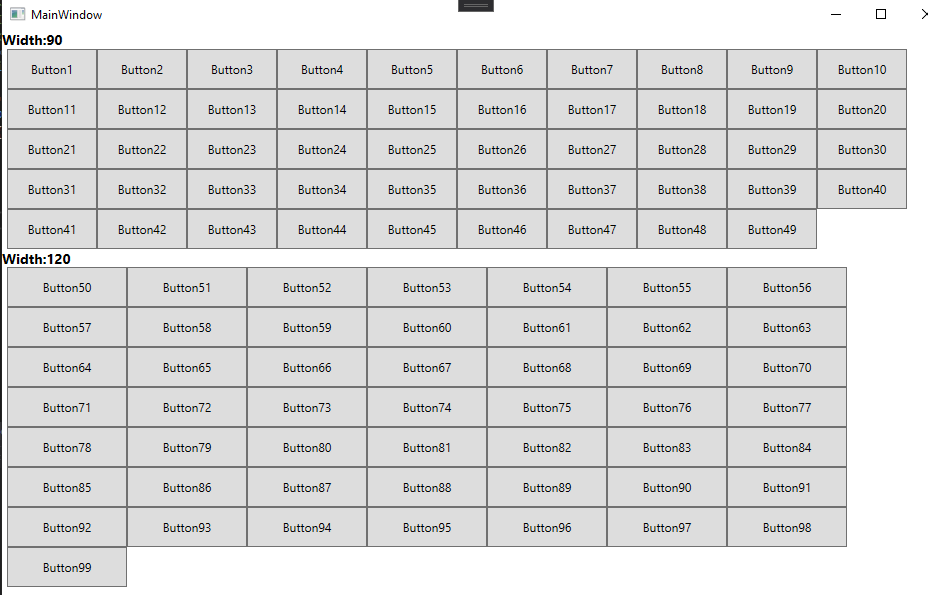
The VirtualizingWrapPanel supports horizontal and vertical orientation, caching, container recycling and grouping [[Derive from VirtualizingWrapPanel][1]] , so I made a sample of grouping the Buttons in VirtualizingItemsControl as below:
XAML code:
    <vwp:VirtualizingItemsControl Name="vic"
                                  VirtualizingPanel.CacheLengthUnit="Item"
                                  VirtualizingPanel.ScrollUnit="Pixel"
                                  VirtualizingPanel.VirtualizationMode="Recycling"
                                  VirtualizingPanel.IsVirtualizingWhenGrouping="True"
                                  >
        <ItemsControl.ItemsPanel>
            <ItemsPanelTemplate>
                <vwp:VirtualizingWrapPanel Orientation="Vertical" SpacingMode="None" StretchItems="False" />
            </ItemsPanelTemplate>
        </ItemsControl.ItemsPanel>

        <ItemsControl.GroupStyle>
            <GroupStyle HidesIfEmpty="True">
                <GroupStyle.HeaderTemplate>
                    <DataTemplate>
                        <WrapPanel>
                            <TextBlock HorizontalAlignment="Left"
                                   FontWeight="Bold"
                                   FontSize="14"
                                   Text="Width:" />
                            <TextBlock HorizontalAlignment="Left"
                                   FontWeight="Bold"
                                   FontSize="14"
                                   Text="{Binding Name}" />
                        </WrapPanel>
                    </DataTemplate>
                </GroupStyle.HeaderTemplate>
                <GroupStyle.Panel>
                    <ItemsPanelTemplate>
                        <VirtualizingStackPanel  Orientation="Vertical" />
                    </ItemsPanelTemplate>
                </GroupStyle.Panel>
            </GroupStyle>
        </ItemsControl.GroupStyle>
    </vwp:VirtualizingItemsControl>
C# code:
public MainWindow()
        {
            InitializeComponent();
            List<Button> buttons = new List<Button>();

            for(int i=1;i<100;i++)
            {
                Button button = new Button();
                if(i<50)
                {
                    button = new Button() { Content = "Button" + i.ToString(), Width = 90, Height = 40 };
                }else
                {
                    button = new Button() { Content = "Button" + i.ToString(), Width = 120, Height = 40 };
                }
                buttons.Add(button);
            }

            vic.ItemsSource = buttons;
            ICollectionView cv = CollectionViewSource.GetDefaultView(vic.ItemsSource);
            cv.GroupDescriptions.Add(new PropertyGroupDescription("Width"));
        }
The result picture is:
Did my answer give you any help? If it didn't, please let me know and give me more details.
If the response is helpful, please click "Accept Answer" and upvote it.
Note: Please follow the steps in our documentation to enable e-mail notifications if you want to receive the related email notification for this thread.