In Windows 10, Windows Defender is full Anti-Malware product and you shouldn't run it along with another one (like McAfee). If you want to use McAfee make sure you are using Compatible version of it and it will disable Windows Defender, otherwise , you may keep using Windows Defender.
Windows Defender and McAfee Total Protection
Do I need to choose one or the other and disable one or do they each do something different and I should run them both?
Windows for home | Windows 10 | Security and privacy
Locked Question. This question was migrated from the Microsoft Support Community. You can vote on whether it's helpful, but you can't add comments or replies or follow the question.
5 answers
Sort by: Most helpful
-
Anonymous
2016-07-29T13:34:46+00:00 The first program I removed after booting up my new Dell Win 10 laptop was McAfee. I’m using Windows Defender and I also installed Malwarebytes Anti-Exploit and I run occasional scans with Malwarebytes Free to see if WD missed anything.
Thus far WD has performed flawlessly.
But the decision on which antimalware program to use is really up to the individual user…there is no “best” antivirus program and there is no program that provides 100% protection against malware.
http://windows.microsoft.com/en-us/windows-10/getstarted-protect-your-pc
Windows Defender (which is part of Win 10) should have been disabled (to prevent software conflicts and performance issues) by the presence of McAfee on the computer.
If you wish to use Windows Defender for antimalware protection you should uninstall McAfee, run the McAfee Removal Tool and then reboot the computer. Windows Defender should then be enabled. http://service.mcafee.com/FAQDocument.aspx?id=TS101331
SeeChoosing an Anti-Virus Program
http://www.howtogeek.com/220232/how-to-use-the-built-in-windows-defender-antivirus-on-windows-10/ Good article but ignore the ads!
http://www.dslreports.com/forum/r30380692-AV-Poll-2015
Regards…
http://ask-leo.com/why\_dont\_antimalware\_tools\_work\_better.html
http://blog.emsisoft.com/2015/01/27/top-10-ways-pups-sneak-onto-your-computer-and-how-to-avoid-them/
-
Anonymous
2016-07-30T15:56:47+00:00 What you are referring is the issue with the insider build which affect some users. Of course this happened in current branch but you should take a note that is happens sometimes. Such issue has been fixed in anniversary update but there is possibility that some users might affected.
So for the anniversary update, it should work as expected meaning, having third-party Anti-Virus would disable Windows Defender, but if for whatever reason, it didn't work as expected, users could post their issue in forum and we guide them to fix the issue.
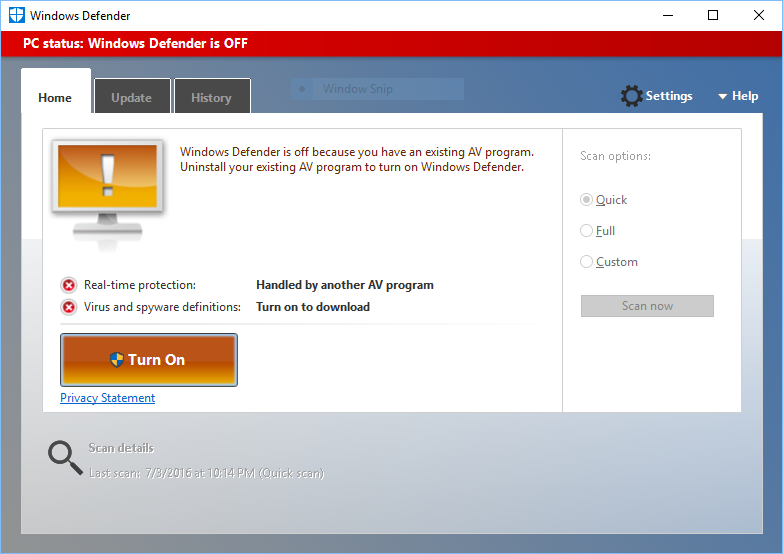
Not sure what you’re saying here, Cyber – but what I’m actually talking about is the new version of Windows Defender that will be included with the Anniversary Update. When you have a third-party AV app installed in the Anniversary Edition of Windows 10, Defender will look like this when you start it:
And then once you’ve clicked on that big Turn 0n button, you’ll be able to run any kind of Windows Defender scan (or update) from the Defender UI – and Defender’s Automatic Maintenance scan and Command Line Utility will also be enabled (screenshots are from a test machine running Preview Build 14372.0 with Avast Free installed):
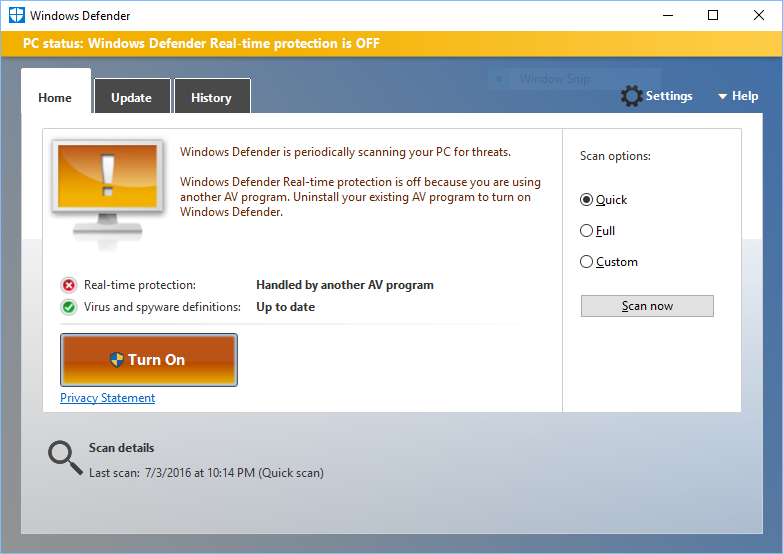
The only bug I see so far is that the big button should be labelled "Turned On" once the Limited Periodic Scanning feature has been enabled.
GreginMich
-
Reza-Ameri 45,806 Reputation points Volunteer Moderator
2016-07-30T14:27:38+00:00 What you are referring is the issue with the insider build which affect some users. Of course this happened in current branch but you should take a note that is happens sometimes. Such issue has been fixed in anniversary update but there is possibility that some users might affected.
So for the anniversary update, it should work as expected meaning, having third-party Anti-Virus would disable Windows Defender, but if for whatever reason, it didn't work as expected, users could post their issue in forum and we guide them to fix the issue.
-
Anonymous
2016-07-29T21:33:11+00:00 Do I need to choose one or the other and disable one or do they each do something different and I should run them both?
The Windows 10 Anniversary Update is right around the corner now, and when it arrives, having a third-party AV app will no longer prevent you from using Windows Defender. The terms of coexistence are spelled out here:
Since both McAfee and Defender rank relatively low in terms of malware detection, using both would definitely be better. Using Defender in conjunction with a higher-ranking AV app would be the best strategy.
https://www.av-test.org/en/antivirus/home-windows/windows-10/
GreginMich
