What is your Windows version and Service Pack?
What is the issue you are having that you think updating the ATA driver will solve?
The FUJITSU MHY2160BH is a hard drive and the ATA drivers are for your motherboard so we need to know what that is so do this:
Click the Start button/orb in the lower-left corner of your screen. Or, press the Windows logo key on your keyboard.
In the box enter:
msinfo32
Select/click msinfo32.exe and the System Information dialog box will open.
Click on System Summary, click Edit, Select All (Ctrl-A), Copy (Ctrl-C) and then paste (Ctrl-V) the information back here in your next reply.
There will be some personal information (like System Name and User Name), and whatever appears to be private information to you, just delete it from the pasted information.
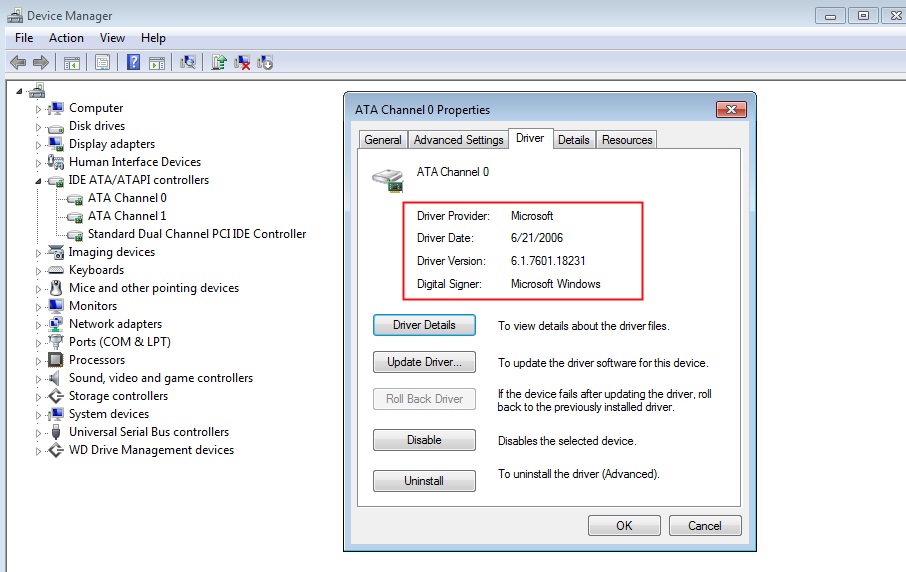
From Device Manager figure out what the currently installed ATA driver is so that if you change it you will see the version change too. Include the version information in your next reply:
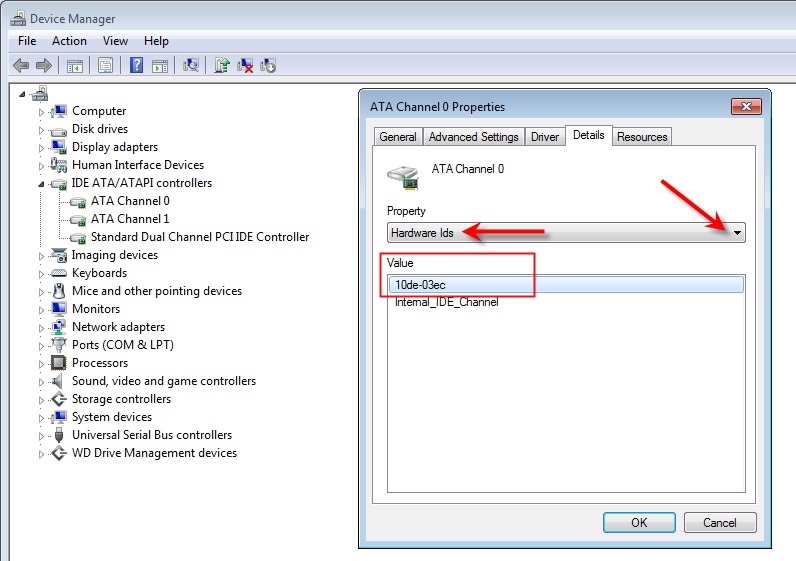
From Device Manager find the hardware ID (Value) of the device you think needs new drivers and include the Hardware ID in your next reply.
In this example the Hardware ID is 10de-03ec:
' cx='32' cy='32' r='32' /%3E%3Ctext x='50%25' y='55%25' dominant-baseline='middle' text-anchor='middle' fill='%23FFF' %3EA%3C/text%3E%3C/svg%3E)
