Windows10: How to run Dungeon Siege 2 + Broken World
To be honest I never had any problem with "Dungeon Siege" through "Dungeon Siege 2 - Broken World" on my Windows 7 rig. Just a few tweaks and running "DS2" in Compatability Mode (Win XP SP3) and it was fine. BUT...
I just upgraded to Windows 10 and, while "DS" and "DS-LoA" ran just fine in Win 10, "DS2" was DOA.
After spending an entire evening wading through the various blogs and forii I came up with an idea that worked. so, for all of you Win 8 and Win 10 users who really love Siege here's what I found.
First off for reference, my rig:
Intel Motherboard
i5 3.2 GHz Processor
16GB RAM
nVidia GTX650 Ti Graphics Card
HP High Definition 26-inch monitor running at 1920x1080
Thermaltake 1000W Power Supply
My solution:
Install "Dungeon Siege 2" then immediately install "Dungeon Siege 2 - Broken World." The game simply will not work without version 2.30.0.4277 of "DungeonSiege2.exe" (not even the DS2 patch to version 2.2x.xxx gets the game up and running).
The next thing you need to do is edit the parameters to start the game by setting it to run in Windowed mode. Yeah, I know that bites but it's that or fight with the graphics and mouse settings. Along with running in Windowed mode it helps to "hard code"
a couple of other parameters to make the process more enjoyable.
To edit the start parameters right-click on the Desktop shortcut to start the game and choose "Open File Location" then right-click on the shortcut that points to the game and select "Properties." Edit the line in the "Target" box to read:
"F:\Dungeon Siege 2 Broken World\DungeonSiege2.exe" fullscreen=false height=1035 width=1380
NOTE:
I have a separate drive for my games. The default location for the install is "C:\Progam Files (x86)\Dungeo...."
Make sure you use the quotes. DON'T copy and paste this data - make sure you use the correct location on "your" computer)
This forces the game to start in Windowed mode and sets the "final" screen resolution to a scale that is a compatible ratio with 640x480. You can use other ratios, just make sure the "height" is slightly less than your actual monitor resolution. (fig.1)
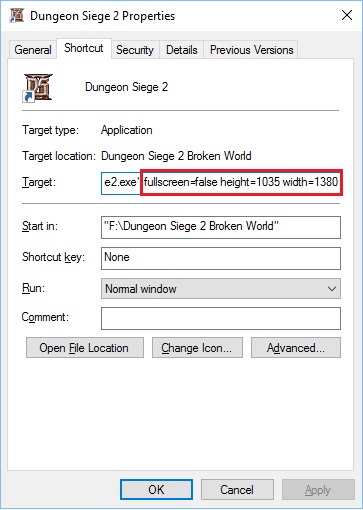
(fig. 1)
If you experience any jiggery motion with the mouse you can also edit the registry to compensate. Open regedit.exe and navigate to:
HKLM\SOFTWARE\Microsoft\Windows NT\CurrentVersion\AppCompatFlags\Layers
If Layers doesn't exist right-click AppCompatFlags and "Create New Key" name it Layers. Then select Layers and in the right-hand pane, right-click and select "New" "String Value." Name the String Value the complete path to the game (in my case,
F:\Dungeon Siege 2 Broken World\DungeonSiege2.exe). Remember to use the path on your computer.
Double-click the new string to open it and type
NoDTToDITMouseBatch
Then click OK
This should get rid of any mouse jitters.
CAVEAT: Edit the Windows Registry at your own risk. If you are not comfortable doing it - dont't.
After doing all of this - Launch the game! You'll get a window in the center of your monitor that looks similar to fig. 2
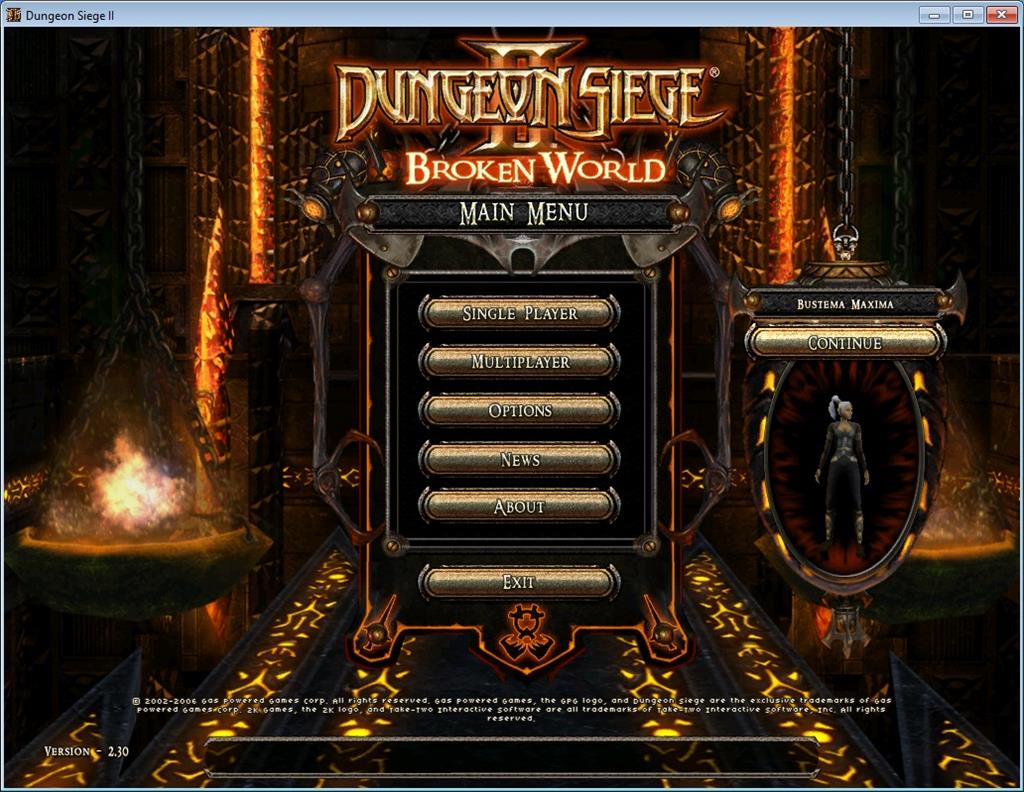
(fig. 2)
Maximize the window and you should be good to go. You end up with a title bar at the top (and a status bar at the bottom unless you use auto-hide), but you can play the game. And what a good game it is.
Hope this helps.
' cx='32' cy='32' r='32' /%3E%3Ctext x='50%25' y='55%25' dominant-baseline='middle' text-anchor='middle' fill='%23FFF' %3EA%3C/text%3E%3C/svg%3E)
