Share via

Why Age of Mythology does not work on Windows 7?

Anonymous
2009-07-25T15:04:13+00:00

I just installed Age of Mythology on Windows 7 RC, when I run the game it says : The application was unable to start correctly (0xc0000005).I tried to run it with Compatibility for Windows xp sp1&sp2 and Windows Vista sp1&2, but still not working, beside it's working fine on windows xp.I looked in google to find any solution, but all I found is that everyone saying it's working on Windows 7.So, I need your help please.Thanks

Windows for home | Previous Windows versions | Gaming

Locked Question. This question was migrated from the Microsoft Support Community. You can vote on whether it's helpful, but you can't add comments or replies or follow the question.

0 comments No comments

Answer accepted by question author

Anonymous
2009-07-26T16:13:35+00:00

simple fact that you may have to face is that is may not be compatible at all with Windows 7 per the software compliers website since Windows 98 is listed in the compatibility specs with XP being the latest...

Jonathan Matthis aka "7tester" on MSN QnA

Chief Site Administrator

Windows 7 QnA

http://windows 7qna.ning.com

Was this answer helpful?

1 person found this answer helpful.
0 comments No comments

Answer accepted by question author

Anonymous
2009-07-26T15:33:18+00:00

Hello Adams-PC,

 Thank you for using Microsoft Windows Forums.

I am showing the system requirments for this game are as below.  I would suggest going to the link below and selecting contact us to verify if this game is compatable with Windows 7.  I also included a link below for support with Windows 7 which is where I would suggest going to for support with this problem.  Thanks!

System Requirements
<ul><br><li>Microsoft® Windows® 98/Me/XP/2000 </li><li>PC with 450 MHz equivalent or higher processor </li><li>128 MB of system RAM </li><li>1.5 GB available hard disk space </li><li>32x speed or faster CD-ROM drive </li><li>16 MB video card required </li><li>Sound card, speakers or headphones required for audio<br></li><li>Microsoft Mouse or compatible pointing device </li><li>56.6 Kbps or better modem for online play </li></ul><br><br>http://support.microsoft.com/?pr=gms

Windows 7 Forums:

http://social.technet.microsoft.com/Forums/en/category/w7itpro,windowsvistaitpro,windowsxpitpro/


James Microsoft Answers Support Engineer Visit our Microsoft Answers Feedback Forum and let us know what you think.

Was this answer helpful?

1 person found this answer helpful.
0 comments No comments

29 additional answers

Sort by: Most helpful
  1. Anonymous
    2016-09-05T22:37:41+00:00

    Perhaps this will shed some light:

    If you have KB3086255 installed (you can check Control Panel, Windows Update, Installed Updates):
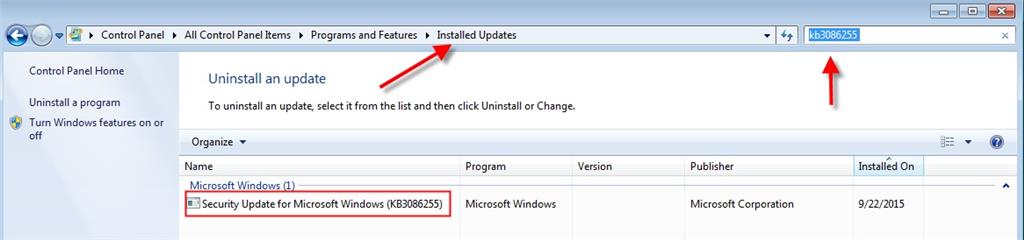
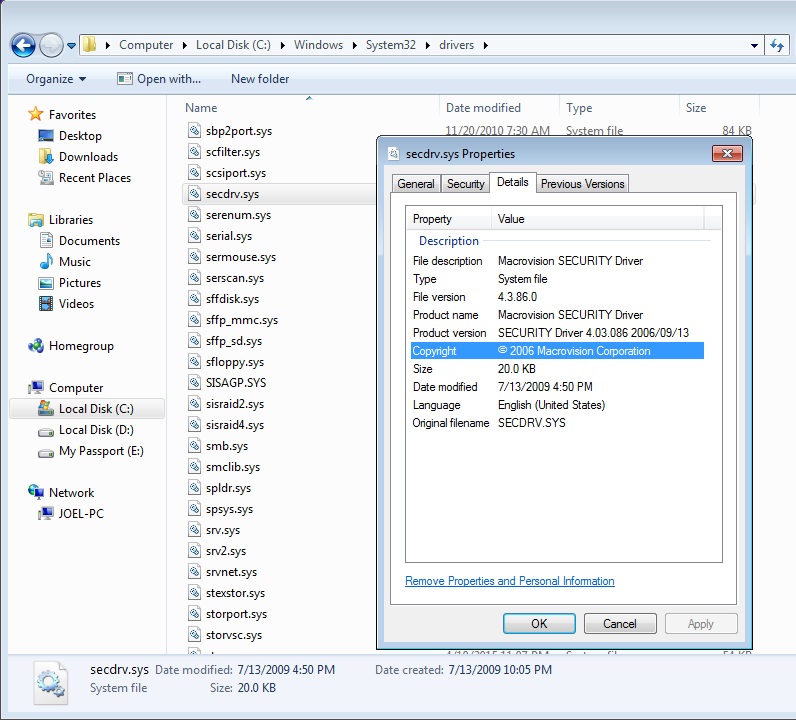
    That update disables a third party driver called secdrv.sys for "security reasons". 

    The driver is the Macrovision SECURITY Driver found in the %windir%\system32\drivers folder:
    You can read about that update here:

    https://support.microsoft.com/en-us/kb/3086255

    If you want to play games listed in the following link:

    http://www.gameburnworld.com/protectedgameslist.shtml

    You are going to have to enable that secdrv.sys driver and start it manually or you can set it to start automatically when Windows starts if that is your desire knowing that your system will be exposed.

    You can enable and start the driver from a Command Prompt Run as administrator:
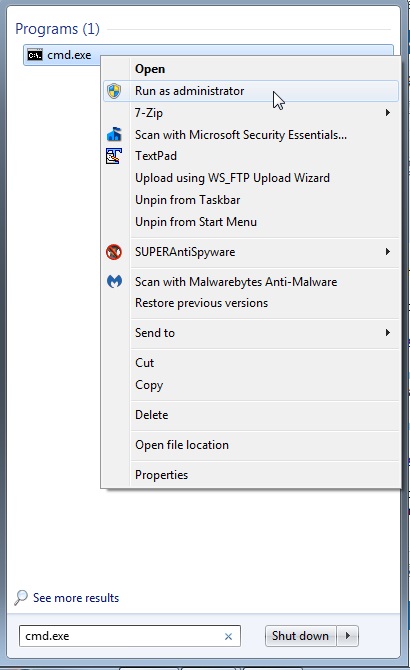
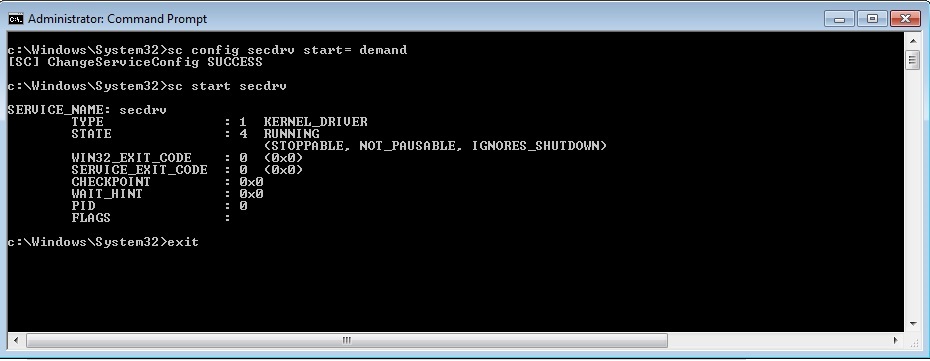
    To enable and start the driver one time enter the following commands one at a time pressing the Enter key after each being sure to include the space after the equals sign for the first command:

    sc  config  secdrv  start=  demand

    sc  start  secdrv

    Enter 'exit' to close the Command Prompt window.

    You should see something like this:
    If you want the driver to start automatically when Windows start enter the following command being sure to include the space after the equals sign, then restart your system and the driver will start automatically:

    sc  config  secdrv  start=  auto

    You should see something like this:
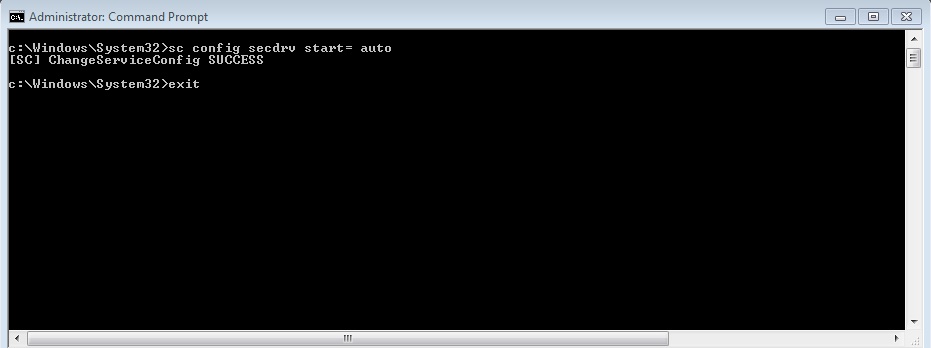
    Enter 'exit' to close the Command Prompt window, then restart your system.

    Then see how your game works and include a reboot to be sure the changes "stick".

    Here is some additional reading if interested:

    https://myonlinesecurity.co.uk/september-2015-windows-updates-kb3086255-breaks-many-games/

    Was this answer helpful?

    2 people found this answer helpful.
    0 comments No comments
  2. Anonymous
    2010-07-21T03:47:43+00:00

    Hello!

    I test software for compatibility for new Windows versions, but this solution relies on your version of windows 7

    You need to see if you are running the 32- bit or 64- bit versions of windows 7

    Only the the 32- bit version will work.

    Was this answer helpful?

    2 people found this answer helpful.
    0 comments No comments
  3. Anonymous
    2010-07-21T08:55:37+00:00

    Hello!


    I test software for compatibility for new Windows versions, but this solution relies on your version of windows 7

    You need to see if you are running the 32- bit or 64- bit versions of windows 7

    Only the the 32- bit version will work.

    I have Windows 7 Home Premium 64-bit version and my 'Age of Mythology' works absolutely flawlessly without any compatibility settings or modifications even though Microsoft lists the game as incompatible with Windows 7. Maybe you should go back to "Software Compatibility Checking School"!

    Was this answer helpful?

    1 person found this answer helpful.
    0 comments No comments
