Share via

Windows Defender is OFF, I can't turn it ON

Anonymous
2017-02-13T17:56:56+00:00

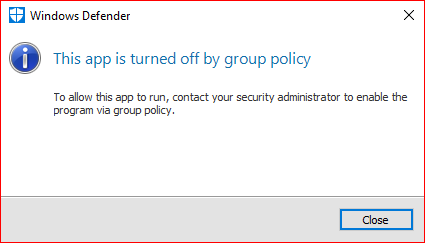
When trying to open windows defender on windows 10 a Message box pops up saying "This app is turned off by group policy - To allow this app to run, contact your Security Administrator to enable the program via group policy" and also same happens in the settings where it shows as being off.

How can't I get it to switch back on I've tried the options given in the community but it still does not switch on. Please can someone help.
Windows for home | Windows 10 | Security and privacy

Locked Question. This question was migrated from the Microsoft Support Community. You can vote on whether it's helpful, but you can't add comments or replies or follow the question.

0 comments No comments

12 answers

Sort by: Most helpful
  1. Anonymous
    2017-02-14T17:58:58+00:00

    Split from this thread.

    This Worked Thank You.

    Before you can open Windows Defender, you must remove your current antivirus. With an antivirus installed, Windows Defender will remain turned off (and it should).

    Press Win key + R. This will open Run dialog box. Type 'gpedit.msc' in it and press Enter.

    If Local Group Policy Editor opens up:

    Navigate to Computer Configuration -> Administrative Templates ->Windows Components -> Windows Defender. Double-click on Turn off Windows Defender setting and set it to Disabled. Press OK and try to open Windows Defender again.

    30+ people found this answer helpful.
    0 comments No comments
  2. Anonymous
    2017-02-13T18:13:53+00:00

    When trying to open windows defender on windows 10 a Message box pops up saying "This app is turned off by group policy - To allow this app to run, contact your Security Administrator to enable the program via group policy" and also same happens in the settings where it shows as being off.

    How can't I get it to switch back on I've tried the options given in the community but it still does not switch on. Please can someone help.

    The behavior you are describing may occur if a third party program is installed or there are remnants of a third party program installed.  

    Go to Security and Maintenance, look in 'Security' and see what program is listed under Virus Protection.  Windows Defender will not be enabled if there is a program other than Windows Defender listed.

    Have you tried the steps recommended in Problems starting Windows Defender in Windows 8/8.1/10 to include running the software removal tools for any security software (AVG, McAfee, Norton, whatever) that may have previously been on the computer followed by a reboot? **List of anti-malware product removal tools**

    For further information see the reply of quietman7 in this thread: http://answers.microsoft.com/en-us/protect/forum/protect\_defender-protect\_scanning/windows-defender/e994f94f-92d5-4d44-9721-79c2a686ce24.

    Alternatively see https://www.tenforums.com/tutorials/5918-windows-defender-turn-off-windows-10-a.html

    Or - - -

    I use WD and have no complaints regarding the program. But You may prefer to install a third party antimalware program (which should disable Windows Defender) and you’ll no longer be concerned with the various issues that intermittently affect Windows Defender on Win 10.

    There are a number of viable free and paid options available – take your pick…

    Choosing an Anti-Virus Program

    Is Windows Defender The Best For Windows 10?  Good article but ignore the ads.

    http://www.dslreports.com/forum/r30380692-AV-Poll-2015

    http://windows.microsoft.com/en-US/windows/antivirus-partners#AVtabs=win10

    Regards…

    http://blog.emsisoft.com/2015/01/27/top-10-ways-pups-sneak-onto-your-computer-and-how-to-avoid-them/

    9 people found this answer helpful.
    0 comments No comments
  3. Anonymous
    2017-02-14T03:56:25+00:00

    It’s actually just Automatic Maintenance that’s broken – and that’s just the most touted part of Limited Periodic Scanning. Third-party AV Apps are supposed to turn Windows Defender off by setting the DisableAntiSpyware and DisableAntiVirusDWORDs in the Windows Defender registry key to the value of 1 (disabled true). When that’s done properly, the Windows Defender screen should still load when you try to start Defender, and provide the option for turning on Limited Periodic Scanning by clicking on the big “Turn On” button:

    Turning on Limited Periodic Scanning resets the respective DWORDs in the Windows Defender key to 0, and this activates the options for manual scanning, and the entire Windows Defender Command Line Interface – which allows for direct command line scanning and updating, as well as for scheduling scans and updates with Task Scheduler:

    It also activates the Windows Defender Automatic Maintenance tasks, including the Windows Defender Scheduled Scan task – which, as you know, isn’t working properly at this point. You can, however, presently run manual scans; use the Startup Shortcut methods; or schedule your own Windows Defender scans/updates once Limited Periodic Scanning has been enabled. Since Limited Periodic Scanning is really a new Windows 10 feature, no third-party AV app should be disrespecting this protocol by setting a DisableAntiSpyware DWORD to the value of 1 in the Polices key (the Group Policy key), which results in Windows Defender being completely disabled. That option should only be utilized by local administrators:

    GreginMich

    7 people found this answer helpful.
    0 comments No comments
  4. Anonymous
    2017-02-21T04:47:00+00:00

    This did not solve my Problem .

    2 people found this answer helpful.
    0 comments No comments
  5. Anonymous
    2017-02-13T22:33:46+00:00

    When trying to open windows defender on windows 10 a Message box pops up saying "This app is turned off by group policy - To allow this app to run, contact your Security Administrator to enable the program via group policy" and also same happens in the settings where it shows as being off.

    How can't I get it to switch back on I've tried the options given in the community but it still does not switch on. Please can someone help.

    When you see this message****on a home PC, it’s normally the handiwork of malware that’s impersonating the “administrator” – so the first thing that you’ll have to do is scan the system with a balanced combination of trusted third-party Antivirus/Antimalware tools. This is what I would recommend:

    Kaspersky Virus Removal Tool:

    http://support.kaspersky.com/viruses/kvrt2015

    Emsisoft Emergency Kit:

    http://www.emsisoft.com/en/software/eek/

    Malwarebytes Anti-Malware (free version only):

    https://www.malwarebytes.org/antimalware/

    Eset Online Scanner:

    http://www.eset.com/us/online-scanner/

    Some other trusted third-party malware-removal tools are listed here:

    https://answers.microsoft.com/en-us/protect/wiki/protect_other-protect_scanning/list-of-malware-removal-tools/d824b9af-ebd8-4c47-94e2-8ee6c544c100

    Then attempt to turn Defender back on with one of the methods described in this thread:

    https://answers.microsoft.com/en-us/protect/forum/protect_defender-protect_start/windows-defender-turned-off-by-group-policy/bcbe6404-88d4-400c-be7a-29a865c126b7

    Also see the answer in this thread:

    https://answers.microsoft.com/en-us/protect/forum/protect_defender-protect_scanning/windows-defender-this-app-is-turned-off-by-group/dfa59c2a-b358-4f62-80b6-6b8e4994dc32

    We’ve seen an unusually high incidence of Windows Defender getting disabled by Group Policy lately, and that’s got me wondering if some third-party AV/Antimalware app might be disabling Windows Defender via Group Policy. That’s not a normal procedure, and it’s really not an acceptable procedure – because this would prevent users from enabling Defender’s new Limited Periodic Scanning feature. So if people who are having this issue would routinely report their primary AV app; whether or not they had turned on Limited Periodic Scanning; and also any other Security apps that they might be using; that information might help us solve the mystery.

    If you’re using Windows Defender in a standalone configuration, don’t wait until you see sure signs of an infection before you scan your PC with the above third-party malware removal tools – use them on a regular basis. Remember that “Limited Periodic Scanning” is a two-way street: If you’re using a third-party AV app, then you should definitely have Windows Defender’s Limited Periodic Scanning mode enabled so it can find things that the third-party AV app might miss. And conversely, if you’re using Windows Defender for your primary AV protection, then you should be scanning your PC regularly (periodically) with a well-balanced group of dependable third-party Antivirus/Antimalware scanners in order to find anything that Defender might have missed.

    GreginMich

    2 people found this answer helpful.
    0 comments No comments
