Hi
Thanks for Coming Microsoft Community
It seem to Intel centrino Wireless Adapter is missing
Right Click on network Controller and properties>detail tab>property>change device description to Hardware device.
Check if any number showing 8088.or Copy all and paste here
or click here and let the Intel check which driver is missing
http://www.intel.com/p/en_US/support/detect/wireless
click check your system update
Thanks a lot.
No, it isn't Intel Wireless LAN Driver
Yes, the updates let the Wireless adabpter defined. However, it is Realtek Wireless LAN Driver for Windows 7 (32/64)
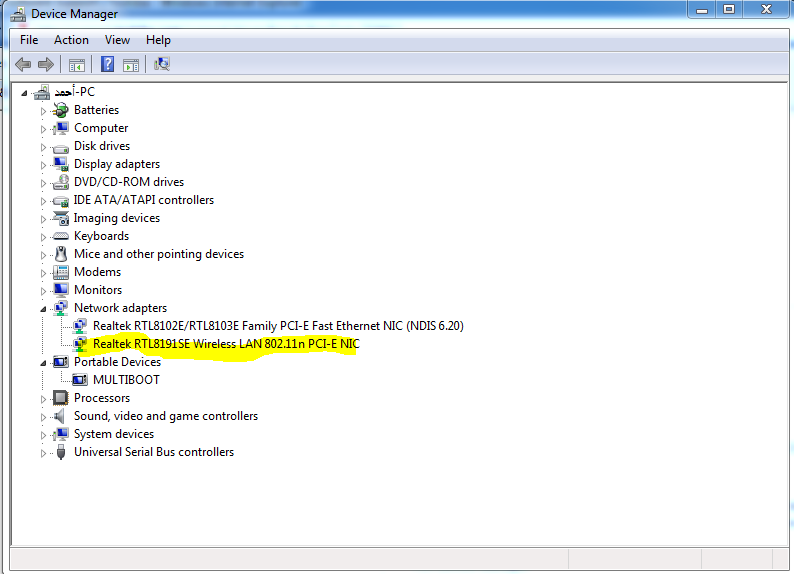
Thus, I don't need to go to http://support.toshiba.com/support/driversResults?freeText=2558912 to download Realtek Wireless LAN Driver for Windows 7 (32/64).
this raises another question which is, how can I know if there are other devices still missing and needing drivers to be working. For instance, my laptop has a Web Camera integrated with it, and I don't know if this will be working or not. Also, I don't
know if there is a bluetooth integrated with my laptop or not. I think if any devices were still missing and needing a drivers, they would have listed under 'other devices' category in the device manager.
' cx='32' cy='32' r='32' /%3E%3Ctext x='50%25' y='55%25' dominant-baseline='middle' text-anchor='middle' fill='%23FFF' %3EA%3C/text%3E%3C/svg%3E)
