Share via

Problems installing Corel PaintshopPro X5 - "your system has not been modified"

Anonymous
2013-07-24T19:20:23+00:00

This past January 2013, I upgraded my laptop to Windows 8. Since then I had Paintshop Pro X5, VideoStudio Pro X5, and Corel Wordperfect Suite X5 working on it without any problems.

Recently, I updated my laptop to an SS drive. Since I was unable to clone the drive due to size difference, I did a fresh Windows 8 install and began, over time, reinstalling my software as well. I had no problems reinstalling the Wordperfect Suite or VideoStudio Pro X5. Both installed without a hitch and work fine.

However, my attempts to install Paintshop Pro X5 has been an exasperating experience. The first time I was able to enter the serial number and it seemed all was well until it reached near the end. I wasn't looking at the time but then I noticed that the laptop went blank and then rebooted.

I tried to start the program, but nothing would work. I then attempted a re-install which gave me a "your system has not been modified" shown below:
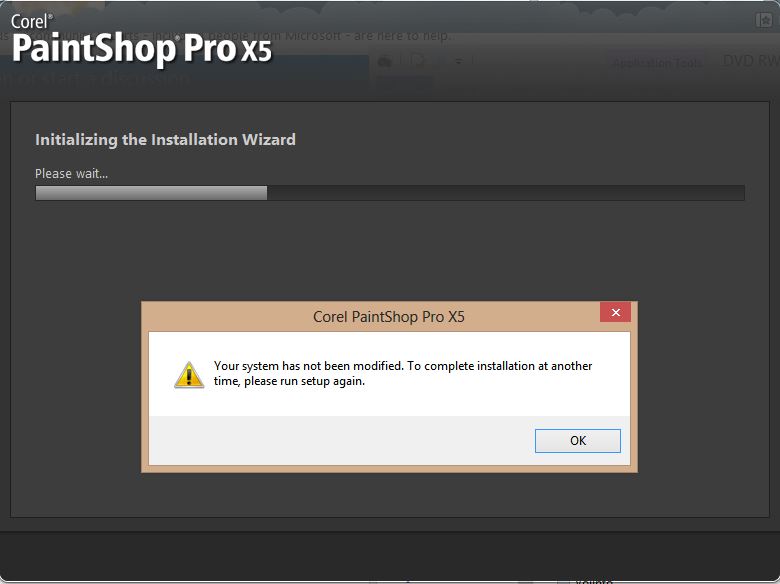
Nothing happens when the Installation Wizard reaches the end. Multiple attempts to get this install to work have failed.

I've tried manually uninstalling, cleaning out the registry, and installing under safe mode. I also tried using Admin with UAC turned off. Each attempt has met with the above message when I try to reinstall. 

Any suggestions as what I may do next to get Paintshop Pro installing properly?

Thank you for your time.

Windows for home | Previous Windows versions | Performance and system failures

Locked Question. This question was migrated from the Microsoft Support Community. You can vote on whether it's helpful, but you can't add comments or replies or follow the question.

0 comments No comments

4 answers

Sort by: Most helpful
  1. Anonymous
    2017-06-21T07:34:46+00:00

    I had the same problem with Paint Shop Pro X6.  Ran across these instructions and it fixed it for me:

    Go to this Corel Community Forum page: http://forum.corel.com/EN/viewtopic.php?f=56&t=52337

    Download and run the cleanup utility for your version of Paint Shop Pro

    Run your Paint Shop Pro install again.

    10+ people found this answer helpful.
    0 comments No comments
  2. Anonymous
    2013-09-16T10:41:08+00:00

    hello friend

    i am having similar probelm regarding paintshop x5

    have you solved your problem?

    can you help me as well?

    thanks

    vaibhav

    9 people found this answer helpful.
    0 comments No comments
  3. Anonymous
    2013-07-25T00:12:19+00:00

    Hi

    Your best resource is Corel support.

    Corel Support Overview:

    http://www.corel.com/corel/pages/index.jsp?pgid=800170

    Corel Communities:

    http://www.corel.com/corel/pages/index.jsp?pgid=800085

    They will be aware of any known issues when installing on Windows 8.

    Regards

    3 people found this answer helpful.
    0 comments No comments
  4. Anonymous
    2013-09-16T19:34:32+00:00

    Corel sent me to these instruction to completely remove all traces of the failed installation and do a fresh install. It worked for me.

    Removal Instructions for Paintshop Pro X5

    1 person found this answer helpful.
    0 comments No comments
