Share via

Windows 7 Home Premium SP1 64bit ISO

Anonymous
2017-08-04T17:38:15+00:00

My hard drive is corrupted and unusable.

I am going to buy another hard drive.

I tried the manufacturer of the computer to get a recovery disk but they are unable to supply one for me.

I need to download the Windows 7 Home Premium SP1 64bit ISO but the site below will not let me do this...

https://www.microsoft.com/en-us/software-download/windows7

I get the message "The product key you've entered appears to be for software which was pre-installed by the device manufacturer."

Can someone help please?

Windows for home | Previous Windows versions | Windows update

Locked Question. This question was migrated from the Microsoft Support Community. You can vote on whether it's helpful, but you can't add comments or replies or follow the question.

0 comments No comments

16 answers

Sort by: Most helpful
  1. LemP 74,925 Reputation points Volunteer Moderator
    2017-08-04T19:25:50+00:00

    You can get a legitimate Windows 7 Home Premium ISO file by using the download tool here:  https://www.heidoc.net/joomla/technology-science/microsoft/67-microsoft-windows-and-office-iso-download-tool

    Use the product key from the COA label on your computer (if you have a laptop, it may be inside the battery compartment).

    8 people found this answer helpful.
    0 comments No comments
  2. Anonymous
    2017-08-04T17:44:16+00:00

    thanks

    8 people found this answer helpful.
    0 comments No comments
  3. LemP 74,925 Reputation points Volunteer Moderator
    2017-08-04T21:46:30+00:00

    To answer your second question, you get that message because Microsoft will not provide ANY support to users of OEM software, which includes "software pre-installed by the device manufacturer."  Under the terms of Microsoft's license, the device manufacturers are responsible for support, which is why they can buy Windows at a price low enough to include with the computer and still make a profit.

    Unfortunately, the Heidoc "Windows ISO Downloader" program appears to require "Windows 7 or newer."
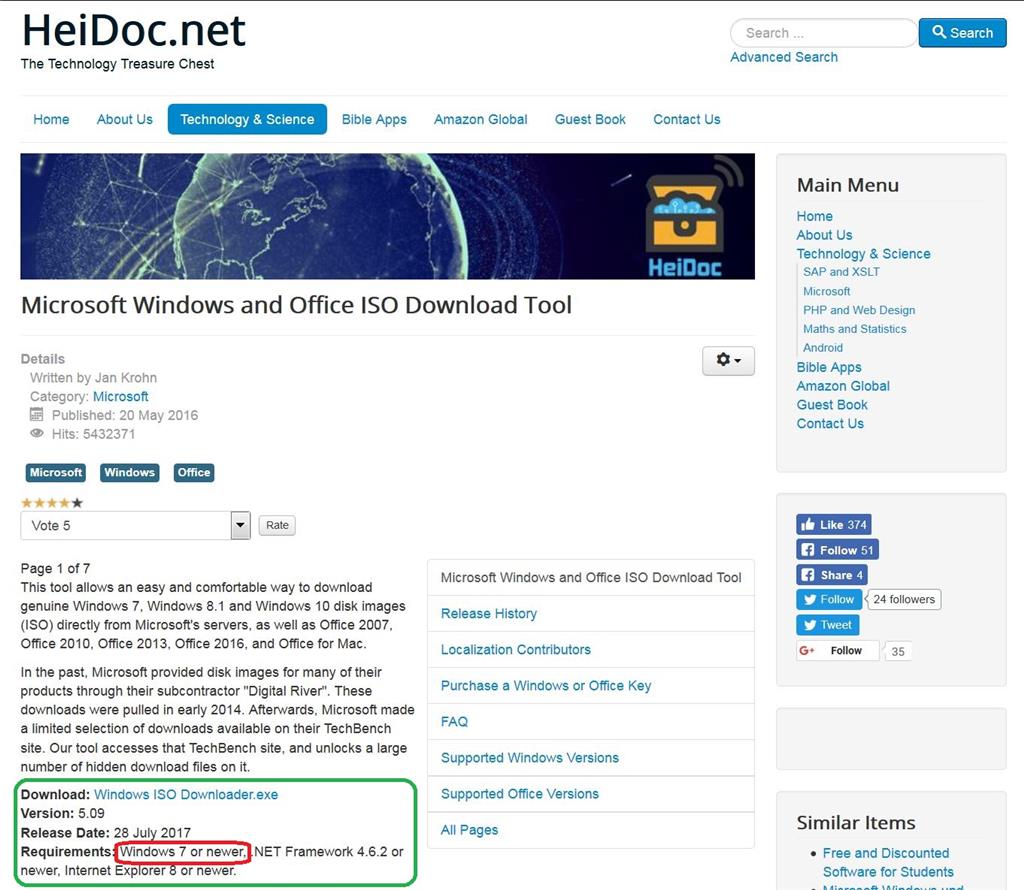
    You can see if redownloading the exe file will help, but I suspect that at this point your only option is to find a Windows 7 or newer computer with an Internet connection that you can use to download the ISO file. 

    Perhaps a friend or a public library or Internet cafe.  If you use a publicly-available computer, make sure that the proprietor permits downloads AND that the computer has a USB port so you can attach a USB flash drive (public computers rarely have DVD burner drives).  You'll need a USB flash drive that has at least 4 GB free. 

    Note that you will be just copying the ISO file to the USB flash drive.  You'll still have to make a bootable DVD or USB flash drive in order to install Windows.  If you intend to make a bootable USB flash drive to install Windows (using RUFUS), you'll have to copy the ISO file to your laptop first, because Rufus will repartition and reformat the USB flash drive as the first step in making it bootable.

    4 people found this answer helpful.
    0 comments No comments
  4. Anonymous
    2017-08-04T22:30:20+00:00

    Just to add please.

    Would it be the...

    Windows 7 Home Premium SP1

    ...or the...

    Windows 7 Home Premium SP1 COEM

    Thanks.

    2 people found this answer helpful.
    0 comments No comments
  5. Anonymous
    2017-08-04T20:52:12+00:00

    Thanks for the reply LemP, it is appreciated.

    I have tried to download the ISO from the site you suggested by clicking the Windows 7 button and it has just given me a blank screen with OK in the bottom left hand corner for the last 15 minutes.

    I am trying to do this on my Windows Vista Ultimate laptop because I obviously don't have a hard drive in my Windows 7 laptop.

    What am I doing wrong please?

    Also, why will this work when I previously got the message...

    The product key you've entered appears to be for software which was pre-installed by the device manufacturer.

    When trying to download it from...

    https://www.microsoft.com/en-us/software-download/windows7

    I appreciate your time and help.

    2 people found this answer helpful.
    0 comments No comments
