A short while after upgrading the hard drive in my laptop from a 160GB HDD to a 1TB SSHD Windows gave me the following error:
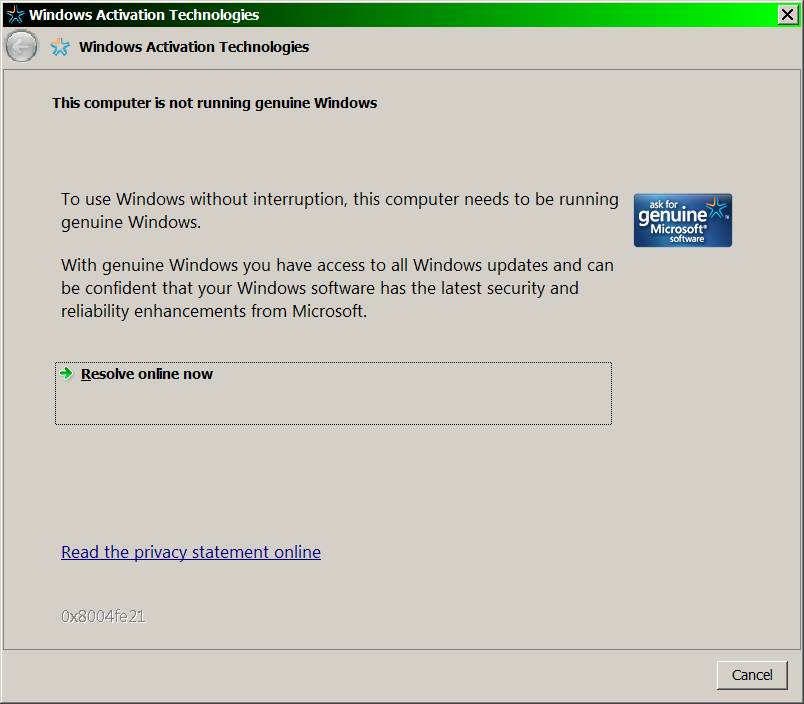
The following are the stats on my laptop plus a copy of the MGADiag.exe report:
Lenovo Thinkpad T500
BIOS Version 3.23 (6FET93WW) (Current 9/12/2017)
BIOS date 2012-10-12
Embedded Controller Version 1.06
System-unit serial number 20552CU1234567
System board serial number (blank)
UUID 4614ba00-4ac4-11cb-9ab1-b968cbadc4f6
MAC Address (Internal LAN) 00 24 7E DB C2 BC
Windows 7 Professional 64 bit Service Pack 1
ACPI x64-based PC
Intel Core2 Duo CPU T9400 @ 2.53
8GB RAM (8192MB)
1TB SSHD Seagate ST1000LM014-1EJ164
- First Install Date: 05/23/2017 05:07:48PM
ATI Mobility Radeon HD 3650
Mobile Intel(R) 4 Series Express Chipset Family
LCD 1680x1050
Conexant 20561 SmartAudio HD
DVD Drive: HL-DT-ST DVDRAM GSA-U20N
Intel(R) ICH9M-E/M SATA AHCI Controller
MGADiag.exe report
Diagnostic Report (1.9.0027.0):
Windows Validation Data-->
Validation Code: 0x8004FE21
Cached Online Validation Code: 0x0
Windows Product Key: *****-*****-MV8MH-98QJM-24367
Windows Product Key Hash: wgci5Gdejx4esg7++zTOe3LWF+4=
Windows Product ID: 00371-OEM-8992671-00437
Windows Product ID Type: 2
Windows License Type: OEM SLP
Windows OS version: 6.1.7601.2.00010100.1.0.048
ID: {136478D7-5981-49E0-BC7F-BA84F4638287}(1)
Is Admin: Yes
TestCab: 0x0
LegitcheckControl ActiveX: N/A, hr = 0x80070002
Signed By: N/A, hr = 0x80070002
Product Name: Windows 7 Professional
Architecture: 0x00000009
Build lab: 7601.win7sp1_ldr.170427-1518
TTS Error:
Validation Diagnostic:
Resolution Status: N/A
Vista WgaER Data-->
ThreatID(s): N/A, hr = 0x80070002
Version: N/A, hr = 0x80070002
Windows XP Notifications Data-->
Cached Result: N/A, hr = 0x80070002
File Exists: No
Version: N/A, hr = 0x80070002
WgaTray.exe Signed By: N/A, hr = 0x80070002
WgaLogon.dll Signed By: N/A, hr = 0x80070002
OGA Notifications Data-->
Cached Result: N/A, hr = 0x80070002
Version: N/A, hr = 0x80070002
OGAExec.exe Signed By: N/A, hr = 0x80070002
OGAAddin.dll Signed By: N/A, hr = 0x80070002
OGA Data-->
Office Status: 103 Blocked VLK
Microsoft Office Enterprise 2007 - 103 Blocked VLK
OGA Version: N/A, 0x80070002
Signed By: N/A, hr = 0x80070002
Office Diagnostics: 77F760FE-153-80070002_7E90FEE8-175-80070002_025D1FF3-364-80041010_025D1FF3-229-80041010_025D1FF3-230-1_025D1FF3-517-80040154_025D1FF3-237-80040154_025D1FF3-238-2_025D1FF3-244-80070002_025D1FF3-258-3
Browser Data-->
Proxy settings: N/A
User Agent: Mozilla/4.0 (compatible; MSIE 8.0; Win32)
Default Browser: C:\Program Files (x86)\Opera\launcher.exe
Download signed ActiveX controls: Prompt
Download unsigned ActiveX controls: Disabled
Run ActiveX controls and plug-ins: Allowed
Initialize and script ActiveX controls not marked as safe: Disabled
Allow scripting of Internet Explorer Webbrowser control: Disabled
Active scripting: Allowed
Script ActiveX controls marked as safe for scripting: Allowed
File Scan Data-->
File Mismatch: C:\Windows\system32\wat\watadminsvc.exe[7.1.7600.16395], Hr = 0x80092003
File Mismatch: C:\Windows\system32\wat\watux.exe[7.1.7600.16395], Hr = 0x80092003
File Mismatch: C:\Windows\system32\sppobjs.dll[6.1.7601.17514], Hr = 0x80092003
File Mismatch: C:\Windows\system32\sppc.dll[6.1.7601.17514], Hr = 0x800b0100
File Mismatch: C:\Windows\system32\sppcext.dll[6.1.7600.16385], Hr = 0x800b0100
File Mismatch: C:\Windows\system32\sppwinob.dll[6.1.7601.17514], Hr = 0x80092003
File Mismatch: C:\Windows\system32\slc.dll[6.1.7600.16385], Hr = 0x800b0100
File Mismatch: C:\Windows\system32\slcext.dll[6.1.7600.16385], Hr = 0x800b0100
File Mismatch: C:\Windows\system32\sppuinotify.dll[6.1.7600.16385], Hr = 0x80092003
File Mismatch: C:\Windows\system32\slui.exe[6.1.7601.17514], Hr = 0x80092003
File Mismatch: C:\Windows\system32\sppcomapi.dll[6.1.7601.17514], Hr = 0x800b0100
File Mismatch: C:\Windows\system32\sppcommdlg.dll[6.1.7600.16385], Hr = 0x800b0100
File Mismatch: C:\Windows\system32\sppsvc.exe[6.1.7601.17514], Hr = 0x80092003
File Mismatch: C:\Windows\system32\drivers\spsys.sys[6.1.7127.0], Hr = 0x80092003
File Mismatch: C:\Windows\system32\drivers\spldr.sys[6.1.7127.0], Hr = 0x80092003
File Mismatch: C:\Windows\system32\systemcpl.dll[6.1.7601.17514], Hr = 0x800b0100
File Mismatch: C:\Windows\system32\user32.dll[6.1.7601.23594], Hr = 0x800b0100
Other data-->
Office Details: <GenuineResults><MachineData><UGUID>{136478D7-5981-49E0-BC7F-BA84F4638287}</UGUID><Version>1.9.0027.0</Version><OS>6.1.7601.2.00010100.1.0.048</OS><Architecture>x64</Architecture><PKey>*****-*****-*****-*****-24367</PKey><PID>00371-OEM-8992671-00437</PID><PIDType>2</PIDType><SID>S-1-5-21-3016509486-2749693867-2349327627</SID><SYSTEM><Manufacturer>LENOVO</Manufacturer><Model>20552CU</Model></SYSTEM><BIOS><Manufacturer>LENOVO</Manufacturer><Version>6FET93WW
(3.23 )</Version><SMBIOSVersion major="2" minor="4"/><Date>20121012000000.000000+000</Date></BIOS><HWID>162B3B07018400F8</HWID><UserLCID>0409</UserLCID><SystemLCID>0409</SystemLCID><TimeZone>Central Standard Time(GMT-06:00)</TimeZone><iJoin>0</iJoin><SBID><stat>3</stat><msppid></msppid><name></name><model></model></SBID><OEM><OEMID>LENOVO</OEMID><OEMTableID>TP-6F
</OEMTableID></OEM><GANotification/></MachineData><Software><Office><Result>103</Result><Products><Product GUID="{90120000-0030-0000-0000-0000000FF1CE}"><LegitResult>103</LegitResult><Name>Microsoft Office Enterprise 2007</Name><Ver>12</Ver><Val>ACD7202654E586</Val><Hash>fFic3JgCreGGRxyF8uMWB4R4Jcg=</Hash><Pid>89388-707-1528066-65363</Pid><PidType>14</PidType></Product></Products><Applications><App
Id="15" Version="12" Result="103"/><App Id="16" Version="12" Result="103"/><App Id="18" Version="12" Result="103"/><App Id="19" Version="12" Result="103"/><App Id="1A" Version="12" Result="103"/><App Id="1B" Version="12" Result="103"/><App Id="44" Version="12"
Result="103"/><App Id="A1" Version="12" Result="103"/><App Id="BA" Version="12" Result="103"/></Applications></Office></Software></GenuineResults>
Spsys.log Content: 0x80070002
Licensing Data-->
Software licensing service version: 6.1.7601.17514
Name: Windows(R) 7, Professional edition
Description: Windows Operating System - Windows(R) 7, OEM_SLP channel
Activation ID: 50e329f7-a5fa-46b2-85fd-f224e5da7764
Application ID: 55c92734-d682-4d71-983e-d6ec3f16059f
Extended PID: 00371-00178-926-700437-02-1033-7601.0000-3382012
Installation ID: 007915367760240853612795040290437474881533771253855371
Processor Certificate URL: http://go.microsoft.com/fwlink/?LinkID=88338
Machine Certificate URL: http://go.microsoft.com/fwlink/?LinkID=88339
Use License URL: http://go.microsoft.com/fwlink/?LinkID=88341
Product Key Certificate URL: http://go.microsoft.com/fwlink/?LinkID=88340
Partial Product Key: 24367
License Status: Licensed
Remaining Windows rearm count: 3
Trusted time: 9/12/2017 9:13:16 PM
Windows Activation Technologies-->
HrOffline: 0x8004FE21
HrOnline: N/A
HealthStatus: 0x000000000001EFF0
Event Time Stamp: 9:7:2017 19:32
ActiveX: Registered, Version: 7.1.7600.16395
Admin Service: Registered, Version: 7.1.7600.16395
HealthStatus Bitmask Output:
Tampered File: %systemroot%\system32\sppobjs.dll
Tampered File: %systemroot%\system32\sppc.dll|sppc.dll.mui
Tampered File: %systemroot%\system32\sppcext.dll|sppcext.dll.mui
Tampered File: %systemroot%\system32\sppwinob.dll
Tampered File: %systemroot%\system32\slc.dll|slc.dll.mui
Tampered File: %systemroot%\system32\slcext.dll|slcext.dll.mui
Tampered File: %systemroot%\system32\sppuinotify.dll|sppuinotify.dll.mui
Tampered File: %systemroot%\system32\slui.exe|slui.exe.mui|COM Registration
Tampered File: %systemroot%\system32\sppcomapi.dll|sppcomapi.dll.mui
Tampered File: %systemroot%\system32\sppcommdlg.dll|sppcommdlg.dll.mui
Tampered File: %systemroot%\system32\sppsvc.exe|sppsvc.exe.mui
Tampered File: %systemroot%\system32\drivers\spsys.sys
HWID Data-->
HWID Hash Current: OAAAAAEABAABAAIAAAABAAAABAABAAEAln1OxANBsFQuCICF5Czie3L96qOEu7AIdiCMWuChRso=
OEM Activation 1.0 Data-->
N/A
OEM Activation 2.0 Data-->
BIOS valid for OA 2.0: yes
Windows marker version: 0x20001
OEMID and OEMTableID Consistent: yes
BIOS Information:
ACPI Table Name OEMID Value OEMTableID Value
APIC LENOVO TP-6F
FACP LENOVO TP-6F
HPET LENOVO TP-6F
BOOT LENOVO TP-6F
MCFG LENOVO TP-6F
SSDT LENOVO TP-6F
ECDT LENOVO TP-6F
SLIC LENOVO TP-6F
ASF! LENOVO TP-6F
SSDT LENOVO TP-6F
TCPA
DMAR
SSDT LENOVO TP-6F
SSDT LENOVO TP-6F
SSDT LENOVO TP-6F
...I've read in a few places on here that an update of the Intel Rapid Storage Technology drivers would do the trick for my situation. But when I look on the Lenovo site, the "Intel Rapid Storage Technology Driver Windows 7 (64-bit)" lists the following
controllers (https://support.lenovo.com/us/en/downloads/ds014898):
This package installs the software (Storage driver) to enable the following devices:
Intel 7 Series Chipset Family SATA AHCI Controller
Intel 5 Series 6 Port SATA AHCI Controller
Intel Mobile Express Chipset SATA AHCI Controller
...and mine is the "Intel(R) ICH9M-E/M SATA AHCI Controller" (via Device Manager). Any help in finding the correct drivers to download and install for my particular system to clear up this issue would be greatly appreciated.
Very Truly Yours,
Chris
[Moved from: Windows / Windows 7 / Deviced & Drivers]
' cx='32' cy='32' r='32' /%3E%3Ctext x='50%25' y='55%25' dominant-baseline='middle' text-anchor='middle' fill='%23FFF' %3EA%3C/text%3E%3C/svg%3E)
