Share via

Windows 10 system volume information taking by 85% hard disk space

Anonymous
2017-11-22T20:06:13+00:00

Hi I am currently using Windows 10 and presently suffering from a big issue. There is a single file which installed by itself on June 1st and now it is taking 364 GB of my 460 Gb hdd. Following is the details of the issue:-
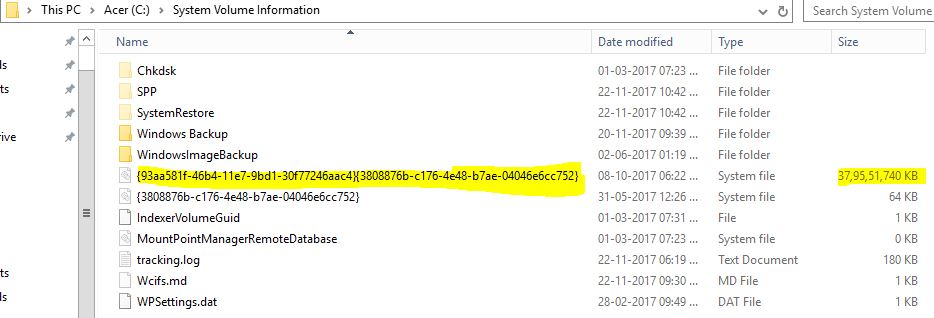
 I have already tried the following:-

1)deleted the restore points and shadow copy

2)restarted the system restore after deleting the backups and stopping it

3)did disk cleanup for system

4)did virus check

5)removed all backup and restore points

6)ran disk fragmentation and cc cleaner as well

Currently the situation is :-
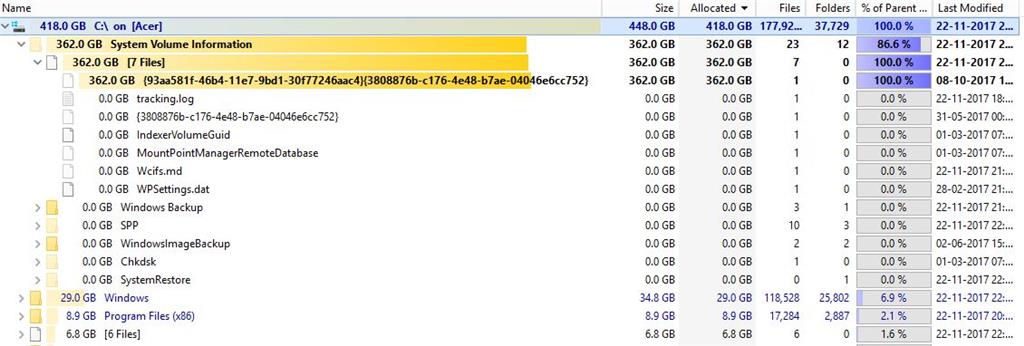
 

 I have tried everything and cannot reinstall the Os due to some application issues. Need any assistance to resolve. please help. I am using windows 10 so any suggestion based on other OS is of no use for me. please help

regards

Saurav

Windows for home | Windows 10 | Files, folders, and storage

Locked Question. This question was migrated from the Microsoft Support Community. You can vote on whether it's helpful, but you can't add comments or replies or follow the question.

0 comments No comments

6 answers

Sort by: Most helpful
  1. Anonymous
    2017-11-23T20:47:04+00:00

    Already tried and went through this article. I already deleted all restore points and shadow copy. it did clear 4 GB but the main 364GB has no change.

    It is not letting me to take any kind of ownership or access

    Please assist with any more suggestion.

    2 people found this answer helpful.
    0 comments No comments
  2. Anonymous
    2017-11-23T20:45:06+00:00

    HI I tried to delete it with TreeSize with Admin rights in safe mode as well but no go it is not even allowing me to rename it. it is giving me an access denied error and stopping. 

    I ran ESET as you informed but it did not detected any alerts as well. I also enable the default Windows Administrator and then tried to delete it from there but there as well i am getting access denied and unable to delete.

    Please do help me if there is any more suggestion or way to fix this. I am running out of options here.

    1 person found this answer helpful.
    0 comments No comments
  3. Sumit 43,786 Reputation points Volunteer Moderator
    2017-11-23T04:47:22+00:00

    That resides in System Volume Information folder which usually contains deleted files.

    See if this helps:

    https://answers.microsoft.com/en-us/windows/for...

    1 person found this answer helpful.
    0 comments No comments
  4. Anonymous
    2017-11-23T21:22:58+00:00

    Open Start, type: CMD

    Right click CMD

    Click Run as administrator

    Type CD followed by the drive letter

    example: cd x:\

    Hit Enter

    X represents the name of the drive letter

    Once you have navigated to where the folder is on the drive, type:

    At the command prompt type del (delete) followed by the file name. Example: del folder name

    0 comments No comments
  5. Anonymous
    2017-11-22T21:59:22+00:00

    Try using the ESET Sysrescue Offline scanner described in the following article to scan your drive.

    https://www.groovypost.com/howto/clean-virus-in...

    I would also recommend you use TreeSize to delete the file.

    https://www.groovypost.com/howto/map-hardrive-u...

    0 comments No comments
