Share via

Service Host- Local Session Manager using too much memory

Anonymous
2017-11-26T12:35:02+00:00

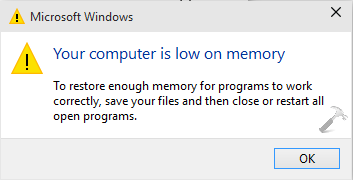
My Dell 7010 Desktop recently always showing :

 I have 12 GB memory which was updated from 4 GB since this warning first time coming. After updated, Warning still coming.  I checked the Task Manager and find Service Host- Local Session Manager always using too much memory. Who can give me a suggestion? Please!!

Windows for home | Windows 10 | Settings

Locked Question. This question was migrated from the Microsoft Support Community. You can vote on whether it's helpful, but you can't add comments or replies or follow the question.

0 comments No comments

Answer accepted by question author

Anonymous
2017-11-26T13:00:04+00:00

Try these first to see if they work:

Open Start, type: CMD

Right click CMD

Click Run as administrator

Type in at the prompt OR Copy and Paste these one at a time : (Hit enter after each)

Dism /Online /Cleanup-Image /CheckHealth

Dism /Online /Cleanup-Image /ScanHealth

Dism /Online /Cleanup-Image /RestoreHealth

Also run the System File Checker utility:

Open Start, type: CMD

Right click CMD

Click Run as administrator

At the Command Prompt, type: sfc/scannow

This will check for any integrity violations

Restart your system

I recommend you update the most critical ones: BIOS, Chipset, Display Driver, Network adapters.

http://answers.microsoft.com/en-us/insider/wiki...

Was this answer helpful?

8 people found this answer helpful.
0 comments No comments

2 additional answers

Sort by: Most helpful
  1. Anonymous
    2017-11-26T18:31:25+00:00

    Thanks Andre, It's very helpful. High usage gone. Thanks lots.

    Was this answer helpful?

    0 comments No comments
  2. Virginia M 41,105 Reputation points Independent Advisor
    2017-11-26T13:02:00+00:00

    Hello mwy0920, does the information here help?

    https://www.drivereasy.com/knowledge/service-ho... Please don’t download the driver software from the site though.

    Please post back if non of these work.

    Was this answer helpful?

    0 comments No comments