Share via

Stuck in endless loop trying to update to Win 10 update 1709

Anonymous
2017-12-01T18:48:05+00:00

Hi,

  I have been trying to update my pc to the latest Win 10 1709 for the past 2 weeks, but I get stuck in an endless loop. It never successfully updates.

The steps that happen:

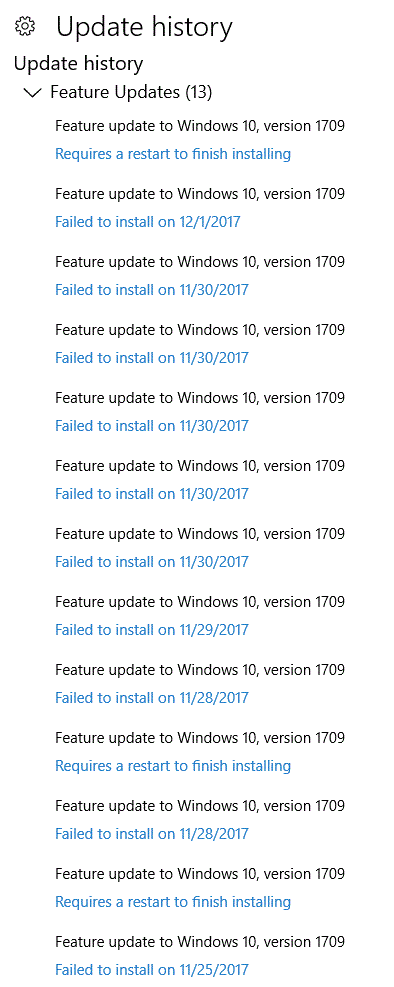
  In Settings =>Windows Update, I "Check for Updates". It will say that an update (1709) is available and then will begin the update. Since I have a very slow net connection (650kb/sec; the fastest avail in my rural area), the update will proceed for ~24hrs.  The Windows Update screen then will eventually say that "Your PC is up to date". If I then look at the Update History, it will show that a "Requires a restart to finish installing". I then restart the machine and it again says that "Your PC is up to date". Then I will click "Check for updates" to be sure it actually completed, but it then says that "An update is available (1709)", and then commences to start the 1709 update again. Hence I'm stuck in the loop.

  I have tried this process for 2 weeks now, and usually get the same thing. Since I am on this slow net connection, the PC is virtually useless during the 24hrs update download. The upgrade hogs the connection so nothing else can be done on the web.

   Here is a week's worth of my "Update History"

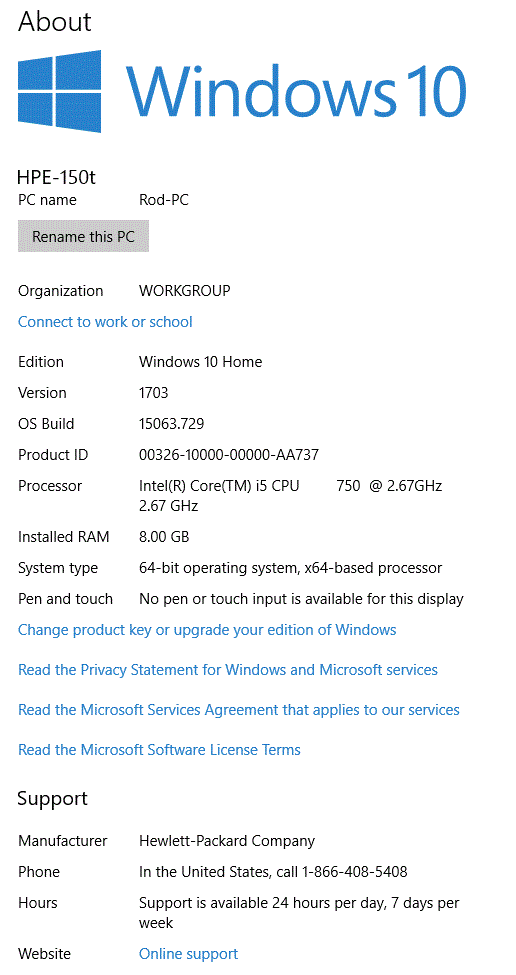
 My PC is this:

  I have read many posts about this problem, and other similar 1709 upgrade problems on answers.microsoft.com and other sites. There are many posts for "fixes" (try this, try that, etc), with no solution from Microsoft that I can find. It appears that this is a problem that Microsoft knows about? 

  I have seen many suggestions (even from Microsof reps) to "turn off anti virus and firewall and retry the update".  Since it takes so long for me to download files, removing these security protections for ~24hrs could cause even more problems....not a good idea. I am using Norton Security.

  I have tried using the Windows Upgrade Assistant, but that just hangs. I could try to download the ISO files directly, but the process to do this appears to be a "work around", with many steps. I don't feel comfortable with this...

  With 400 million PCs running Windows 10 worldwide, this upgrade to 1709 must be a serious problem for Microsoft and users. What do I do now?

thanks

Windows for home | Windows 10 | Windows update

Locked Question. This question was migrated from the Microsoft Support Community. You can vote on whether it's helpful, but you can't add comments or replies or follow the question.

0 comments No comments

20 answers

Sort by: Most helpful
  1. Anonymous
    2017-12-14T14:09:47+00:00

    This is not a fix but it pauses updates until Microsoft fixes the problem...hopefully: Right click on the windows logo (start button) lower left of desktop. Click settings. Click update and security. Advanced options. Turn on the "pause updates" option. Then wait 35 days or less until they figure this out.

    At least that will give your hard drive some time to recover from the 100% usage it had been subjected to for the last few weeks!

    Was this answer helpful?

    6 people found this answer helpful.
    0 comments No comments
  2. Anonymous
    2018-02-15T01:36:13+00:00

    i went out and bought an apple computer it works fantastic I have shut this one down now for nearly a month we will see if it updates now.

    Was this answer helpful?

    5 people found this answer helpful.
    0 comments No comments
  3. Anonymous
    2018-02-03T16:47:37+00:00

    This is remarkable that there are threads going back to the Creators Update problems going back to the end of November I believe - and we are still mired in this ^#@^%$#&.

    My GF was in tears this morning and because I thought I could get through it with the Windows Update Troubleshooter and it fixed some registry values and what not we attempted it again - and she was over an hour late to sign in from home as it takes forever to return the computer to a usable state.

    I'd also like to thank Microsoft for pushing my data usage through the roof:  nearly 500 GB were pushed through this month with the updates constantly cycling and tying up the network and machine's CPU and reduced disk performance from this nightmare.

    There are numerous threads and tons of people in this and other forums with the issue - where is the FIX!!!!!!!

    THIS IS THE PROBLEM WITH THE ONE SIZE FITS ALL BS UPDATE built into Windows 10 when combined with inadequate quality control...this is a few year old PC with nothing exotic about the hardware or setup.

    Was this answer helpful?

    4 people found this answer helpful.
    0 comments No comments
  4. Anonymous
    2017-12-06T21:45:19+00:00

    See this link to reset Windows update:

    Windows Update Reset

    Was this answer helpful?

    4 people found this answer helpful.
    0 comments No comments
  5. Anonymous
    2017-12-10T18:32:40+00:00

    See this link to reset Windows update:

    Windows Update Reset

    Thanks for the reply. I tried this fix, but when running the steps, I got lots of error messages when the commands ran. This section of commands did not work at all:

    Not sure what this was trying to do, but it spit out lots of error messages.

    Also, in the following section of commands, most of them created error messages of "dll found, but no index found" or something to that effect:

         ...etc

     But I ran thru all the steps anyway, restarted, and still saw the "1709 update failed"problem. I presume that this set of commands was for a different version of the OS, and why it didn't work.

      However, I let the machine try to do the 1709 update over the next couple of days and viola! it finally worked. Not sure if your suggestion had anything to do with this, or not. But thanks for your help.

      But now I have a new problem. With the 1709 update finished, my graphics driver is now messed up. I have a 1920x1080 monitor, but now the setting in the display adapter don't have that option, and my screen resolution is all messed up. Also the "Sleep" option is gone  (Windows => Power button => options). Only shows Shutdown and Restart. I had that problem once in the past after another update, and I just rolled back the driver. But now the "Rollback Driver" option is grayed out. I will start a new thread on this prblem, but it appears that the Ati Radeon HD 4300/4500 graphics card/driver and Windows 10 1709 are not compatible. Any thoughts? I really don't want to buy a new graphics card......

    thanks again

    Was this answer helpful?

    2 people found this answer helpful.
    0 comments No comments
