Share via

Windows 10 Nvidia driver problem after Fall Creators Update

Anonymous
2018-01-10T04:25:56+00:00

Hello,

I'm having problems with my Nvidia Video Card since my computer updated to Windows 10 Fall Creators Update on last december (2017).

It made my video card useless. Now some programs that uses Directx 11 or up are not working anymore.

Games not working after update:

  • Rainbow Six Siege (Ubisoft): Shows error messages (error 0xc00000147) and crashes.
  • The Division (Ubisoft): Can't install the directx on the instalation proccess (most games now days try to install directx on the instalation proccess)
  • Epic Games Laucher (Unreal Engine 4): Sometimes shows error messages (error 0xc00000147) and crashes.
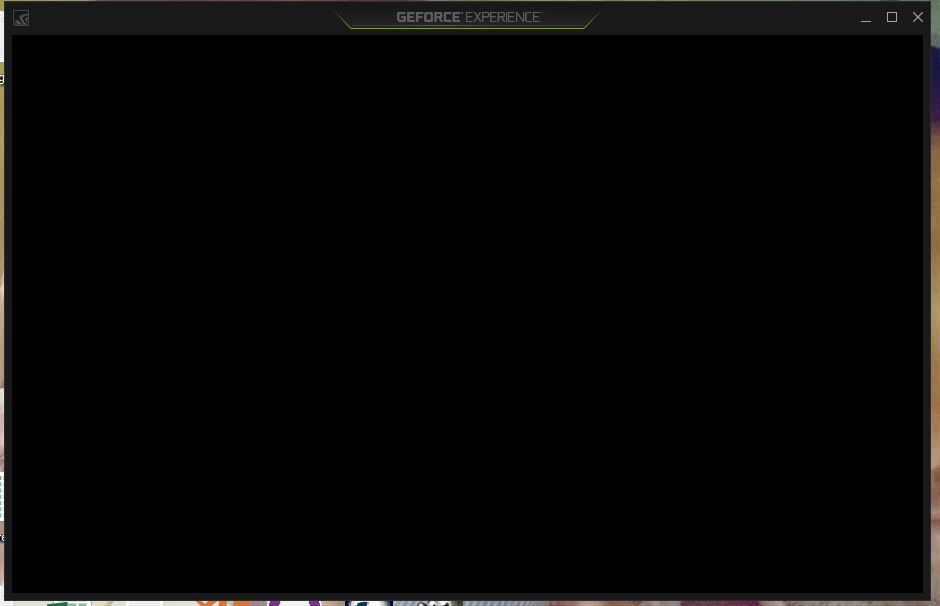
  • GE FORCE Experience (Nvidia): Render the border of the screen and the mouse pointer, but shows black screen on the middle (content).
Now every time i try to install any directx version I got and error (the error is sent to directx log files, but I have no idea where the installer saves the error log).

If i install the OLD manufacturer driver the black screen problem is solved, but the games I mentioned before show a message saying that the computer "don't support the Directx 11 features".

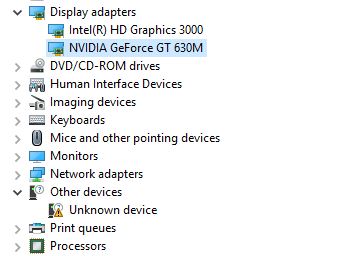
On Device Manager the video card seems working ok, but I don't know why on "Intel Driver & Support Assistant" the video card appear as running ok, but the Availability is "offline" and there's a unknown device (maybe is not related to Nvidia) on device manager. When I try to use the Nvidia GPU, it says "1 program running, 0 screens".
I'm not the only one who is having this problem, as you can see here, also with people who have Amd Radeon and Intel integrated graphics card.

https://forum.kodi.tv/showthread.php?tid=322761

https://forums.geforce.com/default/topic/1033236/gt-630m-black-screen-after-windows-fall-creators-update/?offset=7#5271267

https://forums.geforce.com/default/topic/1033024/multiple-issues-after-upgrading-to-the-fall-creators-update/#5269678

https://forums.geforce.com/default/topic/1030216/geforce-drivers/no-video-signal-after-windows-10-fall-creators-update/?offset=9#5271464

https://forums.guru3d.com/threads/video-stutter-after-win10-fall-creators-update.417796/

I wish I could revert windows version to before the Fall Creators Update or go back to windows 8.1, but I need windows 10 running on my PC because I'm creating a game for windows store (UWP).

Please release a update fix for this problem that is affecting a lot of people!

I wish theres a solution where i don't need to install windows from zero again and lose hundreds of Gigabytes of programs that were installed on this Notebook.

My notebook spec is:

Notebook HP DV6 7017sf 

Windows 10 Pro x64 (1709) Build 10.0.16299

.NET Framework Versions - 2.0.50727.4927, 3.0.30729.4926, 3.5.30729.4926, 4.0.0.0, 4.7.02556

Intel HD Graphics 3000

Core i5-2450M CPU @ 2.50GHz

8GB RAM

Nvidia GEFORCE GT 630M (2GB)   (Log from Intel Driver & Support Assistant )

Adapter Compatibility NVIDIA
Video Processor GeForce GT 630M
--- ---
Driver Provider NVIDIA
--- ---
Driver Version 23.21.13.8871
--- ---
Driver Date 12/15/2017
--- ---
Adapter DAC Type Integrated RAMDAC
--- ---
Adapter RAM 2.00 GB
--- ---
Availability Offline
--- ---
Status This device is working properly.
--- ---
Location PCI bus 1, device 0, function 0
--- ---
Device Id PCI\VEN_10DE&DEV_0DE9&SUBSYS_181B103C&REV_A1\4&275AD0CC&0&0008
--- ---

Moved from: Windows / Windows 10 / Windows update, recovery, & backup

Windows for home | Windows 10 | Devices and drivers

Locked Question. This question was migrated from the Microsoft Support Community. You can vote on whether it's helpful, but you can't add comments or replies or follow the question.

0 comments No comments

Answer accepted by question author

Anonymous
2018-01-15T02:04:14+00:00

Hi Michael,

That device with a driver problem I already solved. It was an HP (HP 3D DriveGuard) problem that happens when we move to windows 10. 

https://support.hp.com/br-pt/document/c02653559

But, the problem of DirectX with windows 10 after upgrade for Fall Creatos Update, remains! And as I said before a lot of people is having the same problem. Microsoft even launch a patch for a similar problem in november!

https://support.microsoft.com/en-us/help/4048955/windows-10-update-kb4048955

"Addressed issue that causes a black screen to appear when you switch between windowed and full-screen modes when playing some Microsoft DirectX games."

I already tried the newest driver as I said before, but it won't solve the problems related to DirectX.

  • DirectX won't install, always got error when finish installing.
  • Many programs that use DirectX above won't work anymore.

I was going to reinstall Windows 10 with a version before fall creators update now, but thank God I found a workaround (after lose so much time trying so many ways to solve this problem since december).

Press second mouse button on the program, select "properties", then "Compatibility" tab and check the option "Disable Full Screen Optimization". Click OK and DONE! :D

I hope Microsoft or someone else launch a permanent fix for this Directx issue. Because it seems a problem related to the kb4048955

Credits to "this is me" youtube channel.

https://www.youtube.com/watch?v=HMAc3iToKGg

Was this answer helpful?

2 people found this answer helpful.
0 comments No comments

14 additional answers

Sort by: Most helpful
  1. Anonymous
    2018-01-10T07:08:44+00:00

    Hi Daniel,

    This issue might occur due to an incorrect video card driver that has been installed. For possible resolution, we suggest that you follow the steps below to manually delete the video card driver from the system and recover the recommended driver version:

    1. Start Device Manager. To do this, press and hold (or right-click) the Start Menu icon, and then select Device Manager.
    2. Expand Display adapters, right-click the adapter that has the problem driver installed, and then select Properties.
    3. Select Uninstall Device.
    4. Check the box that says, Delete the driver software for this device". This step is important and will prevent the problematic driver from reinstalling in the future.
    5. The system may require a reboot at this point. Reboot if needed, then reopen Device Manager.
    6. Select any device, then click Action > Scan for hardware changes.
    7. Go to Start > Settings > Update & security; then, Check for updates, and install any available updates.

    We would appreciate it if you could get back to us and provide us your feedback.

    Was this answer helpful?

    1 person found this answer helpful.
    0 comments No comments
  2. Anonymous
    2018-01-12T05:08:41+00:00

    Hi, I checked the link, but its a speech from GameFest 2010 about directx 11, I don't know how it can help me solve the problem. Maybe you sent the wrong link or I didn't got it.

    I tried to install Directx before but the installer got some errors and I have no idea where these log files were saved. Do you know where I can find it? 

    Actually I think DirectX 11 is working well (for some programs).

    I'm using Unity right now with Directx 11 and it seems OK, but the black screen problem remains with those programs mentioned before.

    Was this answer helpful?

    0 comments No comments
  3. Anonymous
    2018-01-12T04:39:48+00:00

    We appreciate your response, Daniel. We suggest that you check this link, and download the latest Directx 11 version. Should you have encounter any errors, kindly send us a screenshot of the exact error message.

    Your reply is most important to us to ensure we assist you accordingly.

    Was this answer helpful?

    0 comments No comments
  4. Anonymous
    2018-01-11T00:18:57+00:00

    Hello Michael,

    Thanks for your reply. 

    Unfortunately as I explained before, a lot of people is having the same problem. It is not related to a corrupt driver.

    I already tried before the steps you mentioned, I used DDU for a clean install and tried many other solutions with many different drivers, but I have no success.

    I tried the steps you told me once more and the same problem happens. "Black screen on the programs running with Directx 12 or 11 and Error when try to install Directx".

    That "Unknown Device" that appears on Device Manager is not the Video Card, must be the finger printer scanner.

    Was this answer helpful?

    0 comments No comments
