Initiate reinstallation of Windows 7 using manufacturers Recovery Partition
Computers that come preinstalled with Windows often have what is called a recovery partition. This is used to reinstall the operating system in the event of a system crash. To access it, you will need to boot into when you start your computer by
pressing a function key. This can be either F1, F2, F9, F10, F11, F12 or even DEL or Tab key. Consult the owners manual that came with your PC for instructions about how to reinstall Windows.
If your recovery partition is not available or damaged, you should contact the manufacturer of your computer and request a recovery disc set you can use to reinstall Windows 7. They might charge a small shipping and handling fee.
- This is how the recovery partition is accessed for the most popular makes..
- For Dell, press F8 on the keyboard until the Advanced Boot Options menu appears on the screen.
- For HP, press F11 directly after powering up the unit
- For LG, press F11 directly after powering up the unit
- For Toshiba, press and hold '0' BEFORE and during the power up
- For Acer, press and hold ALT + F10 as soon as you see the logo
- For Asus, press F9 as soon as you see the Asus logo.
- For Samsung, press F4 at power up..
- For Fujitsu, press the F8 key repeatedly directly after powering up
- For Advent, restart your computer. Then Press F10 repeatedly until the message "Starting System Recovery" is displayed
- For Sony VAIO, restart and press "F8" or "F10" repeatedly until the "Advanced Boot Options" screen appears.
- Lenovo notebooks include a feature called the Lenovo OneKey Recovery button, which is used to boot into the Recovery Environment and reinstall Windows. http://www-307.ibm.com/pc/support/site.wss/document.do?lndocid=MIGR-4HWSE3
Download, create bootable media from either of the following resource for the edition you have installed.
Microsoft Windows and Office
ISO Download Tool – HeiDoc.net
https://tb.rg-adguard.net/index.php?sid=74a7cf51-12ed-19f5-2885-3b48ad9ee67b
Create a bootable copy:
Windows 7 came preinstalled on my computer, how do I find the product key?
The product key is usually located on the COA sticker attached to the bottom of your laptop or in the battery compartment. In some rare cases it can also be found in the memory compartment. For tower systems, look at the top or the side of the system
unit. It looks like the following:
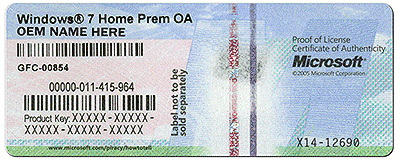
If the Certificate of Authenticity (COA) sticker is damaged or letters or not legible, you will have to consider the following options:
- Use a digital camera to capture a picture of the COA then enlarge it on your computer.
- If the COA sticker is damaged, then you would need to use the recovery partition to reinstall Windows 7, this will exempt the need to use the product key to activate your Windows 7 installation.
Configure your BIOS to boot from the install media:
https://www.groovypost.com/howto/bios-uefi-setup-guide-boot-from-cd-dvd-usb-drive-sd-card/
Boot from the Windows 7 DVD/USB
Click Install Now
Accept License Agreement
When the option is displayed to select an installation type, click (Custom Advanced)
Click Drive Options
Select the drive/s click Delete
Click New
Click Apply
Click OK
Click Format and click Next to proceed with the installation
' cx='32' cy='32' r='32' /%3E%3Ctext x='50%25' y='55%25' dominant-baseline='middle' text-anchor='middle' fill='%23FFF' %3EA%3C/text%3E%3C/svg%3E)

' cx='32' cy='32' r='32' /%3E%3Ctext x='50%25' y='55%25' dominant-baseline='middle' text-anchor='middle' fill='%23FFF' %3EL%3C/text%3E%3C/svg%3E)