Share via

On boot: 50%+ of ram in use (10/16gb) - where is it?

Anonymous
2018-02-18T16:08:07+00:00

Hello,

So recently I've been having ram issues on my desktop. On boot up, after logging in I will have upwards of 10gb of ram 'in use' before even opening applications. I have a laptop which also has 16gb of ram, however on boot up will hardly use more than 6gb. Now this wouldn't normally alarm me, windows like to use what it can and if its there, why not make better use of the ram. Sure.

However, after using my PC for more than 4hours or so, my ram usage will be 99% (15.8gb) from having maybe chrome open (which I know is notorious for similar problems, but I'm confident its not chrome as I have used Firefox for about a month when this was happening) and sometimes, just leaving my machine idle, it can reach this. -> and if I close my applications, it may drop by about 1-2gb, but never any lower. Causing me to restart at least twice a day (which can get really frustrating). This means I usually can't have more than one application open on this machine otherwise the programs start to stutter (due to not getting enough ram). That's ridiculous for a machine with 16gb of ram!

To me, it sounds like I either have a memory leak in one of my programs, windows aren't letting go of ram from closed applications, I have some ram eating virus like a silent bitcoin miner... or some concoction of them all (maybe even faulty ram). I've taken some screenshots right after booting my machine:
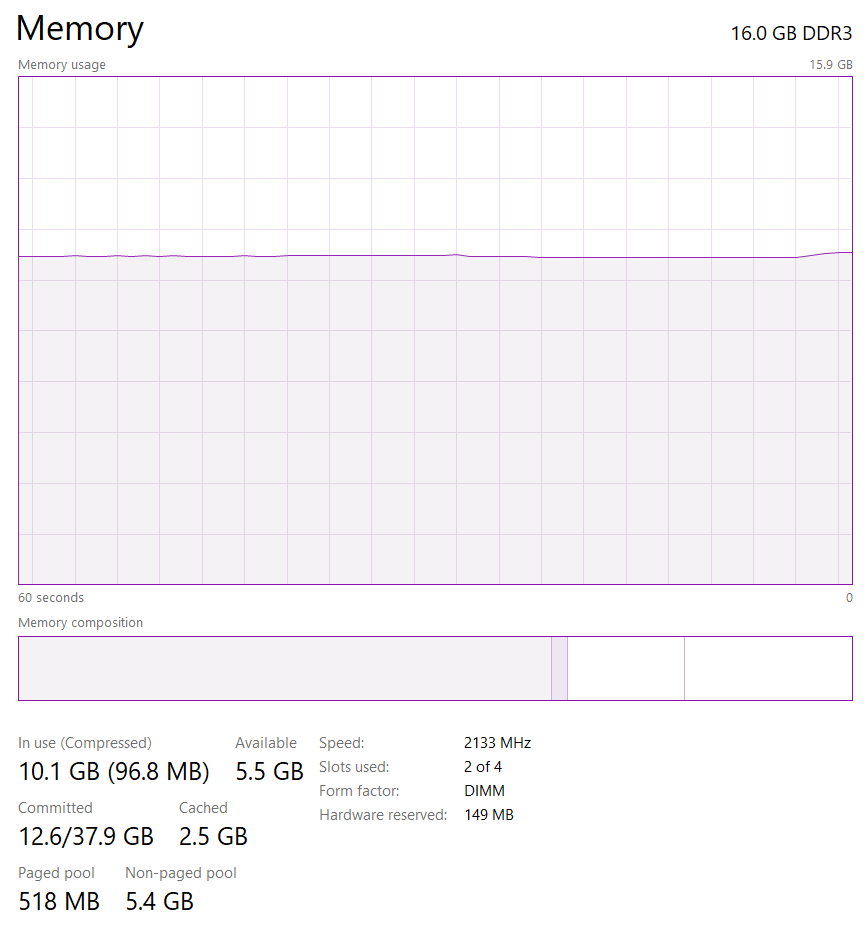
FYI, I have seen the compressed up to 3gb when my ram gets into the 99%.

Next is my active startup programs:
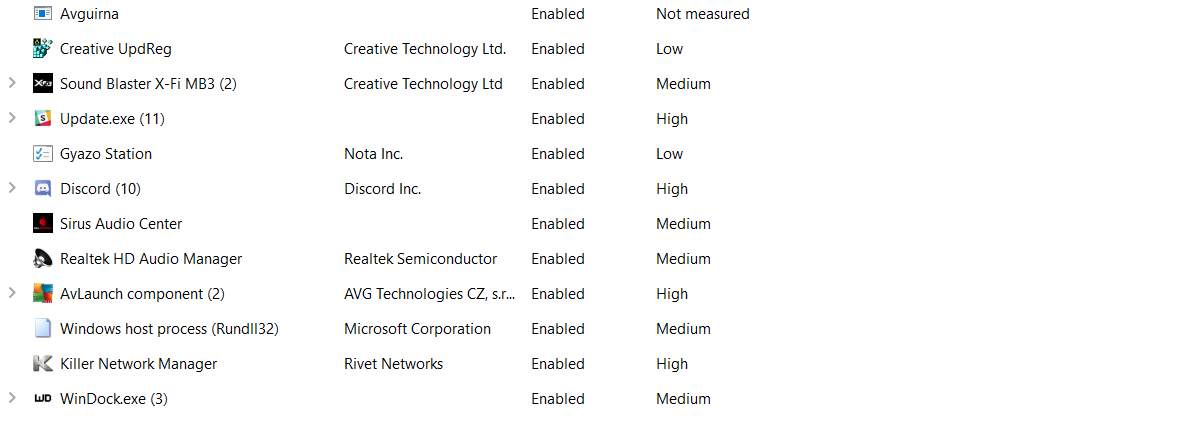
Which to me looks like a typical set of programs (WinDock is a window anchoring program as my monitor is 3440x1440)

This is what my total ram usage is according to my profile:

Which again, is not very large...

This is what resource manager says about my ram:
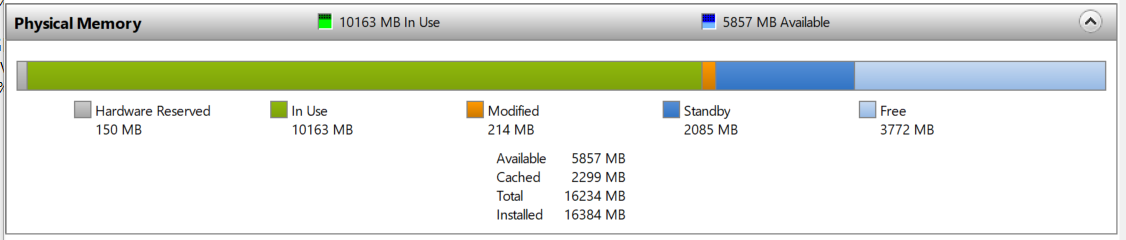
I just can't see where this ram is going. On resource monitor, nearly all the programs normal/tiny amounts of ram. If you would like a full report on that I can post that too.

lastly, let me state my PC spec:

Ram: (8x2) 16gb DDR3 @ 2133MHz Corsair Vengence

Motherboard: GA-Z97X-Gaming 3

CPU: CORE I7-4790K 4.00GHZ (DEVIL'S CANYON) SOCKET LGA1150

Graphics card: GTX 1080 ROG Strix O8G

Windows for home | Windows 10 | Performance and system failures

Locked Question. This question was migrated from the Microsoft Support Community. You can vote on whether it's helpful, but you can't add comments or replies or follow the question.

0 comments No comments

Answer accepted by question author

Anonymous
2018-02-18T23:29:47+00:00

You have non-paged pool of 5.4 GB. This indicates a driver problem. There is also an indication that you have a Killer network card. These are notorious for causing memory leaks.

You can try getting updated Killer software or removing everything apart from the basic driver.

https://www.reddit.com/r/buildapc/comments/3yzjyz/killer_network_suite_gave_me_a_major_memory_leak/

Was this answer helpful?

8 people found this answer helpful.
0 comments No comments

6 additional answers

Sort by: Most helpful
  1. Anonymous
    2018-02-18T22:13:32+00:00

    I'm sorry, but I don't think you've read my post...

    Also take a look at my first reply.

    Thanks for trying to help.

    Was this answer helpful?

    3 people found this answer helpful.
    0 comments No comments
  2. Anonymous
    2018-02-22T20:41:39+00:00

    Hello,

    Looks like my driver is over 2 years old, and the killer suite I had is no longer supported... I've swapped that out and put in their new one and updated my driver. Hopefully, this solves it, as it looks promising. 

    Cheers for that - I'll write an update in here if this is the long-term fix - Also, I didn't realize Killer had such a reputation...

    Thanks again,

    Antony.

    Hello Antony,

    You made the right call in removing the Killer Network Manager and replacing it with the Killer Control Center. Over the past few years, we have made huge improvements in our software, and changes in the Windows OS have also made the Killer Network Manager, which hasn't been updated in around a year, quite buggy. If you have any other issues with any of your Killer devices or software, you can always reach out to us directly by going to our website, hovering over Support, and clicking Contact Support.

    -- Anthony with Killer Networking

    Was this answer helpful?

    1 person found this answer helpful.
    0 comments No comments
  3. Anonymous
    2018-02-18T17:29:38+00:00

    Just a bit more information:

    Booted my machine in safe mode, then back into normal windows - without changing any settings/ programs/bootup config etc. I now have a completely different set of results..

    Ram usage is now 6gb lighter ?!

    But the ram stated by my profile has hardly changed:

    So both are about 1minute or so after my pc has actually booted up. Hope this context has helped.

    Was this answer helpful?

    1 person found this answer helpful.
    0 comments No comments
  4. Anonymous
    2018-02-18T21:16:56+00:00

    Hi Anthony,

    Having a lot of processes running and other programs running on the background may cause high RAM usage. To determine which processes contribute to high RAM usage, please look into the Task Manager again. There could be processes that are unnecessary that you may want to end.

    Also, there could be unnecessary startup programs that run in the background. You can disable these programs so it won't run when your computer starts. For the steps on how to find and stop these programs, please check out the steps on how to Disable unnecessary startup programs on this link.

    Let us know how it goes so we can assist you further.

    Regards.

    Was this answer helpful?

    0 comments No comments
