Share via

How to change boot from HDD to SSD?

Anonymous
2018-02-10T16:43:07+00:00

I recently installed Crucial 275 GB M2 SSD in my new Acer Aspire E5-575-33BM laptop and cloned HDD  to SSD with Easy US Todo back up software. Cloning appear to be successful and on disk management menu SSD looks like it healthy and has all Windows and partition copied and ready. Now, how to change boot from HDD to SSD? I understand I need to change boot on BIOS but not sure how to do it exactly. I tried to do it from YouTube video with changes in BIOS, but now I am not sure whether I did everything right and made laptop to boot from SSD or it still boots from HDD. Will appreciate  some instructions how to check if boot comes from SSD and if not -how to change boot to SSD.

Thanks

 AD

Moved from: Windows / Windows 10 / Windows Ink & touch

Windows for home | Windows 10 | Devices and drivers

Locked Question. This question was migrated from the Microsoft Support Community. You can vote on whether it's helpful, but you can't add comments or replies or follow the question.

0 comments No comments

3 answers

Sort by: Most helpful
  1. Anonymous
    2018-02-10T21:05:27+00:00

    Hello Alden,

    I understand that you've already tried to change the boot order/sequence of your computer. To help you change the boot order/sequence to your SSD, refer to the steps below:

    1. While your computer is booting up, press the F2/Del key to enter BIOS setup.
    2. Change the boot order/sequence and set your cloned SSD as the 1st boot device.
    3. Save the changes.

    You may also check the answer from Andre Da Costa in this **thread**for a more detailed steps of changing the boot order/sequence of your computer.

    Let me know if you have other concerns.

    Regards.

    Was this answer helpful?

    1 person found this answer helpful.
    0 comments No comments
  2. Anonymous
    2018-02-17T21:25:51+00:00

    Thank you for the update. In line with your question, I'd suggest posting your query in the TechNet Forums, where we have support professionals who are well equipped with the knowledge on such issues.

    Let us know if you have other concerns.

    Regards.

    Was this answer helpful?

    0 comments No comments
  3. Anonymous
    2018-02-12T22:43:52+00:00

    Hello,

    Thank you for the advice, I followed your instruction, went to F2 in BIOS and changed sequence of bootable disks putting SDD on top of  HDD, so it was on BIOS like this :1) Windows, 2) SSD Crucial; 3) Toshiba HDD ( original drive).

    But results were pretty suprising: booting did not cut by 80% like some people say it will if boot will go from SSD instead of HDD. It looks to me booting from SSD is even longer than from HDD and I now wonder if cloning was done correctly, may be it something wrong with partition?

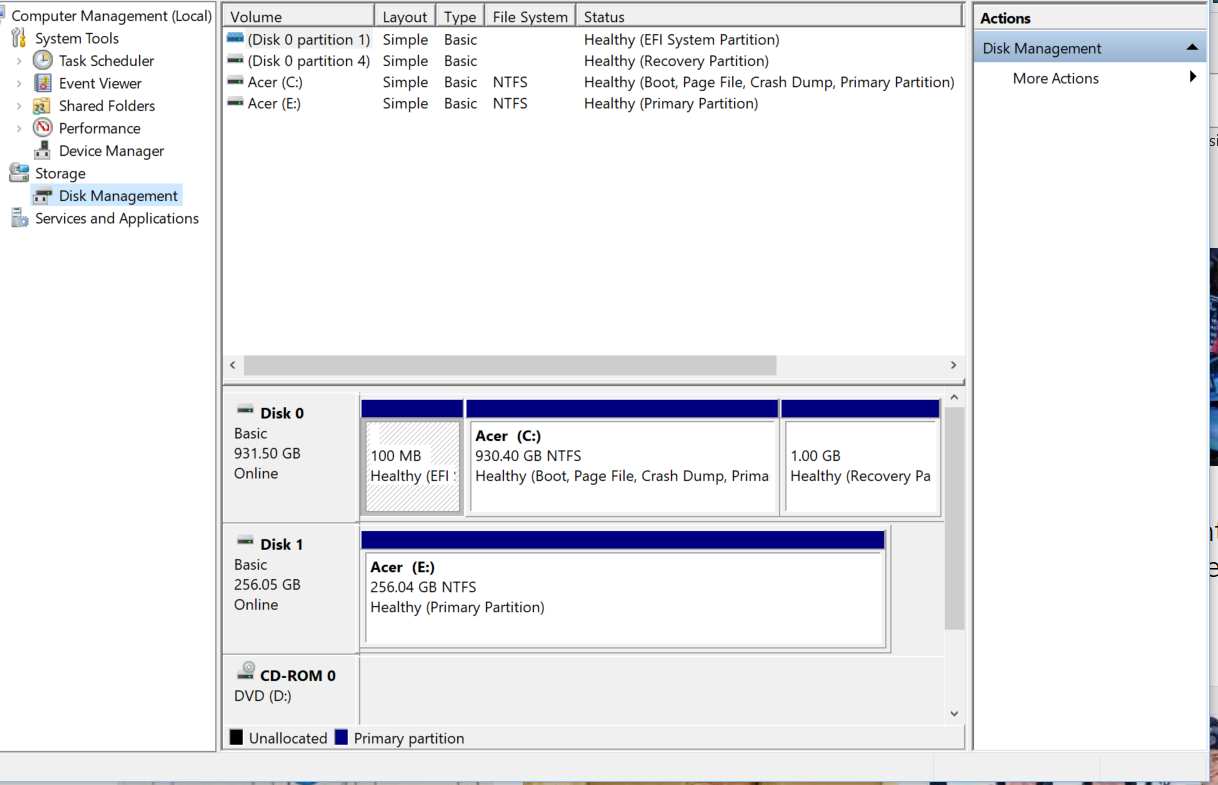
    I checked disk management and copied image from  it. Disk 1 (SSD) shows Healthy (primary partition) and HDD shows Healthy (boot, page file, crash dump and primary partition). SSD is missing  page file, crash dump) May be it's the reason why SSD boot is slow? And if I will have to erase my cloned Windows from SSD is it possible to clone it again to the same SSD may be using different software?. I am afraid if I format SSD to re-clone my HDD, it will erase not just my Windows and some other apps on SSD but also it will erase installation software that came with SSD. I will appreciate your advice.

    AD
    Was this answer helpful?

    0 comments No comments
