Share via

Windows 10 apps run on GPU and ignore background apps off setting

Anonymous
2017-09-21T20:26:10+00:00

So I have been looking for a way to get windows apps just to bugger off.

The "Stop windows apps from running in the background" option dose NOTHING at all. 

None of the apps are in my start menu. 

There is no option to remove them from windows. 

The only way to get them to go away at the moment is to open them all one by one and close them. About 30 mins later they restart them selves. 

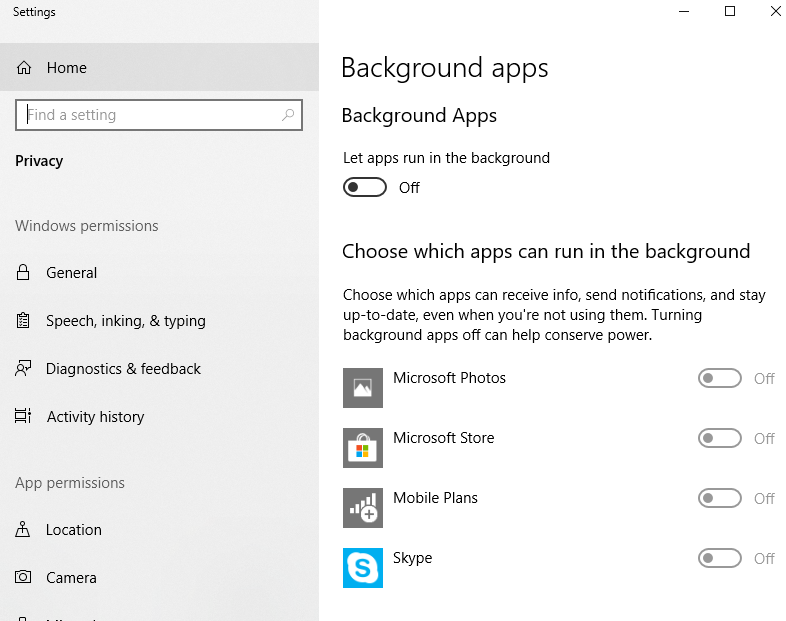
As I have said I have background apps off here is a screenshot to prove it.

So what is going on here. Are you trying to lower windows performance by getting my GPU to run these apps or something strange .. why do they ignore the background apps set to off.. and honestly what is the point of it if it dose not work..

How do i get them to stop running on the GPU or AT ALL .

Moved from: Windows /Windows 10 /Windows settings /PC

Windows for home | Windows 10 | Performance and system failures

Locked Question. This question was migrated from the Microsoft Support Community. You can vote on whether it's helpful, but you can't add comments or replies or follow the question.

0 comments No comments

33 answers

Sort by: Most helpful
  1. Anonymous
    2018-02-05T10:29:36+00:00

    There are really really two issues here.

    One is that apps relaunch themselves in the background, even when explicitly set not to. Frankly, it makes you wonder which other (privacy) settings Microsoft simply ignores.

    The other is that background apps spin up the high-powered graphics card, which is completely unreasonable. (And is an additional hassle on a Surface Book, where it blocks the tablet detach).

    Was this answer helpful?

    30+ people found this answer helpful.
    0 comments No comments
  2. Anonymous
    2018-02-18T11:29:39+00:00

    Yep, same here. I have allow background apps set to disabled in settings, yet I just caught the Microsoft Photos app (which I have never used) running and causing CPU to hit 100% while I'm busy trying to work.

    This is an absolute joke, and to suggest that I should go to the trouble of reinstalling windows as a solution is impossible to answer without swearing.

    Was this answer helpful?

    20+ people found this answer helpful.
    0 comments No comments
  3. Anonymous
    2018-09-07T18:21:16+00:00

    I actually can't believe this is still an issue. 

    These processes keep my gpu from downclocking and "idling" at over 50'c, kill them (somehow managed to and they came back) and my GPU core clock drops down completley and temps lower to 28'c

    I'm not the only guy with this issue and know another.

    Open up "Settings" and watch how your GPU usage goes through the roof too, sending temps up with it. 

    You are killing performance by having this bug!

    No one in msft cares apparently. And when you talk to their “technical people” they have no idea what you are saying. 

    They think “oh cool, let’s use the GPU that comes with their computer. They have no use for it”

    emm. Nope. I have some use for it. That’s why I got this computer. I have a i9 Hq cpu. Is windows that processor heavy that it needs my geforce 1080 as well? It just kills my GPu’s performance. Any real programmer knows that GPU is not good for random applications. It kille my cuda performace and also it kills gaming performance for gamers. 

    g. 

    I actually can't believe this is still an issue. 

    These processes keep my gpu from downclocking and "idling" at over 50'c, kill them (somehow managed to and they came back) and my GPU core clock drops down completley and temps lower to 28'c

    I'm not the only guy with this issue and know another.

    Open up "Settings" and watch how your GPU usage goes through the roof too, sending temps up with it. 

    You are killing performance by having this bug!

    No one in msft cares apparently. And when you talk to their “technical people” they have no idea what you are saying. 

    They think “oh cool, let’s use the GPU that comes with their computer. They have no use for it”

    emm. Nope. I have some use for it. That’s why I got this computer. I have a i9 Hq cpu. Is windows that processor heavy that it needs my geforce 1080 as well? It just kills my GPu’s performance. Any real programmer knows that GPU is not good for random applications. It kille my cuda performace and also it kills gaming performance for gamers. 

    g. 

    Happy to announce I've just solved the issue.

    Doing the following solved the issue for myself and brother.

    Go into Nvidia CP > Set every program to Optimal Power that is in use in the activity monitor
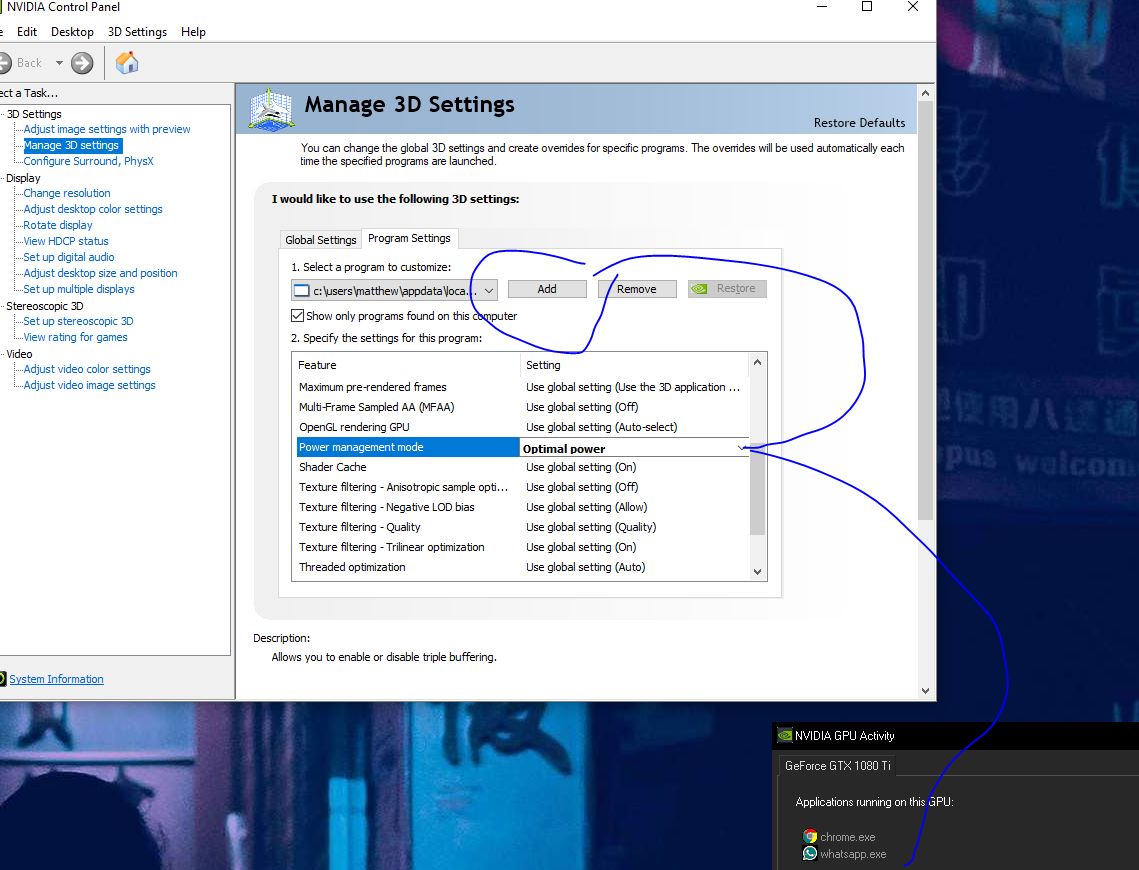
    In the Nvidia CP as per above initial image above, it will have an "Add" button where you can choose apps, click it and it will show recent Apps, there you will apps that have been used by the GPU recently which you can set to Optimal Power.
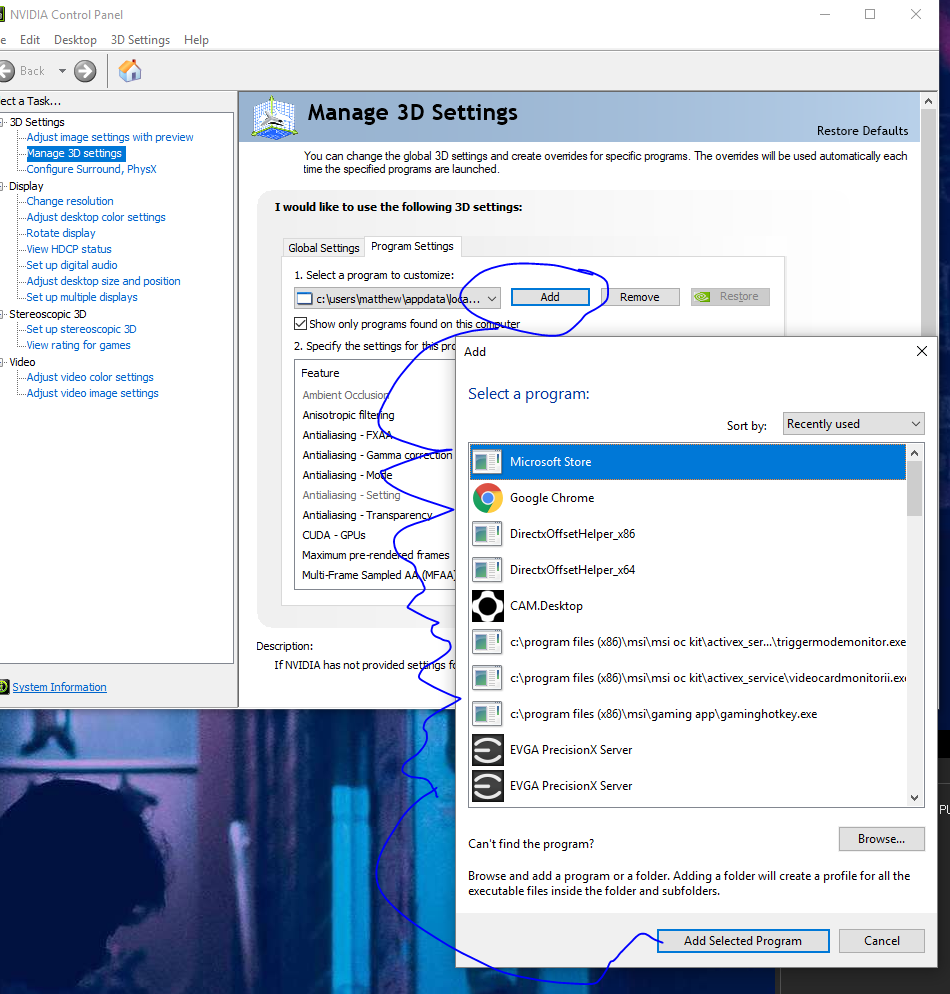
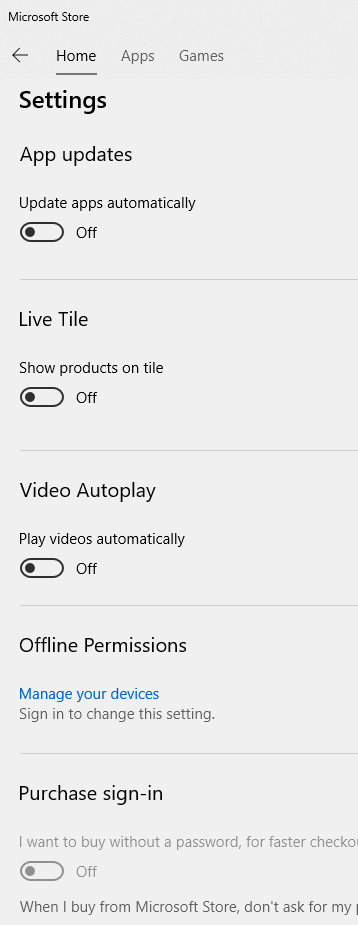
    I disabled Automatic Updates in the "Microsoft Store" by going Start > Search > "Microsoft Store"
    I disabled "Background Apps" as below by Start > Search > "Background Apps"
    I then Signed out and back in and my GPU is now sitting at 32'c and usage is next to none.

    Until this is "Resolved", if ever, any new program you will probably have to set to Optimal Power or you can try setting the "Global Settings" tab to Optimal Power and only set the programs you want to use as "Prefer Maximum Performance"

    Was this answer helpful?

    10+ people found this answer helpful.
    0 comments No comments
  4. Anonymous
    2018-01-15T00:47:45+00:00

    you gpu is set to your main card in bios

    And I wish to continue to use my cards gpu for those programs that I wish. The problem I'm having is that with recent Windows 10 upgrade changes there are Microsoft programs that are automatically using my cards gpu when they previously did not, and there doesn't appear to be any way to keep them from doing so. I wish someone could just take the time to contact the team responsible for the updates to see why these programs are now hogging gpu memory - and maybe give us way to keep them from doing so. Right now I manually go in an kill them every couple hours.

    Was this answer helpful?

    10+ people found this answer helpful.
    0 comments No comments
  5. Anonymous
    2017-09-21T20:47:48+00:00

    Anyone know what I can do to make them stop.

    Was this answer helpful?

    10+ people found this answer helpful.
    0 comments No comments
