The steps provided in the reply above are taken from this Microsoft document, which unfortunately tends to appear at top of many search result lists for “Controlled Folder Access”:
https://support.microsoft.com/en-us/help/4046851/windows-10-controlled-folder-access-windows-defender-security-center
After stating that “You can add an app to the list of safe or allowed apps to prevent them from being blocked”, this article goes on to provide the steps for turning off Controlled Folder Access, rather than the steps that you would actually take to
“Allow a blocked app in Windows Defender Security Center” (the title of the article), so there’s a rather glaring logical disconnect in this article, and it really should be fixed.
While the proper steps to “Allow a blocked app in Windows Defender Security Center” are inexplicably missing in the article that bears that title, other Microsoft documents on this topic actually do provide the proper steps for this, e.g.:
If you see an App is blocked message when you try to use a familiar app, you can simply unblock the app. If this message displays:
- Write down or take note of the path of the blocked app.
- Select the message, and then select Add an allowed app.
- Browse for the program you want to allow access.
https://support.microsoft.com/en-us/help/4012987/windows-10-virus-threat-protection-windows-defender-security-center
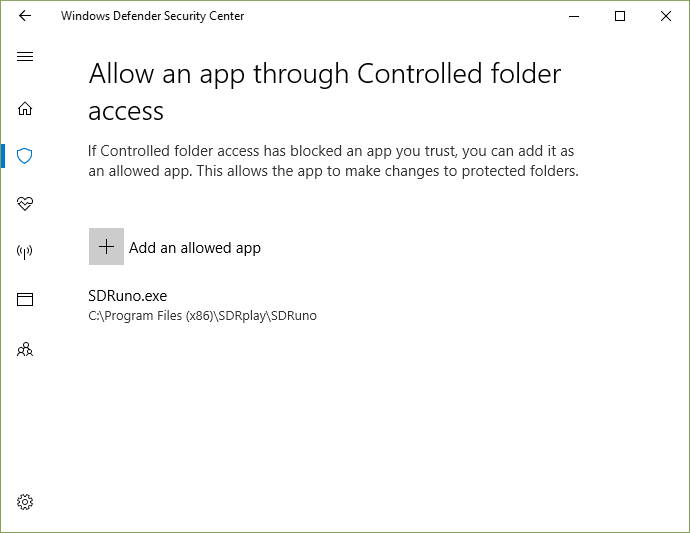
This method should allow you to add any of your blocked apps to the default list of authorized apps (whitelist) – without opening the gate to ransomware and data-wipers by turning off Controlled Folder Access.
The file path in the Unauthorized changes blocked notification does tend to be truncated – but there’s usually enough of it there to locate the app without any trouble (it’s usually in the Program Files or Program Files (x86) directory).
If the file path is truncated to the point where you can’t locate the blocked app in the
Open dialog; then open Event Viewer; navigate to the Windows Defender Operational log; and locate the blocking event (Event ID 1123):
- Right-click on the Start button **** and select Event Viewer.
- Navigate to Applications and Services > Microsoft > Windows
> Windows Defender > Operational
- Filter for (or just look for): Event ID 1123
Issues with this new ransomware protection feature were fully anticipated – and that’s why it includes an Audit Mode, which allows you to monitor folder access activity without having anything blocked – so you can spend some time “learning the ropes”
without having your work disrupted.
Right-click on the Start button and select Windows PowerShell (Admin); and then copy, paste, and enter this command:
Set-MpPreference -EnableControlledFolderAccess AuditMode
https://docs.microsoft.com/en-us/windows/security/threat-protection/windows-defender-exploit-guard/evaluate-controlled-folder-access
Issues with Adobe apps and LibreOffice are frequently reported, and it might take some time to work through these. But if you’re willing to make the effort, you might find some helpful suggestions here:
https://www.tenforums.com/antivirus-firewalls-system-security/96309-controlled-folder-access-problems.html
Going forward, application developers will also be providing specific information for allowing their apps, and should soon be providing help with this in their respective user forums; e.g.:
https://wiki.documentfoundation.org/Faq/General/Defender_Controlled_folder_access_exception
If you actually do encounter serious difficulties with whitelisting your unrecognized apps,
then you might want to turn off Controlled Folder Access temporarily and “try again later” – or better yet; just make sure that all of your personal files are properly backed up on a disconnected drive, and then don’t worry about turning it
back on:
https://cloudblogs.microsoft.com/microsoftsecure/2017/03/28/world-backup-day-is-as-good-as-any-to-back-up-your-data/?source=mmpc
Additional resources:
Stopping ransomware where it counts: Protecting your data with Controlled folder access
https://cloudblogs.microsoft.com/microsoftsecure/2017/10/23/stopping-ransomware-where-it-counts-protecting-your-data-with-controlled-folder-access/
Ransomware FAQ
https://www.microsoft.com/en-us/wdsi/threats/ransomware
Customize Controlled folder access
https://docs.microsoft.com/en-us/windows/security/threat-protection/windows-defender-exploit-guard/customize-controlled-folders-exploit-guard
GreginMich
' cx='32' cy='32' r='32' /%3E%3Ctext x='50%25' y='55%25' dominant-baseline='middle' text-anchor='middle' fill='%23FFF' %3EA%3C/text%3E%3C/svg%3E)
