You stated :>>> I have 8 Gb of RAM and 114 Gb system drive which is designated for Microsoft Windows OS. I use other drives for heavier apps like games.
I've heard of this feature of having 8-12-16-... Gbs of RAM, when one may forget about pagefiles. For me, it sounds like fantasy. When I watch youtube in HD or play games, the Windows OS may extend the pagefile up to 20 Gbs. I can't
buy a bigger SSD simply because pagefile settings don't work properly.
*******>>>>>> So this how to do it:
How to Add a Pagefile to USB Thumb Drive.
You should get a certified ReadyBoost USB 2.0 or higher TD for faster speed transfer.
To use ReadyBoost in Windows 10, make sure that SuperFetch is enabled. ReadyBoost won't work if the SuperFetch service is stopped or disabled.
Go to THIS PC and right click the thumb drive and FORMAT>QUICK NTFS.
Now select properties.
Then select READY BOOST TAB.
Now set it up so you can use it for pagefile.
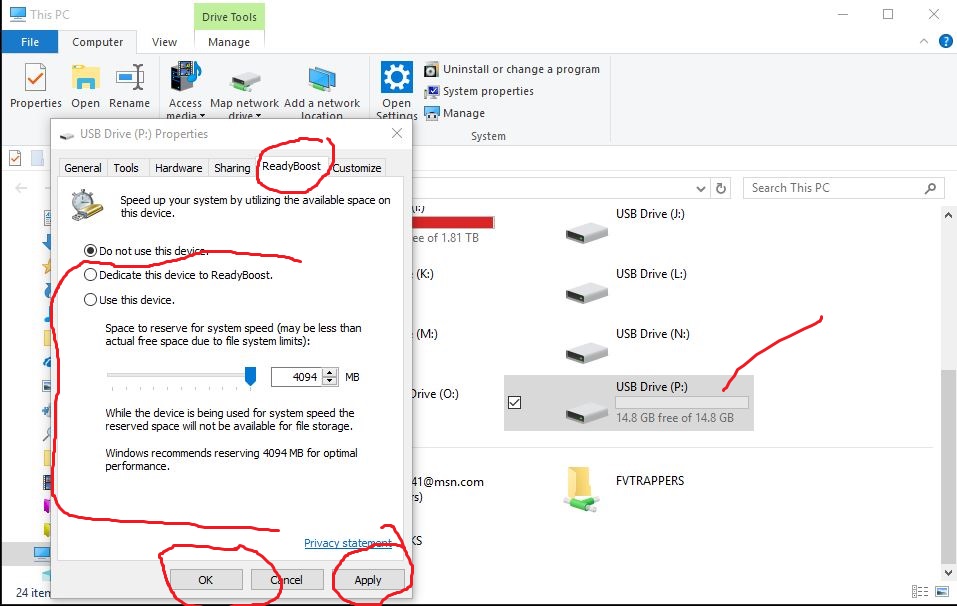
Now Restart PC
Go to pagefile to set it up and send it to another fresh formatted TD.
***To change or move the Pagefile go to:
Control Panel\All Control Panel Items\System>>
(OR)
Right Click THIS PC on desktop.
Advanced System Settings
Performance>>Settings
Advanced>>Change
Uncheck - Top Box
Select pagefile location in list.
Custom - Min. 64MB - Max ???
OR
System Managed Size. (Recommended)
Set, Ok, Apply, OK, Apply, OK.
Restart PC
Now I have not used this in 10 years (Ready Boost), and actually forgot all about it until it just hit me.
I want to be honest with you. I not only build PC’s and fix about 200 peoples PC’s a Year, mostly Windows OS issues and I know Windows very well. I also am just under an expert level in Audio and Video. I have Created, edited and ripped more audio
and video files than you could even imagine. So I want to show you and help you understand that what you are doing is useless and not what you think is happening whatsoever.
Now I also want to say that I have 7 HHD drives with Videos on them that are played from.
Your external drives have nothing to do with any memory or CPU usage running a program or video off that drive with your OS. Now a thumb drive, well it matters what the thumb drive is connected to such as USB 1.0, 2.0 or 3.0. USB 1.0 is long gone and
2.0 can transfer Video bitrates just fine. Even 720 HD and 1080 HD.
Now as for HD flash videos, there is no way a flash video would ever come close to even using 20GB memory period. And a flash video is very compressed, which means they are very low bitrates for HD videos, but watching them they are decompressed.
Because Flash lacks integration with the operating system and the graphics card's APIs that would allow it to do so. In order for the Flash plugin to defer decoding to the GPU, it needs to talk to the operating system, and subsequently to the graphics
card to pass decoding and rendering instructions. So yes, they can use a lot of CPU% and memory, and a whole lot of memory if it is shared memory. Maybe 1GB and your hardware makes the difference too.
So online videos use a lot of Video memory and that is also why you can choose hardware acceleration in a browser for these reasons to balance out consumption.
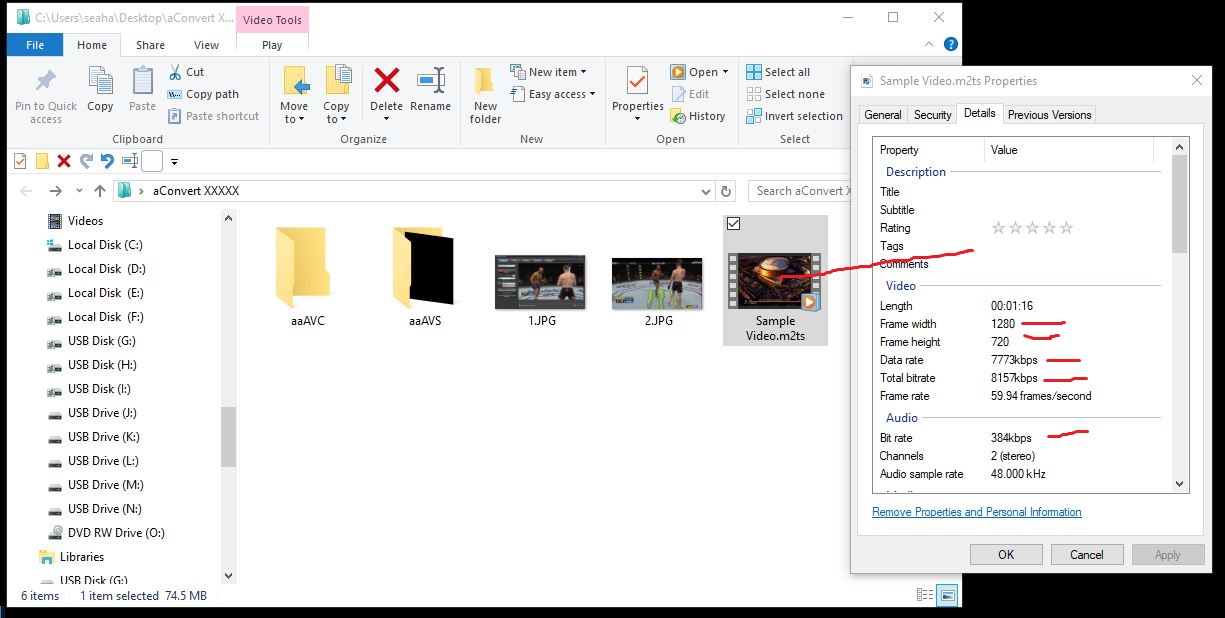
A standard HD video 1280x720 is about 4500kb/s to 8500kb/s MPEG-4/AVC plus
320 or 384kb/s audio bit rate just like your TV stations you watch.
A 1920x1080 is about 8500kb/s to 13.5mb/s MPEG-4/AVC.
As I continue, you playing games that start from a different drive or are installed on a different drive while logged on to your Windows OS has nothing to do with any memory or CPU usage whatsoever or the pagefile. The pagefile will be same size no
matter what drive it is on, unless the external Pagefile drive has limited space to increase the size needed.
I also want to state that My PC I built was 9 years ago and I have 3.0Ghz 6-core CPU speed and only the max 8.0GB RAM with 1 GB DEDICTED MEMORY for video and I run AMD Radeon CrossfireX, which allow you to connect 2 Video cards at one time
and use them both and I have 2 on 1 and 1 on the other connected to TV and monitors.
Now I do not know if you have a laptop or not, but this is where the MEMORY comes into question, and really for an instance you describe as playing an online HD flash video and games. If you have >”SHARED VIDEO MEMORY”<, this means you will have another
Item in Task Manager under the Performance tab in the left hand column at the bottom for your Video Card. You will have this if you have shared memory and it will be using some of the installed memory you see in memory.
Now when you play games and especially a HD video and even more so through a browser on Shared Memory, your Video card is sucking your CPU usage and your memory.
Now allowing Windows to adjust your Virtual memory/pagefile, it will increase the max allotment for the page file, and will show the actual use, min and max setting. This is because your Video card does not have its own DEDICATED MEMORY. Therefore
it has to use your physical RAM or increase the pagefile so you can operate that program, video, game
and it will not crash or hang up or video gets jumpy or freezes and video quality stays good and runs smooth. This is in conjunction with your other memory needed for the game itself and then your processor matters most for processing it all.
Then you have anything else running on OS that's needs all 3 too. VID, MEM, CPU.
Then you say the Video and Games Jumps pagefile up to 20GB and I need to do this or that because my C:\ drive is too small and filling up. And I want to move it to another drive for the size reason and because I play games off of other drives. I get
the moving it because C:\ is too low of free space.
________________
I want to share and show you about the rest.
Now I have Hauppauge HDPVR that connects from my PC to my DirecTV box and I can capture videos in 720p or 1080i HD on my PC and watch, or watch and record to my PC at same time. I also watch everything in Windows media player with the one
and Only Shark007 codec pack to play any audio and video file in the world trouble free for over 10 years now on every OS.
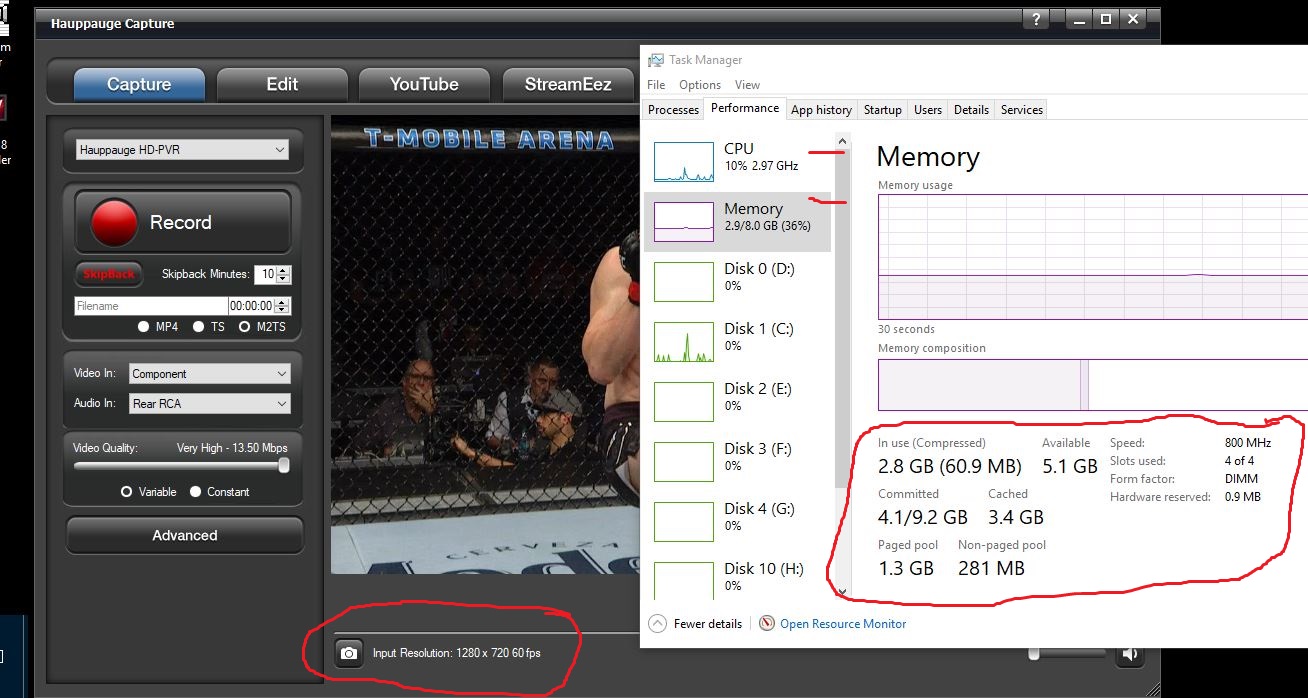
Then I could capture and watch and record, and at same time watch another HD Video in Windows Media Player, and at same time be ripping/ENCODING a HD Video and watching an HD online video, and would not even reach my installed
8GB memory and my pagefile would not be over 1800MB in use.
But if I had shared memory, which I do not, I have dedicated PCIe and there is also AGP, I would have trouble doing half of that with a huge pagefile. So keep that in mind.
And remember I do not have one of these
fancy useless systems with 128GB memory and 3.8Ghz 8 or 12 core processors and 3GB dedicated video memory with a
8GB 256-Bit
PCIe 3.0 Video Card. You only really need 8GB installed RAM. Some Video game, Eh, maybe a little more, but I doubt it.
So your system may or may not be Shared
Video Memory, and if it is not and you have high numbers on Memory. CPU% and Drive load %, then there is something that is not right.
That is if you have close to a comparison to
this, HD 650
MHz Core - 1 GB DDR2 SDRAM - PCI Express 1.1 x16 - Low-profile - 1066 MHz Memory Clock - 32 bit Bus Width - 2560 x 1600 - Video, and the other mentioned above.
So here is some examples:
HD Capture on to PC & record
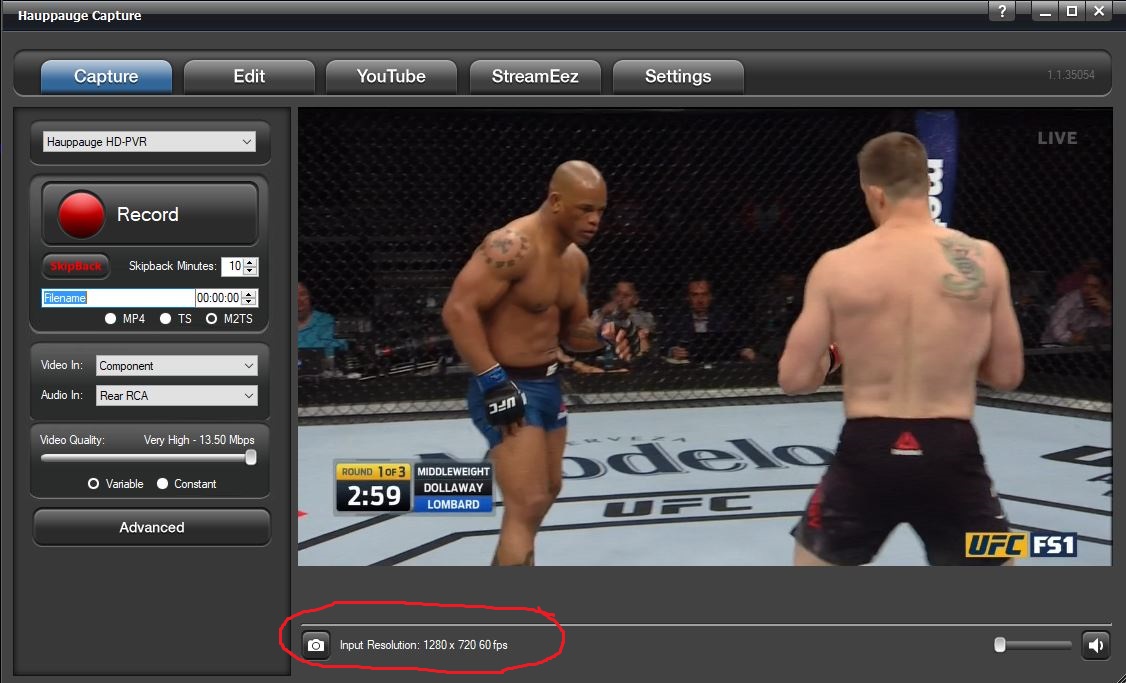
Full Screen

HD Video Sample File
CPU and Memory Usage
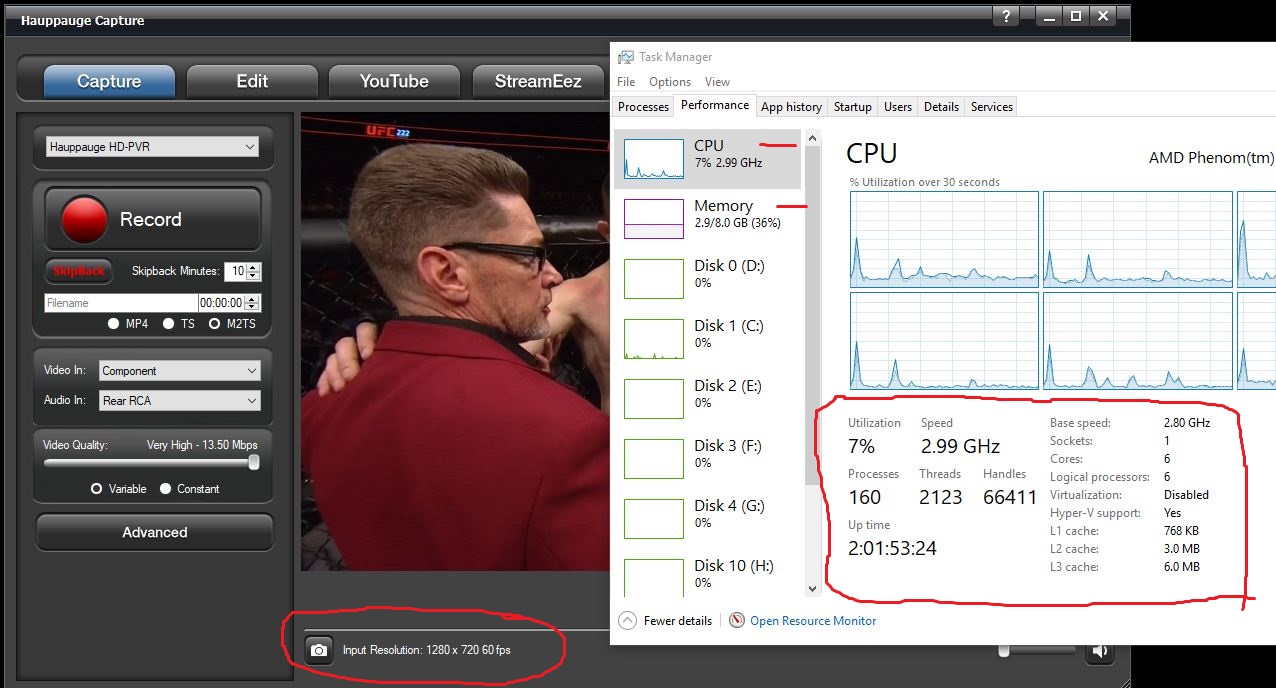
Playing the Captured HD File In Windows
Media Player
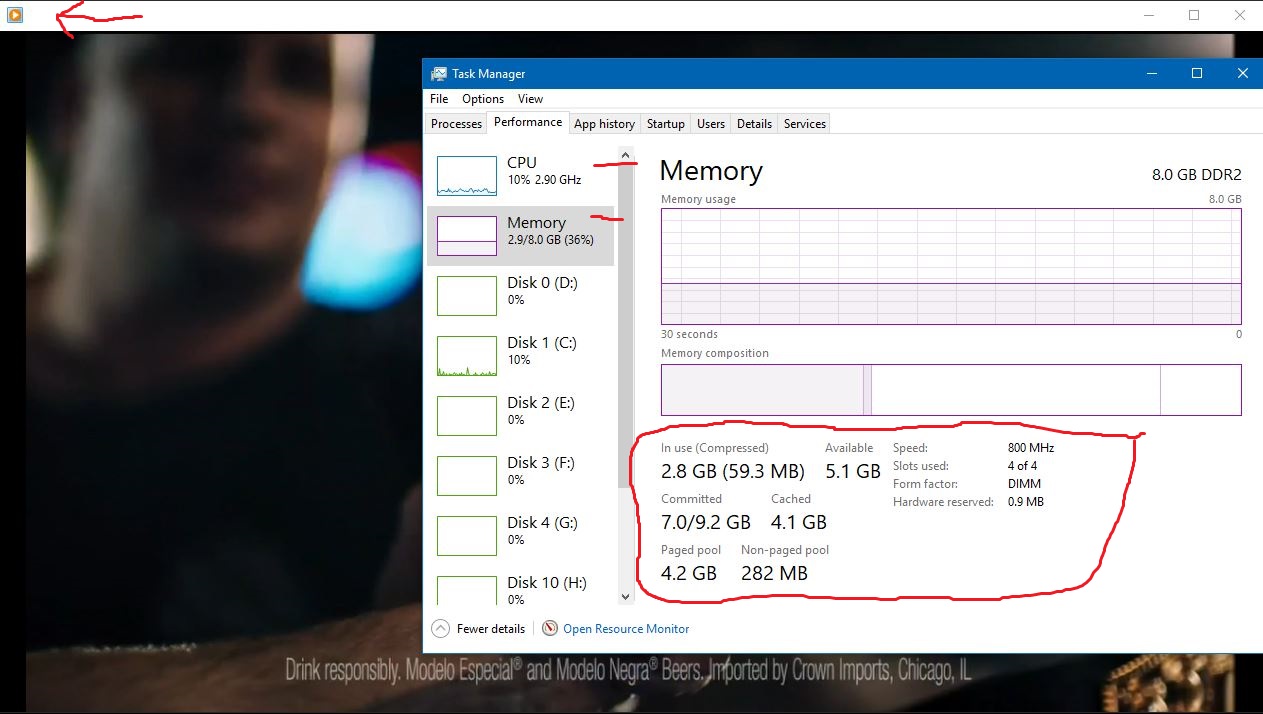
HD online Video
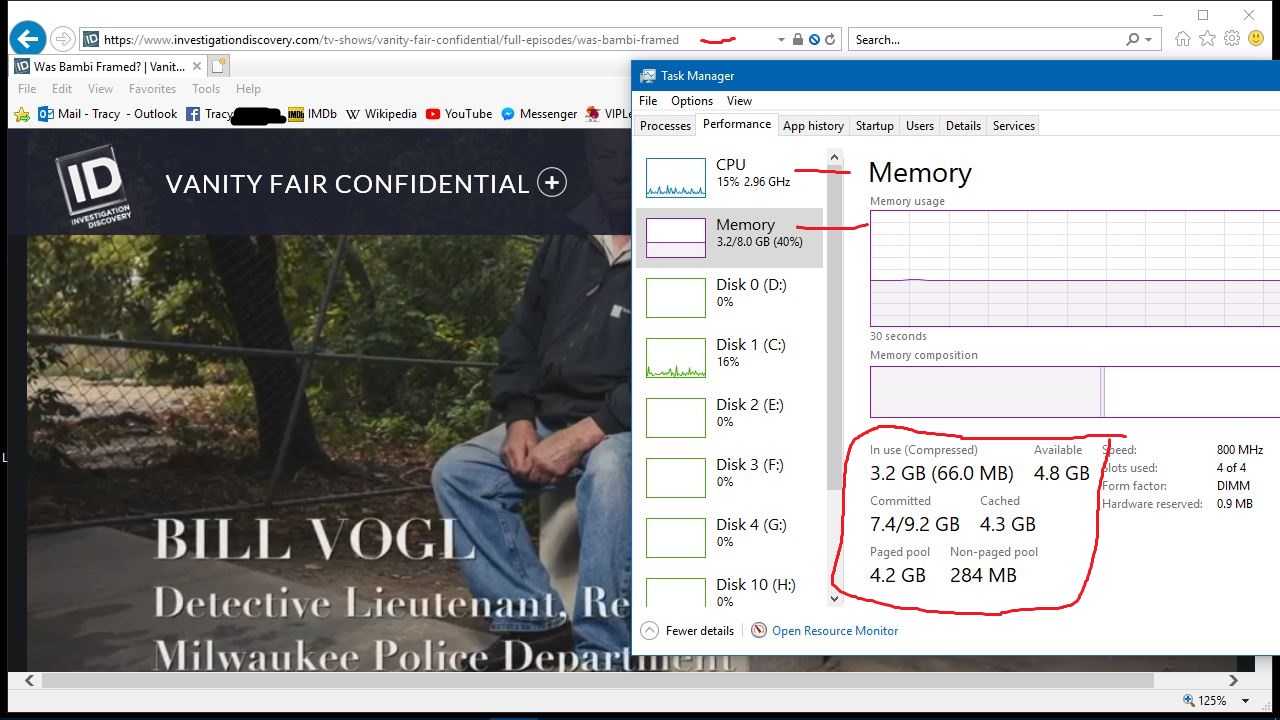
HD You Tube Video
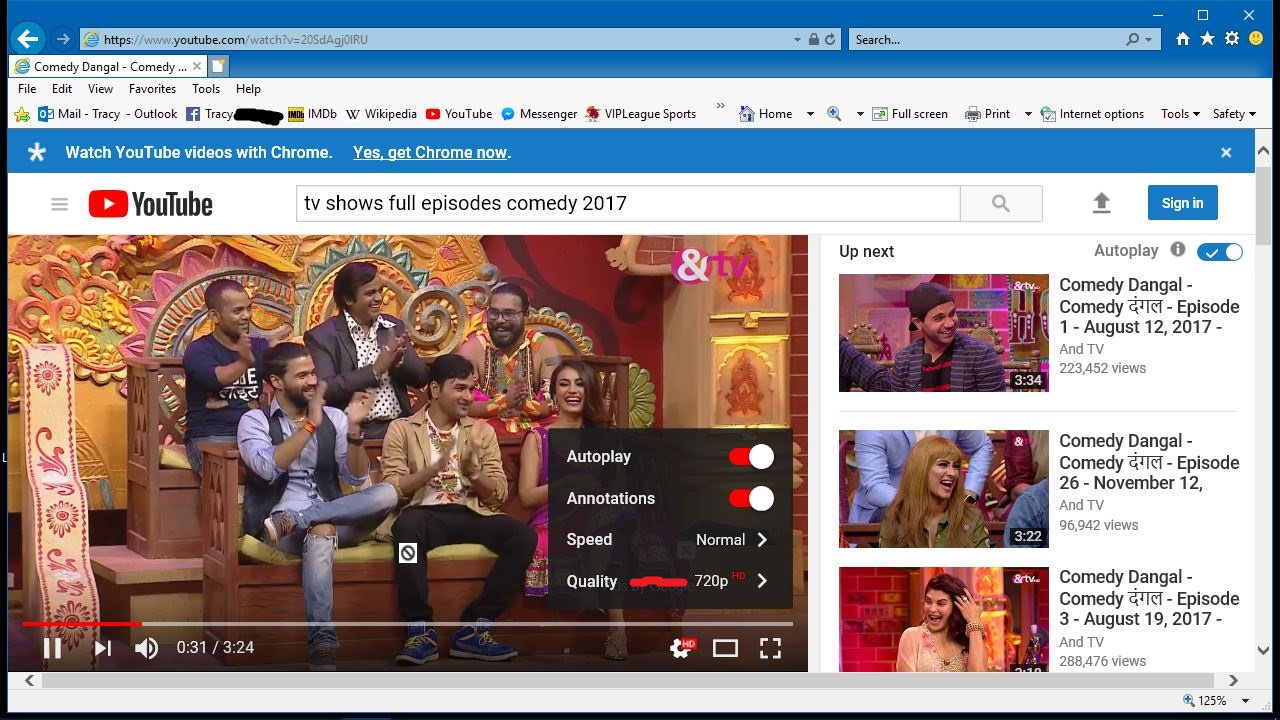
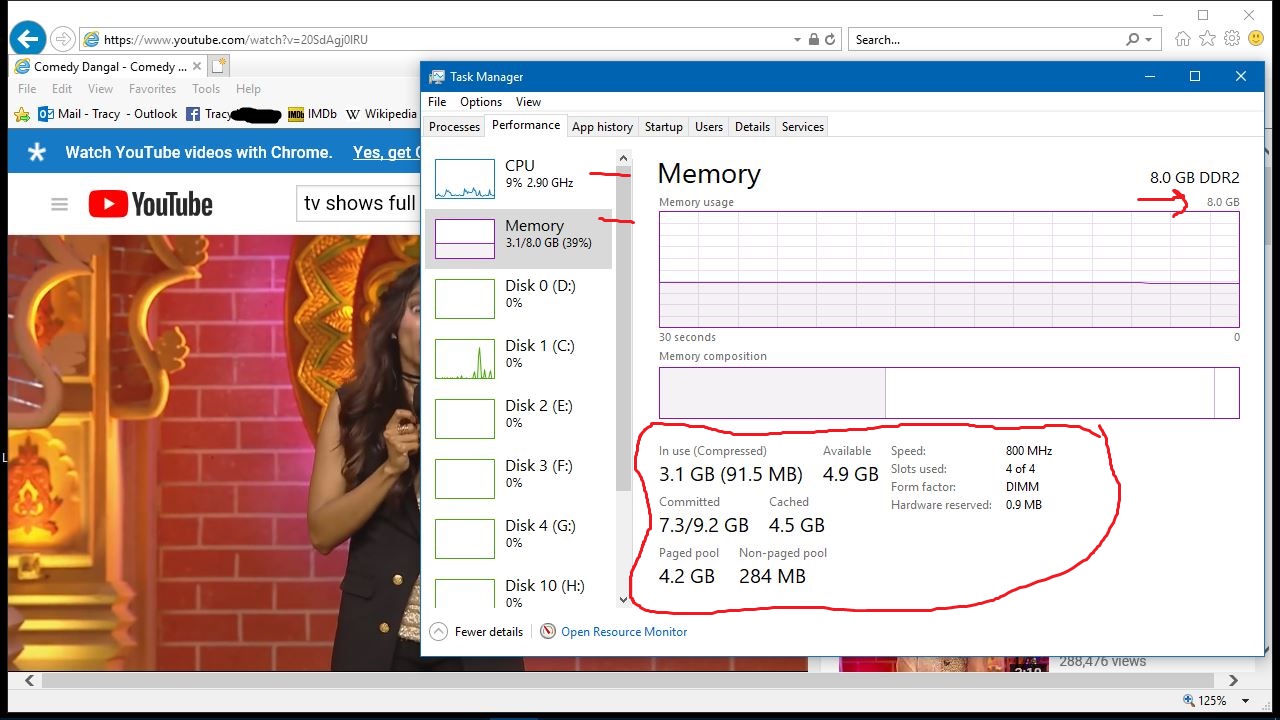
************************************************************************************
************************************************************************************
How to Add a Pagefile to an External Thumb Drive.
You should get a certified ReadyBoost USB 2.0 or higher TD for faster speed transfer.
To use ReadyBoost in Windows 10, make sure that SuperFetch is enabled. ReadyBoost won't work if the SuperFetch service is stopped or disabled.
Go to THIS PC and right click the thumb drive and FORMAT>QUICK NTFS.
Now select properties.
Then select READY BOOST TAB.
Now set it up so you can use it for pagefile.
Now Restart PC
Go to pagefile and set it up and send it to another fresh formatted TD.
***To change or move the Pagefile go to:
Control Panel\All Control Panel Items\System>>
(OR)
Right Click THIS PC on desktop.
Advanced System Settings
Performance>>Settings
Advanced>>Change
Uncheck - Top Box
Select pagefile location in list.
Custom - Min. 64MB - Max ???
OR
System Managed Size. (Recommended)
Set, Ok, Apply, OK, Apply, OK.
Restart PC
Now I have not used this in 10 years (Ready Boost), and actually forgot all about it until it just hit me.
ENJOY!
' cx='32' cy='32' r='32' /%3E%3Ctext x='50%25' y='55%25' dominant-baseline='middle' text-anchor='middle' fill='%23FFF' %3EA%3C/text%3E%3C/svg%3E)
