' cx='32' cy='32' r='32' /%3E%3Ctext x='50%25' y='55%25' dominant-baseline='middle' text-anchor='middle' fill='%23FFF' %3EA%3C/text%3E%3C/svg%3E)

Hi Roger,
This issue likely occurs if the files have been encrypted by Encrypting File System (EFS). It's a built-in encryption tool in Windows that's being used to encrypt files and folders to protect them from unwanted access. For us to troubleshoot your issue with accessing files, we suggest performing some decrypting methods. Before doing so, you need to have a full permission to access system files. To set the permission of your hard drive to full control, refer to these steps:
- Right click on the drive letter corresponding to your hard drive, then go to Properties .
2. Go to Security> Edit> Add.
3. On the Enter the object names to select (examples) section, type Everyone, then click OK.
4. Click Everyone, then under Permissions for Everyone section, put a check mark on the options under Allow.
5. Click Apply, then OK. 6. Go to the Securitytab again, then click Advanced. 7. Click the Changebutton under Permissionstab, then type Everyoneand click OK.
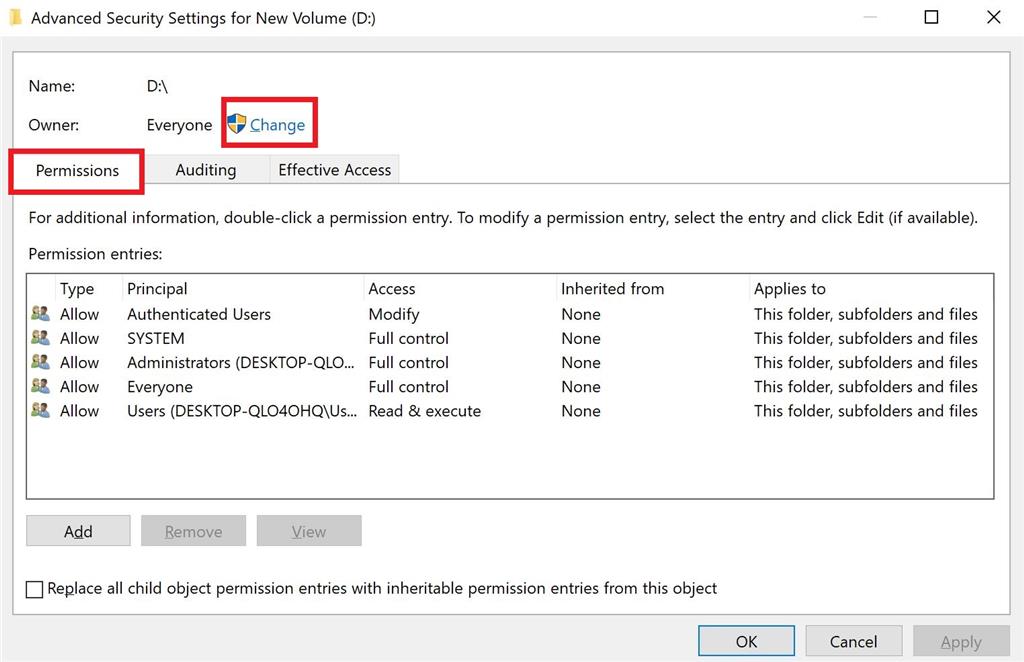
8. Check the box beside Replace owner on subcontainers and objects, then click Apply.
9. Go to the Auditingtab, then click Add.
10. Click the Select a principal button, type Everyoneand click OK.
11. Under Basic permissions section, check the box beside Full Control, then click OK.
12. Click Apply, then OK. 13. Restart your computer to apply the changes.
Afterwards, perform these decrypting methods:
- Decrypt a file or folder through Context Menu
A. Right-click on the file or folder that you're trying to access, then click File ownership and select Personal. 2. Decrypt a file or folder through Advanced Attributes
A. Right-click on the file or folder that you're trying to access, then select Properties.
B. In the General tab, click Advanced.
C. Uncheck the box beside "Encrypt contents to secure data", then click OK.
D. Click the radio button beside "Apply changes to this folder only" or "Apply changes to this folder, subfolders and files" depending on your preference, then click OK. 3. Decrypt a file through Command Prompt
A. Run Command Prompt as an administrator.
B. Type cipher /d "full path of file with extension", then press Enter.
Note: Replace "full path of file with extension" in the command provided with the actual file path.
Get back to us with the result.
not work for me, anyelse best way to decrypt my file(photos .jpg)?
please!!