Outlook | Windows | Classic Outlook for Windows | For business
Using classic Outlook for Windows in business environments

This browser is no longer supported.
Upgrade to Microsoft Edge to take advantage of the latest features, security updates, and technical support.

Error Message: The connection to your email server is timed out.
Exchange Environment:
Exchange Server 2019
Reverse Proxy
Edge Server
Microsoft Connectivity Analyzer Test ActiveSync Report details,

Using classic Outlook for Windows in business environments
The administration and maintenance of Microsoft Exchange Server to ensure secure, reliable, and efficient email and collaboration services across an organization.
Answer accepted by question author
Resolution of this issue:
We have identified the issue was in our Network side where the network team has blocked all countries except only one country(Bangladesh) to access the network.
After unblocking the location-based policy from the firewall, this issue got resolved.
Thank you.
' cx='32' cy='32' r='32' /%3E%3Ctext x='50%25' y='55%25' dominant-baseline='middle' text-anchor='middle' fill='%23FFF' %3EKY%3C/text%3E%3C/svg%3E)
Glad to hear the issue get resolved!
Please feel free to mark your reply as the answer to the question.
It may be helpful to other community members who come up with the same issue.
Thanks for your sharing.
Hi @Al Amran
Note:
Since the screenshot contains your personal information, I have edited the question and covered the personal information for you.
Please don't forget to hide your personal information in your post for security.
Thanks for your understanding!
As Robert mentioned, did you have a A or CNAME record in the public DNS for autodiscover.domain.com to point to the internet-facing server in your environment?
If you have set the correct autodiscover record, can you test with Outlook on a non-domain joined device to access the mailbox?
If Outlook doesn't work either, do you have some websites on the root domain(domain.com)?
To narrow down the issue, you may also test with Outlook
In addition, I noticed that you asked a similar question before:
Outlook 2016/2019 Client Profile is not configuring from External network, don't retrieve user profile information
I suppose the cause may be the same in this case.
And you may need to configure a redirect on the website to redirect all the requests sent to domain.com/autodiscover to autodiscover.domain.com.
If the response is helpful, please click "Accept Answer" and upvote it.
Note: Please follow the steps in our documentation to enable e-mail notifications if you want to receive the related email notification for this thread.
Hello @Kai Yao ,
Thanks for hiding the personal information of this post.
We have A record in the Public DNS for autodiscover.domain.com to point internet-facing server. We can configure Outlook from a non-domain joined device internal and external network.
The only problem we are facing to configure Outlook for mobile devices. We are getting the below error message to configure Outlook for Mobile devices,
The connection to your email server is timed out.
My previous question is not the same as this post. Because the redirection is already in place and Outlook client in desktop/laptop is configuring properly from the non-domain joined device.
Hi,
Thanks for the information!
I suppose that the Microsoft Connectivity Analyzer Test ActiveSync Report should contain some more information about the reason why the test failed.
Would you please post the complete result of the report?
Hi,
Thanks for the information!
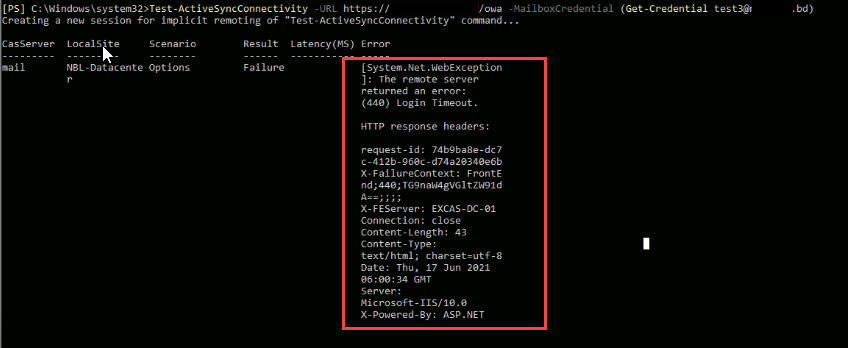
I noticed in the screenshot the URL is https://mail.domain.com/owa.
Did you configure this URL to be the external URL of the activesync directory?
By default it is supposed to be https://mail.domain.com/Microsoft-Server-ActiveSync.
Hello @Kai Yao ,
Already we had configured the external URL like this below,
https://mail.domain.com/Microsoft-Server-ActiveSync
Shell I check by using the below command to verify active sync connectivity?
Test-ActiveSyncConnectivity -URL "https://mail.domain.com/Microsoft-Server-ActiveSync " -MailboxCredential (Get-Credential test3@keyman .com)
Hi,
Yes please test with this URL.
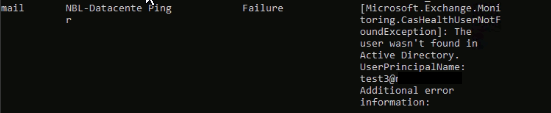
It passes all tests except for the Ping test.
Sorry please use this command instead:
Test-ActiveSyncConnectivity -URL "https://mail.domain.com/Microsoft-Server-ActiveSync " -MailboxCredential (Get-Credential Domain\test3)
We have executed the below command and got the error of my last screenshot.
Test-ActiveSyncConnectivity -URL "https://mail.domain.com/Microsoft-Server-ActiveSync " -MailboxCredential (Get-Credential Domain\test3)
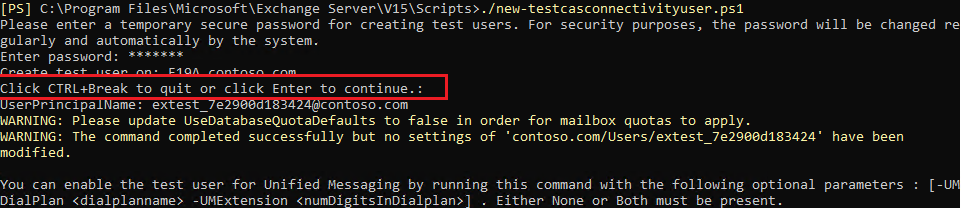
Please locate C:\Program Files\Microsoft\Exchange Server\V15\Scripts and run this command to create a test user account:
./new-TestCasConnectivityUser.ps1
And run this command without specifying a mailbox credential (it will use the test account)
Test-ActiveSyncConnectivity -URL "https://mail.domain.com/Microsoft-Server-ActiveSync "
Hi,
I suppose the test user wasn't created successfully.
By default the result should be like:
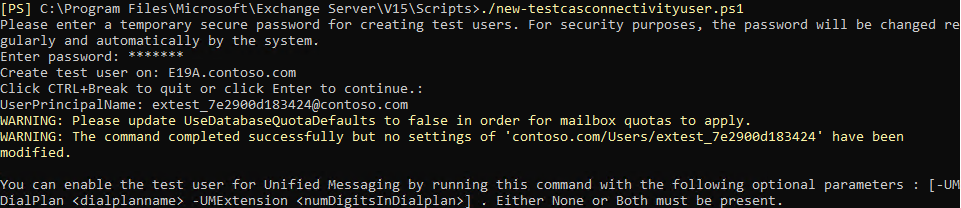
Did you click enter to continue?
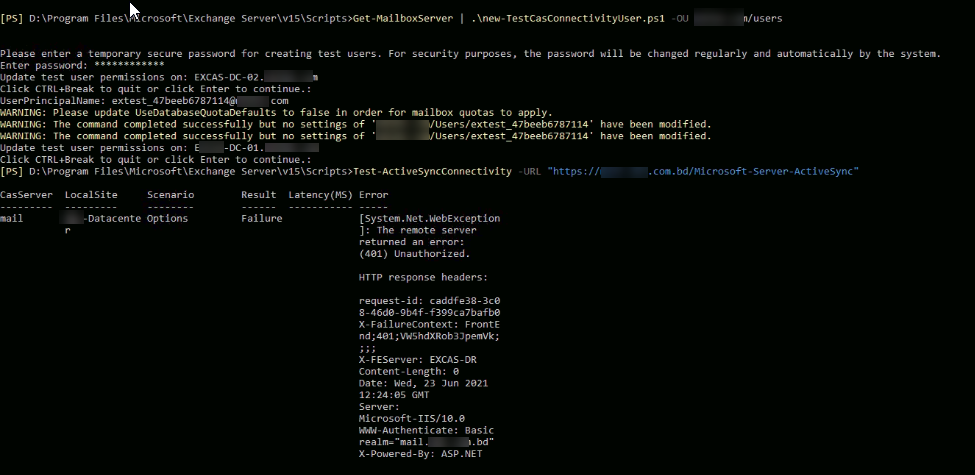
Yes, I have tried to click enter, and getting the below error looks like a screenshot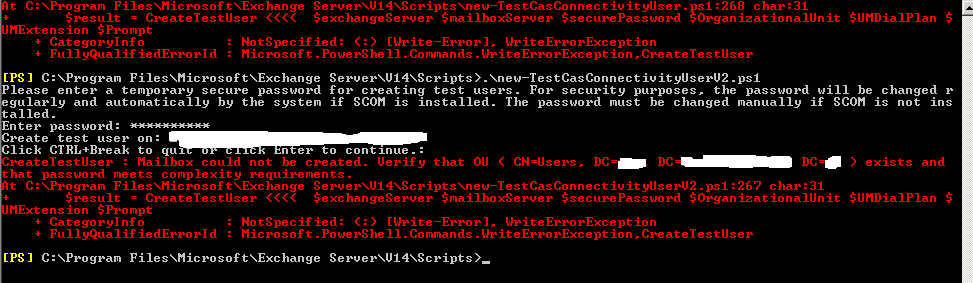 ,
,
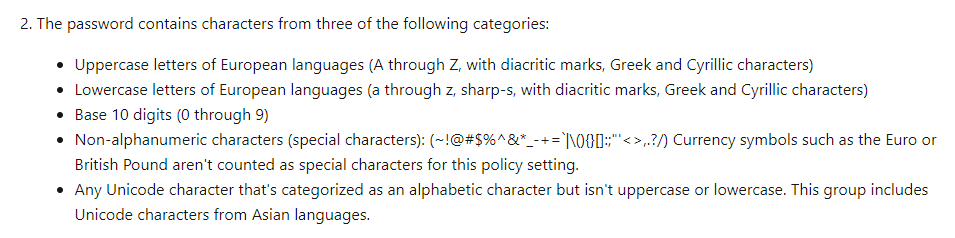
This error may indicate the password doesn't meet complexity requirements.
Did you use a simple password? For example, the password only contains numbers. (1234)
You may use some string like 123.com(characters from three of the following categories) to see if the test user can be created successfully.
Hi,
Thank you for your patience.
I think this error may be caused either by the credentials of the test account are incorrect or the basic authentication is disabled on the ActiveSync virtual directory.
While since the mailbox test3 can pass this first step, I suppose the cause should be with the test account.
Please delete the mailbox extest_47beeb6787114 in EAC and rerun the new-TestCasConnectivityUser.ps1 script.
Besides, have you tested with internal device connecting to Exchange using ActiveSync?
Will it work fine or have the same error(connection timeout)?
Hello!
How could i delete extest user?
Can we test with internal device connecting to Exchange using ActiveSync?
Hello @Kai Yao ,
Thanks for your great support.
We have identified the issue was in our Network side where the network team has blocked all countries except Bangladesh to access the network.
After unblocking the location-based policy from the firewall, this issue got resolved.
Thanks & Regards
Amran
Hi @Kai Yao ,
Hope you are doing good and safe amid this pandemic.
As you already knew that our network had blocked all countries except Bangladesh to access our network. Do you have any idea which specific URL needs to be allowing in our firewall for Outlook for Android/iOS??
In the same scenario, Gmail & Other client is working well but Outlook for Android/iOS is not working because Outlook for Android uses REST protocol.
Hi,
I think the URL should be the same as external URL on ActiveSync virtual directory.
It should be like https://mail.domain.com/Microsoft-Server-ActiveSync.

From the results shown, it suggest that you haven't properly configured or published the Autodiscover service.
See; Autodiscover service in Exchange Server
Hello anonymous userSparnaaij,
Thanks for your reply.
I think the Autodiscover service is configured properly because the Outlook client in desktop/laptop is configuring automatically from the non-domain joined device(internal and external network)
Any action item or command to verify that the Autodiscover service is not configured properly?