Share via

Universal Serial Bus Controllers

Anonymous
2018-06-01T07:01:05+00:00

I bought a laptop from Walmart for around 400 dollars. It was very slow so I had the brilliant idea to free up some CPU by installing a fresh copy of windows 7 that I bought it from amazon which is this:

https://www.amazon.com/Windows-Reinstall-Install-Professional-Ultimate/dp/B074PJF8W1/ref=sr\_1\_1?ie=UTF8&qid=1527835948&sr=8-1&keywords=windows+7

The installation went well and i got all but 1 of the drivers installed. That being the USB drivers. when i plug in my mouse, the light comes on but not the laser used to track mouse movements. It also didn't install the drivers it usually dies when you plug in a new mouse. I am in no way savvy when it comes to drivers. when i try to install the driver from the disk given, i get a blue screen. every single time. when i try to detect software changes from my device manager menu, another blue screen. I didn't damage the laptop in any way and the install of windows 7 was undisturbed so I'm unsure as to why it keeps blue screening. This is the pop up i keep getting after the laptop restarts:

Problem signature:

  Problem Event Name: BlueScreen

  OS Version: 6.1.7601.2.1.0.768.3

  Locale ID: 1033

Additional information about the problem:

  BCCode: 7f

  BCP1: 0000000D

  BCP2: 00000000

  BCP3: 00000000

  BCP4: 00000000

  OS Version: 6_1_7601

  Service Pack: 1_0

  Product: 768_1

Files that help describe the problem:

  C:\Windows\Minidump\060118-20843-01.dmp

  C:\Users\Dyllan\AppData\Local\Temp\WER-33218-0.sysdata.xml

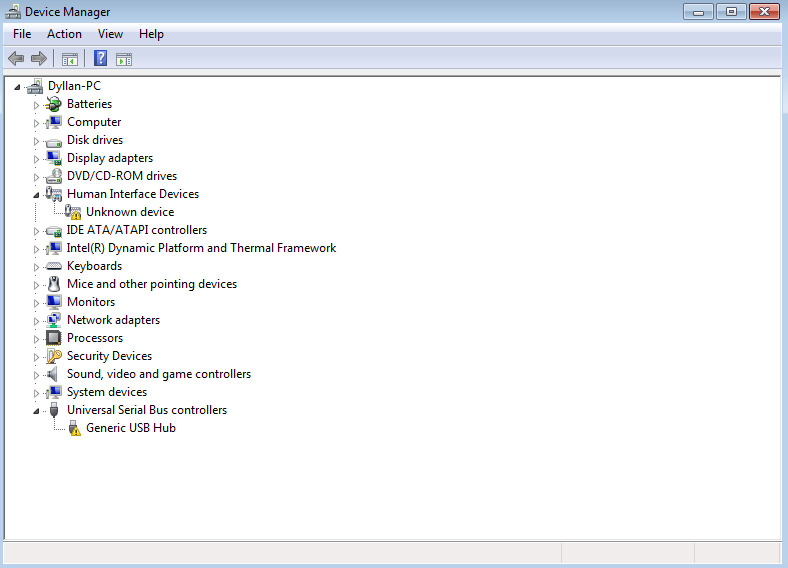
Ive also included a picture of my device manager in case that helps. there was no tab for universal serial bus controllers, I had to add it manually.
Windows for home | Previous Windows versions | Devices and drivers

Locked Question. This question was migrated from the Microsoft Support Community. You can vote on whether it's helpful, but you can't add comments or replies or follow the question.

0 comments No comments

Answer accepted by question author

Anonymous
2018-06-04T09:20:16+00:00

You can see that HP doesn't offer Windows 7 drivers for that model.

That laptop appears to have Intel parts for the USB controller we can tell if you do this:

Click Start, Run and in the box enter:

msinfo32

For USB port information, expand the Components section, click USB, click Edit, Select All, Copy and then past he information back here.

There will be some personal information (like System Name and User Name), and whatever appears to be private information to you, just delete it from the pasted information.

You can see if downloading the Windows 7 drivers right from Intel will work.

https://downloadcenter.intel.com/download/22824/Intel-USB-3-0-eXtensible-Host-Controller-Driver-for-Intel-8-9-100-Series-and-Intel-C220-C610-Chipset-Family?product=65855

The Intel Driver Assistant may be able to tell you what you need:

https://www.intel.com/content/www/us/en/support/detect.html

There is a topic in the HP community along those lines too:

https://h30434.www3.hp.com/t5/Notebook-Operating-System-and-Recovery/HP-15-1233wm-on-Win-7-64bit-with-no-USB/td-p/6458645

Was this answer helpful?

10+ people found this answer helpful.
0 comments No comments

13 additional answers

Sort by: Most helpful
  1. LemP 74,940 Reputation points Volunteer Moderator
    2018-06-01T20:41:30+00:00

    The "wireless button driver" doesn't have anything to do with the USB ports.  It's the button that permits you to turn the wireless radio on or off.  See https://support.hp.com/lamerica_nsc_carib-en/drivers/selfservice/swdetails/hp-envy-15-bp000-x360-convertible-pc/15551145/model/16902189/swItemId/ob-188827-1 (this particular driver is not the one for your laptop; I just linked the page for you to see the description of what the button does).

    From what I understand, the Stop Code 7f associated with your crash may be caused by a driver problems.  It's hard to know what might have been included on that generic "driver disc."  In general, especially with laptops, it's best to use the drivers from the computer manufacturer.  If you provide the Serial Number of your "HP Notebook 15," I'll try to find the correct drivers for you.

    The 7f code also sometimes can be caused by a third-party antivirus/firewall application. 

    What are you using for an antivirus?

    What's the Serial Number of your "HP Notebook 15"?

    Use either method:

    A:

    B.

    Was this answer helpful?

    0 comments No comments
  2. Anonymous
    2018-06-01T20:17:18+00:00

    not sure if it will help but this is the one that causes a blue screen

    Was this answer helpful?

    0 comments No comments
  3. Anonymous
    2018-06-01T19:22:38+00:00

    I wasn't able to copy and paste the stuff so i captured it.

    Really hope it helps. not having a mouse has been the bane of my existence

    Was this answer helpful?

    0 comments No comments
  4. LemP 74,940 Reputation points Volunteer Moderator
    2018-06-01T14:14:55+00:00

    Did you install the chipset driver?  That usually includes the USB drivers.

    What's the make and specific model of the laptop?

    Was this answer helpful?

    0 comments No comments
