Hello,
I hope I have this under the right category/topic!
I'm trying to find a solution to this without having to resort to resetting my computer to an earlier version of Windows 10. However, I will do so if there is no other solution to be found. I'm writing here instead of on Adobe's website because
I feel it's a Windows 10 issue and not a program one because the only thing that has changed is the version of Windows being updated. I have two problems; one of which is kinda solved through background means, the other, I have yet to fix, and I feel may
be related to the first issue.
I have the newest version of Windows 10 (the fall update for 2017). The program I'm using is Adobe Photoshop Elements 15 (most up to date version of it), and the device I'm using is a Wacom PTK-440. I run my operating system off of an SSD, whereas my program
and tablet are run off of a hard drive.
Onto my first issue: D espite me having Press+Hold "disabled" via normal methods of doing so by using the system's
Pen and Touch settings, my tablet's pen acts like it's still "enabled." Screenshot if what I'm describing is unclear:
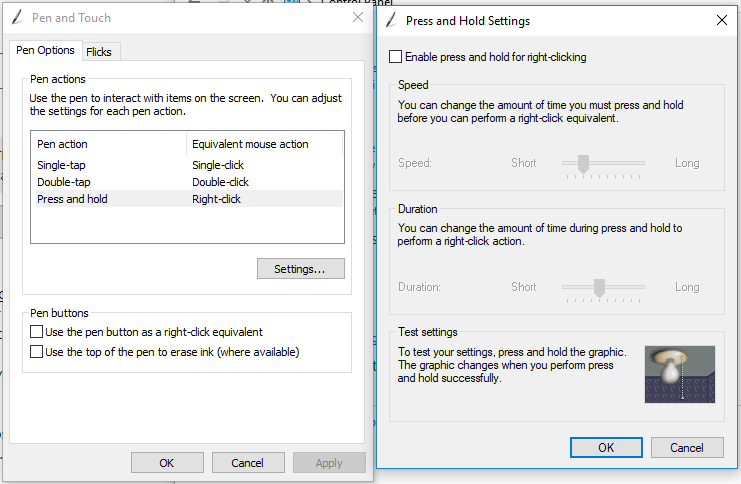
My tablet pen will still allow for Press+Hold functions despite the setting being turned "off." Before the most recent update, the above method worked. After the update, it's basically useless and a dead command. I can still turn the little light
on even with the setting turned "off".
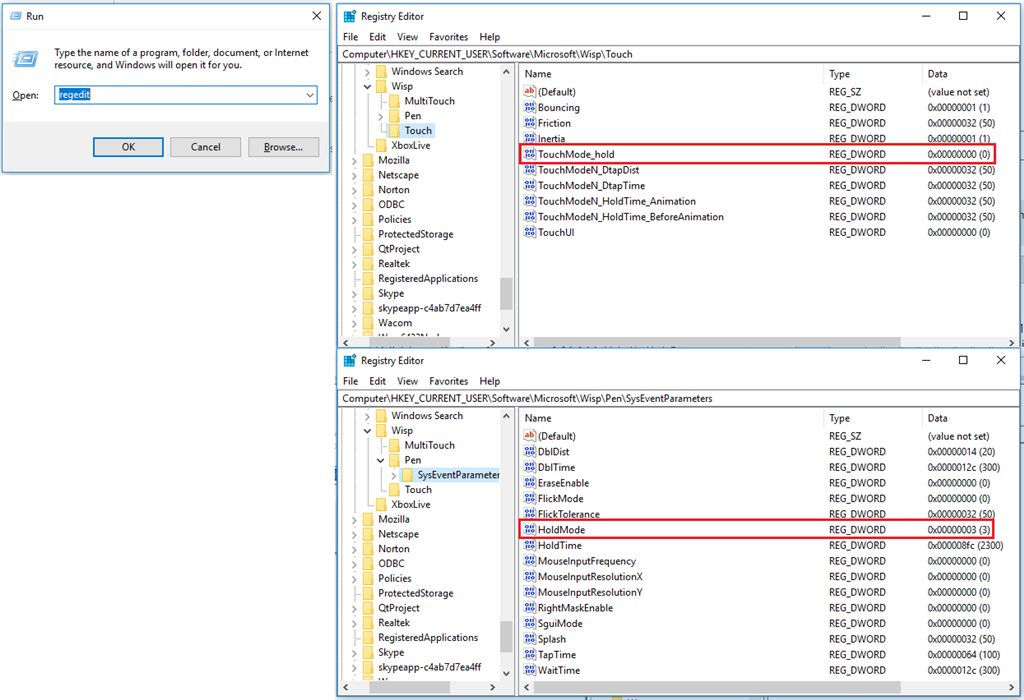
The only way I was able to "fix" this was to manually go into the Registry and change values for the
Touch's "TouchMode_hold", not the Pen's "HoldMode." According to my Internet digging, the "off" value is 0 for the
Touch, and 3 for the Pen. The Pen showed as being "off" already though despite the function actually still working, which I thought was odd. It was only when I had both the Touch and the
Pen Registry values changed to "off" did the pen actually stop the Press+Hold issue.
I'm not sure how to "fix" this issue since I was able to get the system to do as I wanted, however, it bothers me that the regular means of "turning off" the Press+Hold function no longer works at all with my most recent update of Windows
10.
All of this leads into my s econd (and most pressing) issue: my tablet's pen will lag
only while in Adobe Photoshop 15 when doing anything with the "pen" and "eraser" portions of the tablet pen, typically with brush/pen/pencil/eraser strokes. There is a 1-2 second delay between when I make a stroke with the tablet pen and when it actually
shows up in the program. It's like the computer is still trying to think about whether or not it wants to do the Press+Hold command, because it pauses on that initial stroke like it's trying to perform the Press+Hold function (despite the setting being turned
"off").
- When the function is turned "on": the pen will pause and a "thinking" wheel will show up before a drop window appears and allows you to select a different "brush" to use
- When the function is turned "off": the pen will
still pause, but there will be no "ink" on the screen until you move the tablet pen, and, even then, it's after a noticable delay between initial pen-to-tablet contact and the rest of the pen stroke
- What is supposed to happen with the function turned "off": there will be "ink" on the screen the
instant you press the tablet pen to the tablet itself
The tablet pen does not do this in Paint. The delay is not noticable with the mouse. The delay is not noticable when Windows Ink is turned off for the program:
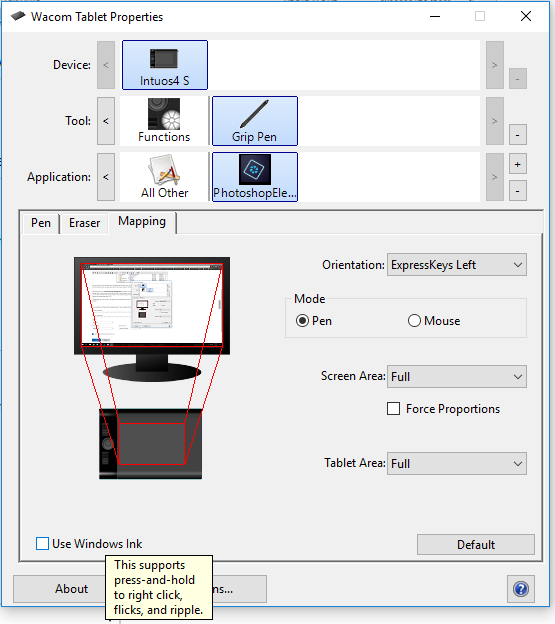
With Windows Ink turned off, however, the tablet pen no longer registers pen pressure, which is an issue for someone trying to draw.
So, currently, I'm stuck with either the tablet pen having no delay, but also having no pen pressure; or, having the tablet register pen pressure, but with a delay with each brush stroke I make.
TL;DR: My Wacom tablet's pen is not responding as it used to, and only started showing problems after the update.
Before I was forced to do the Windows 10 Fall2017 update, I did not have this issue. It was only
afterwards that the program and tablet started showing these issues and the Press+Hold settings being messed up.
I have restarted my computer after changing settings. I have uninstalled my tablet's older driver and replaced it with newer ones. I have done pretty much everything besides resetting my Windows to an earlier state. I'm almost 90% certain this is an issue
dealing with the most recent Windows 10 update, as I did not have this issue before my computer was force-updated. Nothing else besides the update had changed. So, unless it's a compatibility issue with the program (which, I feel, is unlikely since
the program is still pretty new and is up-to-date on its version), I've got nothing else to attempt other than resetting.
Please help!
[Move
from: Windows / Windows 10 / Windows settings]
' cx='32' cy='32' r='32' /%3E%3Ctext x='50%25' y='55%25' dominant-baseline='middle' text-anchor='middle' fill='%23FFF' %3EA%3C/text%3E%3C/svg%3E)
