' cx='32' cy='32' r='32' /%3E%3Ctext x='50%25' y='55%25' dominant-baseline='middle' text-anchor='middle' fill='%23FFF' %3EA%3C/text%3E%3C/svg%3E)

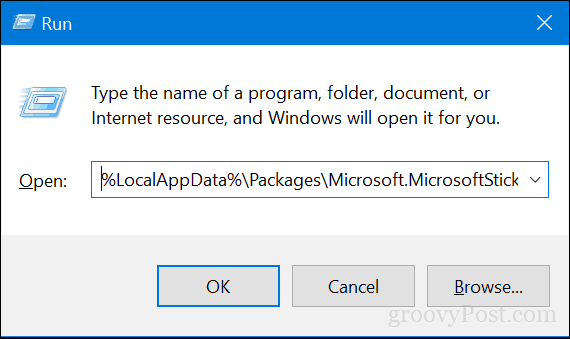
The first step to saving and restoring your Sticky Notes is finding where Windows 10 keeps them. To do that, press Windows key + R, type the following in the search box then hit Enter:
%LocalAppData%\Packages\Microsoft.MicrosoftStickyNotes_8wekyb3d8bbwe\LocalState
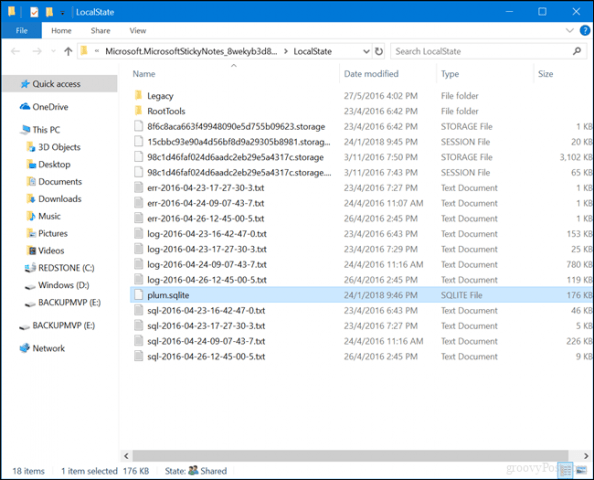
Copy the file plum.sqlite file to a USB thumb drive or another backup source.
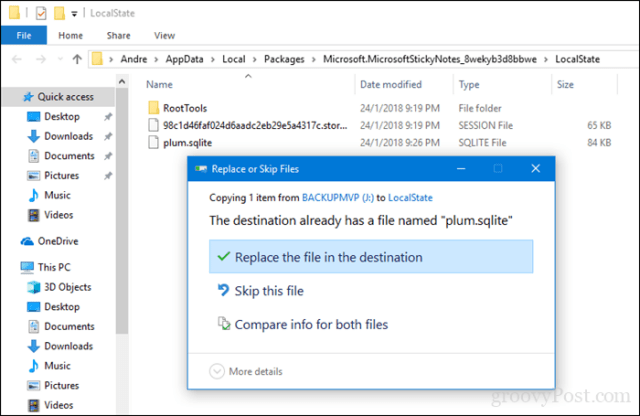
Connect the USB drive to the other device where you want to restore them, open the same Sticky Notes folder, then copy and paste the plum.sqlite file into the same folder. Click Replace the file in the destinationwhen prompted.
Close the folder, restart your computer just to confirm changes then launch Sticky Notes on the other device. You should see your Sticky Notes on your new device.
Source: https://www.groovypost.com/howto/backup-restore-migrate-sticky-notes-windows-10/
' cx='32' cy='32' r='32' /%3E%3Ctext x='50%25' y='55%25' dominant-baseline='middle' text-anchor='middle' fill='%23FFF' %3EVM%3C/text%3E%3C/svg%3E)