I did this but the computer said that it didn't detect any problems with the ram. I don't know if the issue is only happening in cs go because I haven't tried downloading any other heavy games and I literally wrote that I've formatted the computer two times, which automatically means that I've had to reinstall cs go two times as well, but it didn't help.
Why do I have only 3,3 GB of available RAM out of 6?
So my laptop is never slow on normal usage, but when I play heavy games like CS:GO it really lags. The framerate drops so much, to the point where I can't even move in the game without bumping into enemies and objects. Now, I know I don't have a gaming
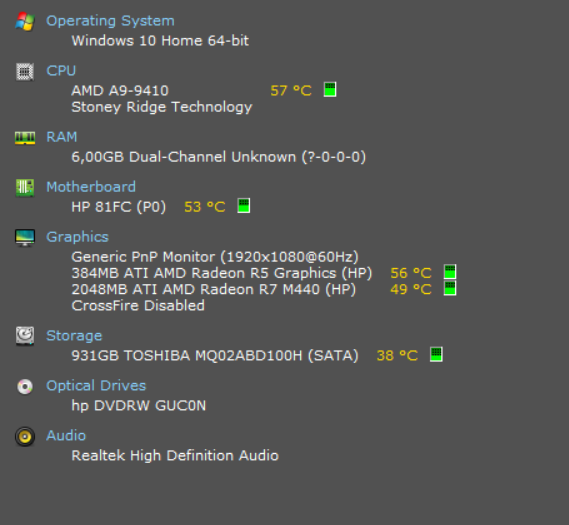
laptop (see the screenshot with the specs below), but I've seen people with way worse specs than mine and still run cs go and other similar games smoothly. Mine lags even when the game is set to the lowest settings. So I went to the task manager and I realised
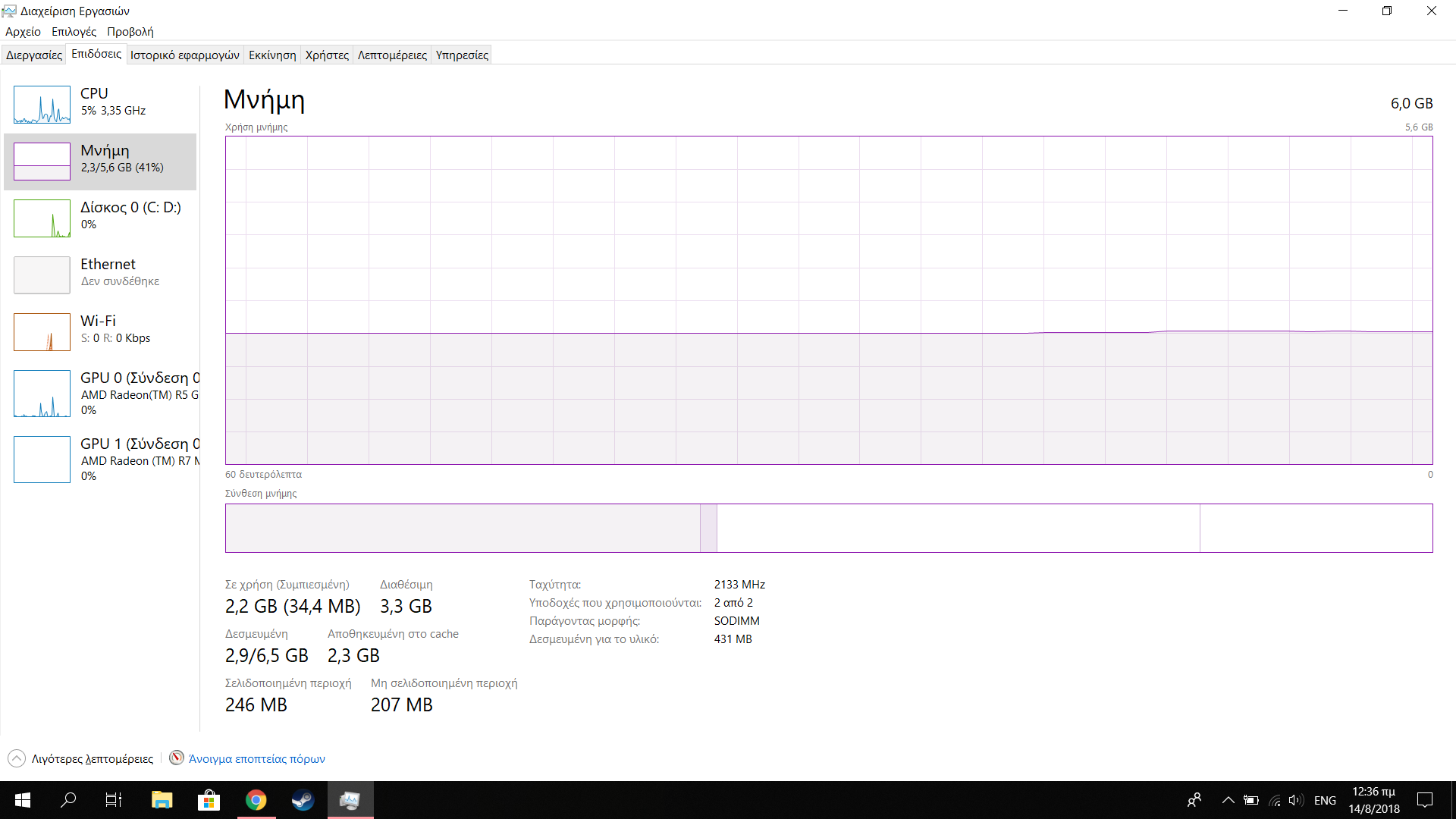
that out of 6 gigs of ram, 5,6 are given to the user but only 3,3 of them are available for usage. Why does that happen? I know that not all of the gigabytes of ram are available when in a computer (for example if you have 6 gigs like I do, 5,6 of them are
"free") but should it really use an entire 3,2 GB by default? Right now as I'm typing this, 2,2 GB of ram are being used by my computer and I only have Chrome and task manager open. I figured that's why heavy games like cs go lag so much on my laptop, even
on low graphics (because of low available ram) but is there a way to fix that? Any suggestion is appreciated.
Windows for home | Windows 10 | Performance and system failures
Locked Question. This question was migrated from the Microsoft Support Community. You can vote on whether it's helpful, but you can't add comments or replies or follow the question.
4 answers
Sort by: Most helpful
-
Anonymous
2018-09-06T13:06:05+00:00 -
Anonymous
2018-08-28T14:25:39+00:00 Thanks for getting back to us. Is the issue only happening on CS:GO? Have you tried to reinstall the game?
Since you've already tried to reinstall Windows which fixes most issues, I suggest that you run the Windows Memory Diagnostic. This will test your device's RAM for any issues. Please follow the steps below:
- Press the Windows key + R > type mdsched.exe, then press Enter.
- Choose whether to restart the computer and run the tool immediately or schedule the tool to run at the next restart.
- Windows Memory Diagnostics runs automatically after the computer restarts and performs a standard memory test automatically.
- When testing is completed, the computer restarts automatically. You’ll see the test results when you log on.
Kindly give us an update if you need further help.
-
Anonymous
2018-08-28T11:05:11+00:00 I am aware that I should be running CS GO smoothly, especially on the lowest settings. My Windows 10 version is 1803 (although I don't see how that could help) and no, I didn't notice any changes to my laptop. It was always like that. I've even formatted it two times now to start over from a fresh Windows 10 but it hasn't helped.
-
Anonymous
2018-08-14T14:48:42+00:00 Hello Cheesy Moon,
Based on the screenshot you've provided, I can tell that the information about how much RAM being used and available RAM shown is correct. Your laptop should be able to run CS:GO. Your available RAM should be sufficient. We would like to know more about your concern. Please answer the following questions below:
- Did you notice any recent changes on your laptop prior to the issue?
- Which build and version of Windows 10 are you running? You can find this information by clicking the Start button, type winver, and then press Enter.
- Have you checked the Processes tab and see which process takes too much memory or CPU usage?
In the meantime, I suggest that you boot your PC in a clean boot state. This will start Windows by using a minimal set of drivers and startup programs to eliminate software conflicts. You can also watch this YouTube video on how to perform a clean boot.
Let us know if you still experience the same issue while you're PC is in a clean boot state. To notify us and have us get back to you, simply reply to this post.