Share via

My computer memory appears to be nearly full, but I have no files saved?

Anonymous
2018-09-21T20:41:28+00:00

Hi all,

I have a relatively new computer and mostly work remotely on it from work.

So all my files are on the work's server and I then VPN and remote desktop in.

I have very few files saved on it yet it says I have nearly filled all of the available memory as you can see below?
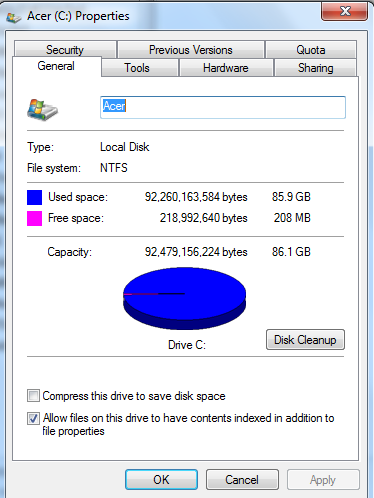
 Checking through the folders on the system I find that "Windows" has 31GB and "Users" has 41GB.

No one else users this computer, if I check my folder under the users folder this is where all of the 41GB are located. If I pick through each subfolder in my folder I can't find anything like this total in there? Any ideas?

I do have iTunes and noted that it stored music files taking up a lot of space, so I exported all of these to an external hard drive.

Thanks in adavnce of your help,

James.

Windows for home | Previous Windows versions | Windows update

Locked Question. This question was migrated from the Microsoft Support Community. You can vote on whether it's helpful, but you can't add comments or replies or follow the question.

0 comments No comments

6 answers

Sort by: Most helpful
  1. Anonymous
    2018-09-21T21:48:34+00:00

    You are talking about "Disk space", not about "Memory".

    You can use this free tool to find out what's eating your disk space:

    http://www.jam-software.com/treesize\_free/

    Note also that an 89 GByte hard disk is grossly inadequate in the current environment. 250 GBytes would be acceptable, 500 GBytes would be good. You can get a 500 GByte disk for less than $50.00.

    10+ people found this answer helpful.
    0 comments No comments
  2. Anonymous
    2018-09-22T09:22:18+00:00

    Did you run the Windows Disk Cleanup yet?

    Make sure your system is not afflicted with this popular Windows bug:

    https://www.computerworld.com/article/3112358/microsoft-windows/windows-7-log-file-compression-bug-can-fill-up-your-hard-drive.html

    How much RAM is in the system of unspecified make and model?

    If you have lots of RAM and have hibernation enabled you can switch that off which will/could remove a very large hiberil.sys file.

    To do that open a Command Prompt as administrator and enter the following command followed by the Enter key:

    powercfg   -h   off

    4 people found this answer helpful.
    0 comments No comments
  3. Anonymous
    2018-09-22T08:58:46+00:00

    Hi Frederik,

    Thanks for the reply, yep I know its not much disc space but it was more the unexplained use of the space that I can't locate that I wanted ot find out about.

    Unfortunately due to a lack of disc space I cant download the tool on the link you sent, as I don't know where the disc space is being used I can't free any up to be able to download!

    Thanks,

    James.

    4 people found this answer helpful.
    0 comments No comments
  4. Anonymous
    2018-09-22T10:44:47+00:00

    I have free'd up a small amount of space, as I have around 1GB free now. But still this seemingly large amount stored in my files that I can not locate..... 

    Yes, you can when using the tool that I recommended.

    1 person found this answer helpful.
    0 comments No comments
  5. Anonymous
    2018-09-22T10:26:24+00:00

    I have free'd up a small amount of space, as I have around 1GB free now. But still this seemingly large amount stored in my files that I can not locate.....

    1 person found this answer helpful.
    0 comments No comments
