Azure Virtual Machines
An Azure service that is used to provision Windows and Linux virtual machines.
This browser is no longer supported.
Upgrade to Microsoft Edge to take advantage of the latest features, security updates, and technical support.
' cx='32' cy='32' r='32' /%3E%3Ctext x='50%25' y='55%25' dominant-baseline='middle' text-anchor='middle' fill='%23FFF' %3EIS%3C/text%3E%3C/svg%3E)
Hey,
How can I add description/help to runbook parameters?
something like:
disk_type (description: choose between HDD and SSD)
An Azure service that is used to provision Windows and Linux virtual machines.
An Azure service that is used to automate, configure, and install updates across hybrid environments.

Hi @Ishai Shahak ,
Currently while configuring input parameters in runbook, there is no property called as "Description" or "HelpMessage" but we only have "Name", "Type", "Mandatory" and "DefaultValue" as properties.
So if interested, you may upvote this and/or this related uservoice feature requests. In general, Azure feature team would check feasibility of a feature request, prioritize against existing feature backlog, add in roadmap as appropriate and would announce and/or update the related Azure document once a feature request is addressed.
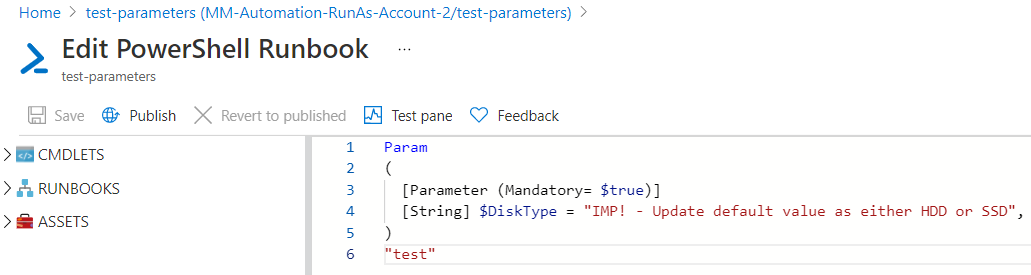
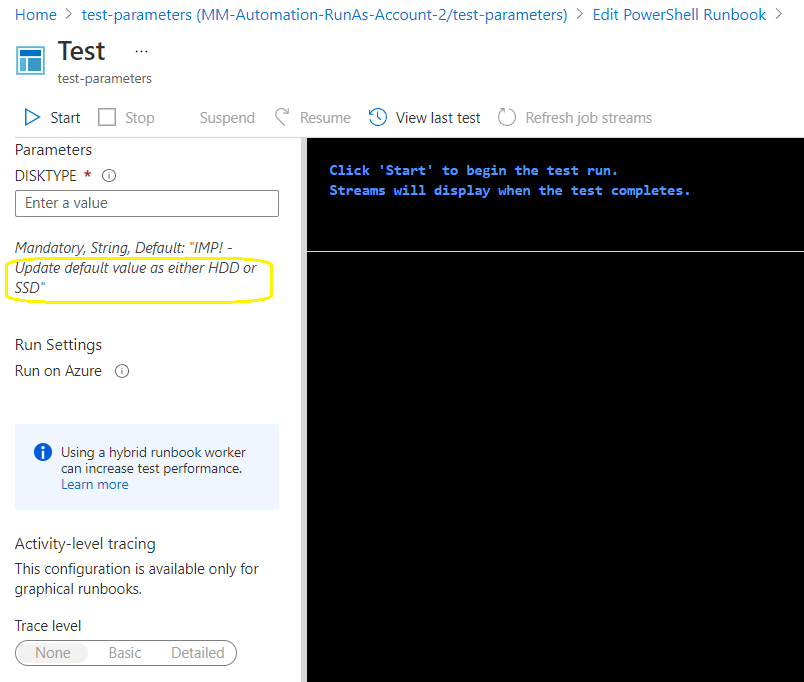
Until the above feature request is implemented, as a workaround, I would recommend you to leverage "DefaultValue" property along with setting "Mandatory" property as true so that the person who executes the runbook in mandatory checks the parameter and hopefully updates it as appropriate.
To illustrate, have your param section as shown in below code block and screenshots.
Param
(
  [Parameter (Mandatory= $true)]
  [String] $DiskType = "IMP! - Update default value as either HDD or SSD",
)
"test"
' cx='32' cy='32' r='32' /%3E%3Ctext x='50%25' y='55%25' dominant-baseline='middle' text-anchor='middle' fill='%23FFF' %3EED%3C/text%3E%3C/svg%3E)
We also needed the "Description" or "HelpMessage" features for the input parameters in Azure runbooks.
To upvote this and/or this related uservoice feature requests are NOT working any more, are there any other new feature requests that we can upvote?
Also we wanted to check when we can expect these features to be available?