Share via

Win 10 Pro Crashed with BSOD error: iaStor.sys

Anonymous
2018-12-21T09:23:10+00:00

Hi Im having lots of crashes after upgrading windows with iastor.sys not same or equal.

I found this post describing a potential fix for it.

https://appuals.com/fix-iastora-sys-blue-screen/ 

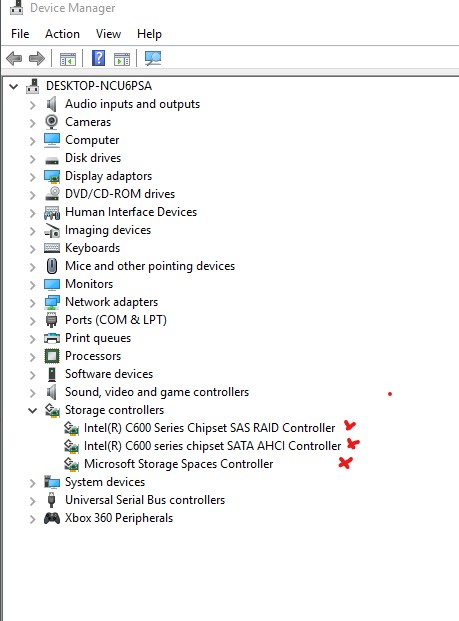
But my computer a DELL T7600 doesnt show the IDE ATA/ATAPI controllers and cant uninstall.

Uninstall this wont make the PC boot due to harddrive not found. 

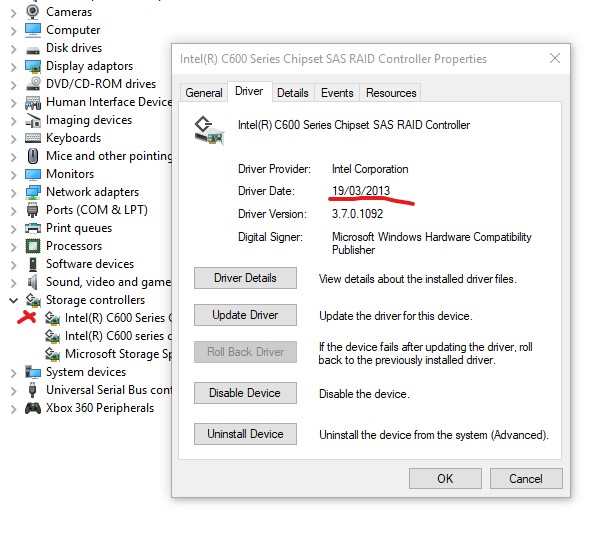
Updating drivers isnt possible.

So I seem to be stuck in an eternal loop of doom.

Please can anyone provide me some help on how to fix this.

Cheers Johan
Updating drive for this wont work since I have the latest.
***Modified Title from: Win 10 Pro iaStor.sys BSOD***

Windows for home | Windows 10 | Devices and drivers

Locked Question. This question was migrated from the Microsoft Support Community. You can vote on whether it's helpful, but you can't add comments or replies or follow the question.

0 comments No comments

6 answers

Sort by: Most helpful
  1. Anonymous
    2018-12-24T04:50:14+00:00

    Hi Johan,

    Thank you for your response.

    Iastor.sys crashes are due to drivers which are corrupted and not compatible. So please try downloading and installing the Storage controller drivers from manufacturer website (as mentioned in the earlier post) again.

    Regards.

    1 person found this answer helpful.
    0 comments No comments
  2. Anonymous
    2018-12-23T11:54:51+00:00

    Hi , yes I went trough all the steps without any success.

    What results did you want me to post from this ? if I misunderstood anything.

    The computer is really unstable now , fast startup turned of , latest updates in win and drivers.

    I dont understand whats causing the iastor.sys crashes and how to fix this.

    Is it driver related ? Please what else can I do? 

    regards Johan

    1 person found this answer helpful.
    0 comments No comments
  3. Anonymous
    2018-12-22T10:10:23+00:00

    Hi, 

    the driver used is the latest driver for storage controller. So have no option of updating this. 

    The troubleshoot guide didnt help me come to a solution to fix this problem. 

    As is the computer crashes randomly and cant be used, and I urgently need some more help to figure out how to fix this. 

    Regards J

    1 person found this answer helpful.
    0 comments No comments
  4. Anonymous
    2018-12-22T10:13:31+00:00

    windows update doesnt present any new availible updates , so are on latest on everything possible.

    0 comments No comments
  5. Anonymous
    2018-12-22T05:57:35+00:00

    Hi Johan,

    Thank you for writing to Microsoft Community Forums.

    We understand how frustrating it could be and if you are using SATA hard drive, you will not find IDE. However, we would suggest you to refer Troubleshoot blue screen errors and try performing troubleshooting steps mentioned in the article.

    If you are able to boot the computer successfully to the desktop, we would suggest you to install drivers for Rapid Storage Technology under Storage Controller from the manufacturer website and then try updating Windows.

    Regards.

    0 comments No comments
