
Hey there,
Is there anyway I can get newly opened windows or applications to always open behind existing windows?
Thanks!
Maybe set programs to open/run minimized ?
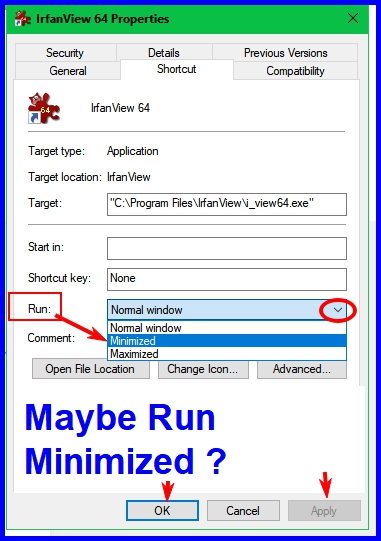
Thanks for the suggestion, but my windows already start up minimized... :(
This browser is no longer supported.
Upgrade to Microsoft Edge to take advantage of the latest features, security updates, and technical support.
' cx='32' cy='32' r='32' /%3E%3Ctext x='50%25' y='55%25' dominant-baseline='middle' text-anchor='middle' fill='%23FFF' %3EA%3C/text%3E%3C/svg%3E)
Hey there,
Is there anyway I can get newly opened windows or applications to always open behind existing windows?
Thanks!
Locked Question. This question was migrated from the Microsoft Support Community. You can vote on whether it's helpful, but you can't add comments or replies or follow the question.
Hey there,
Is there anyway I can get newly opened windows or applications to always open behind existing windows?
Thanks!
Maybe set programs to open/run minimized ?
Thanks for the suggestion, but my windows already start up minimized... :(
David's suggestion would be useful when you open a new program, but I've never seen a similar option for a new Window.
I do use a fair number of free 3rd party programs, but can't suggest any 3dr party software for your particular issue.
I expect if there is a 3rd party program that makes opening a new Window in the background possible it would be
one of the various 'tweaking' programs that has multiple User customisation options. I don't like the odds though.
To that end have a look at...
https://www.makeuseof.com/tag/7-best-tools-tweak-customize-windows-10/
You should be able to find out if a program is capable of doing what you are after by visiting their web site (article above links to
each programs site).
Unfortunately the stuff in these programs can generally be done by the User via Windows if they know their way around Windows
settings, and in many cases by finding a Registry fix doing a search.
Or, if very lucky you may something in...
https://www.majorgeeks.com/mg/sortname/shell_enhancements.html
Still not going to open a new Window behind current Window, but... two variations on the Alt+F key and Alt+TAB options from page above.
https://www.majorgeeks.com/files/details/minimizetotray.html
https://www.majorgeeks.com/files/details/taskswitchxp.html
opening in the back rather than the front. You must admit, most people don't open something new if they are still focused
on their current task/Window.
.
Hey there,
Is there anyway I can get newly opened windows or applications to always open behind existing windows?
Thanks!
Maybe set programs to open/run minimized ?
What version of Window are you using?
Press WinKey + R to open Run box
Type Winver > Press Enter
You'll see the version on your system.
I have version 1803.
Games may have a setting called an alert which will being the app into focus. Check Game settings.
Apps may cause the issue. Troubleshoot to determine which one. Unintall/Reinstall the app.
Follow the below methods and check if it helps.
Method 1: Try booting the system in Safe Mode and check the status of the issue.
Safe mode starts Windows with a minimal set of drivers and services. If a problem doesn't reappear when you start your PC in safe mode, you can eliminate the default settings and basic device drivers and services as possible causes. Refer the link below for steps to boot in Safe Mode.
http://windows.microsoft.com/en-us/windows-10/g...
If the issue still persists, try placing the computer on a Clean boot and check the status of the issue.
Method 2:
Perform a clean boot to check if any third party application is causing the issue, as clean boot helps in eliminating software conflicts.
How to troubleshoot problem by performing clean boot in Windows: https://support.microsoft.com/en-us/kb/929135
Note: Refer "How to reset the computer to start normally after clean boot troubleshooting" to reset the computer to start as normal after troubleshooting.
Alt + F4 will close the window if it is the only one open.
If multiple windows are open, Alt + F4 will bring the original window into focus.
Thanks for the clarification, however Alt-F4 still closes the selected window regardless of how many other windows there are. Am I doing something wrong?