Share via

Issue with Patch Detection

Anonymous
2021-07-09T17:37:49.027+00:00

I have my Surface Laptop 3 that refused to see the July update for PrintNightmare in WSUS or Microsoft Update. I chcked against various WSUS nodes but it never showed as needed and shows as 100% within the console, with Microsoft Update reporting the same. The same goes for 21H1.

I can see other clients getting it and eventually I started thinking it was a block on the MS side, however I then removed it from the domain entirely and then checked Microsoft Update and got around 20 patches including the ones I was looking for.

I was under the impression that GPO only locked away the ability to check against MS Update (which we do not restrict) and not effect what is offered. The partches are approved in WSUS so why am I not seeing them AND how am I suddenly seeing all the needed items in Microsoft Update when I leave the domain?

Windows for business | Windows Server | User experience | Other
0 comments No comments

4 answers

Sort by: Most helpful
  1. Anonymous
    2021-07-20T12:40:20.107+00:00

    I "believe" this issue went away. I'm not exactly sure of the cause, however I did remove the deprecated GPO setting of DisableOSUpgrade using Powershell. After that, reports came in it was again being detected by the stragglers. Why it worked for most devices though and why the patch was not seen when checking for Online updates? ¯_(ツ)_/¯

    Was this answer helpful?

    1 person found this answer helpful.

  2. Rita Hu -MSFT 9,666 Reputation points
    2021-07-13T02:13:47.49+00:00

    @Anonymous
    Thanks for your posting on Q&A.

    I'm not sure whether the issue is related with domain joined. But I found the below messages for your reference first:

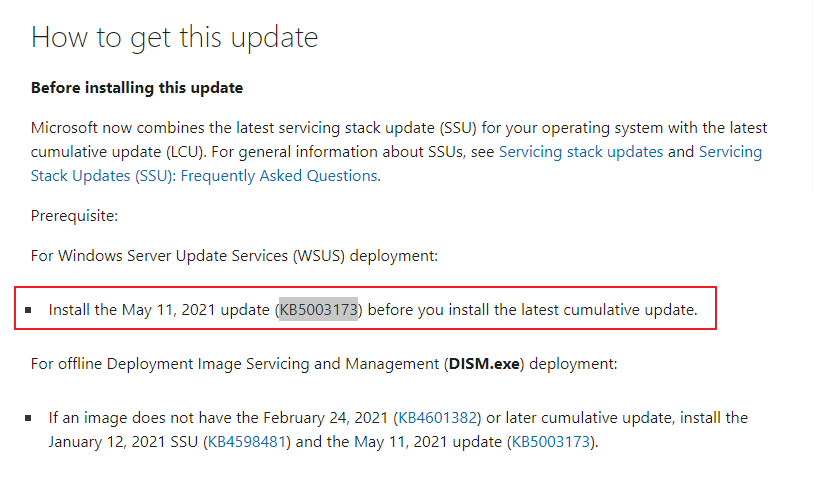
    According to this link, the clients which connect to the WSUS server to get udpates have to install the KB5003173 brfore installing the latest cumulative update. No matter the clients are in Windows 10 20h2 or in Windows 10 21h1.

    Reference picture:
    114009-9.png

    Please try to install the KB5003173 first and then we could try to install the latest cumulative update.

    Hope the above will be helpful. Have a nice time.

    Regards,
    Rita


    If the response is helpful, please click "Accept Answer" and upvote it.
    Note: Please follow the steps in our documentation to enable e-mail notifications if you want to receive the related email notification for this thread.

    Was this answer helpful?

    0 comments No comments

  3. Anonymous
    2021-07-12T12:38:07.443+00:00

    Yes sir, those are all definitely in place and had seemingly been working fine until I noticed this problem. Today I'll be reaching out to staff that are starting to filter in complaints about not detecting the PrintNightmare patch to see where their logs might lead. Very odd though.

    Was this answer helpful?


  4. Adam J. Marshall 10,786 Reputation points MVP
    2021-07-10T01:30:07.727+00:00

    Do you have the correct products and classifications checked in WSUS Options?

    When using WSUS, systems will only KNOW if there's an update if WSUS has the update, and it is approved and downloaded for WSUS to distribute to the client.

    Likely you don't have "Windows 10, 1903 and later" checked as that's a new catchall for all systems 1903 and later.

    https://www.ajtek.ca/wsus/how-to-setup-manage-and-maintain-wsus-part-3-windows-as-a-service-waas-and-group-policy-administrative-templates/

    Was this answer helpful?

    0 comments No comments

Your answer

Answers can be marked as 'Accepted' by the question author and 'Recommended' by moderators, which helps users know the answer solved the author's problem.

