Share via

Speakers configuration keeps reverting to stereo

Anonymous
2019-02-26T07:11:20+00:00

Hi there,

I have encountered a problem with Windows 10 Version 1809.

When I click on "Configure" on Windows Sound, the speakers configuration will revert to stereo even after I have selected 5.1 speakers or 7.1 speakers.

The issue also causes the sample rate to revert to a lower setting.

For example if I have selected 24bit 96kHz on an audio device, clicking on "Configure" will cause the sample rate to revert to 24bit 48kHz.

When I click on "Configure" and click on "Cancel", the speakers' configuration reverts to stereo.
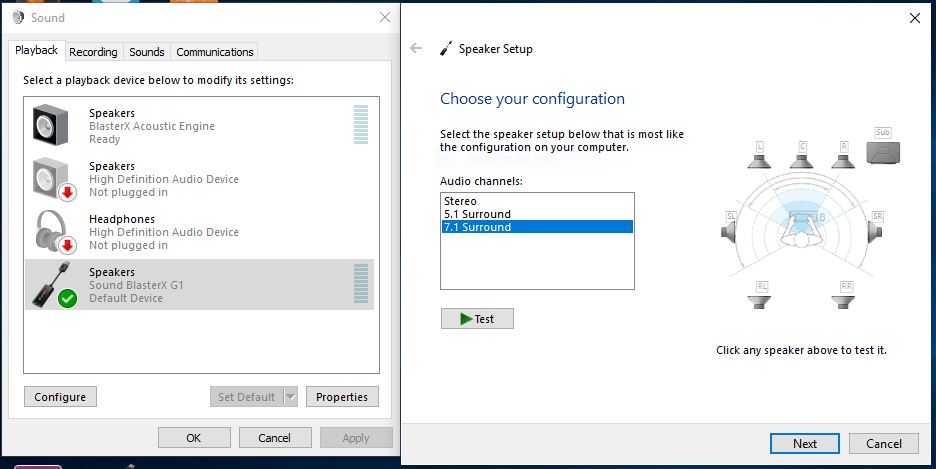
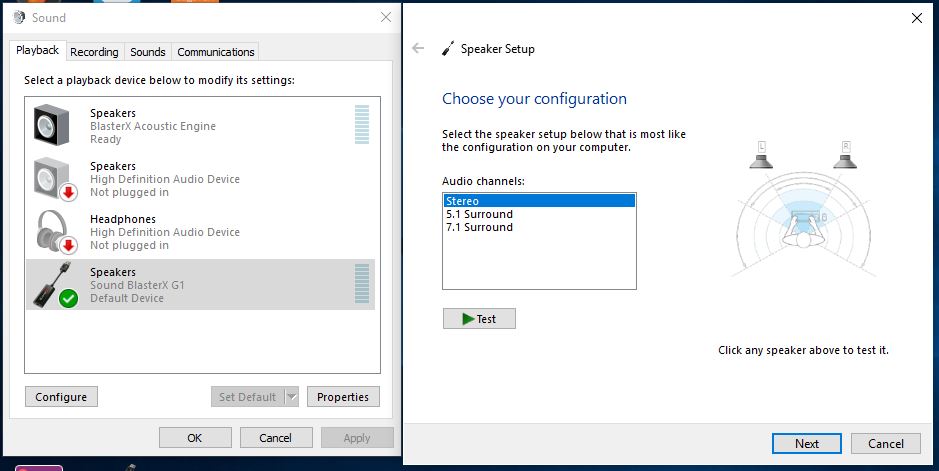
This is happening on other audio devices as well.

This is a video I took with the onboard audio device:

https://www.youtube.com/watch?v=EoqlMSMw7LY&feature=youtu.be

Windows for home | Windows 10 | Settings

Locked Question. This question was migrated from the Microsoft Support Community. You can vote on whether it's helpful, but you can't add comments or replies or follow the question.

0 comments No comments

11 answers

Sort by: Most helpful
  1. Anonymous
    2019-02-26T08:46:54+00:00

    i also have this bug

    tested with both my creative sond blaster z & onboard sound card no fix

    fresh install no fix

    sca sfc no fix

    restore image health no fix

    here is a video made by creative support

    IT'A A MICROSOFT BUG THEY NEED TO FIX

    https://drive.google.com/file/d/1xvHGYb6KmGPDZk2rEsJoCrPjLYDZNtNa/view?usp=sharing

    10 people found this answer helpful.
    0 comments No comments
  2. Anonymous
    2019-02-26T11:35:40+00:00

    this is a bug and this is a report to the developers...to fix this issue can you get this to them ??

    also when you post solution did you test this??

    this issue is reproducing on my 2 machines

    can you please test on your own ?

    5 people found this answer helpful.
    0 comments No comments
  3. Anonymous
    2019-05-22T20:33:44+00:00

    Same issue here :(

    Win10 1809 x64 #17763.503

    MSI Z170A Board with Realtek ALC1150 Audio.

    No matter if using Microsoft provided "High Definition Audio Device" or Realtek's latest 6.0.1.8619 (25.03.2019) drivers.

    The setting keeps resetting to stereo after certain amount of time.

    No difference if I set it via Windows Sound Setting or Realtek provided App....

    4 people found this answer helpful.
    0 comments No comments
  4. Anonymous
    2019-06-01T14:07:00+00:00

    I have the same issue with a Creative Labs X FI Titanium sound card.  I had quite alot of trouble just getting it to act correctly as the rear speakers wouldn't work and played through the front speakers.  After installing different drivers I finally got it to work but it now keeps reverting back to Stereo at every boot up.

    3 people found this answer helpful.
    0 comments No comments
  5. Anonymous
    2019-02-26T07:30:02+00:00

    Hi Vijay,

    I have tried the suggestions provided for both the Sound BlasterX G1 and the onboard audio device.

    I can't roll back the drivers and there are no new drivers.

    Is there a possibility of a bug on Windows 10 Version 1809's settings?

    I hope that someone from Microsoft can test the "Configuration" setting to see if the sample rate changes after setting to a higher sample rate.

    Thank you

    2 people found this answer helpful.
    0 comments No comments
