Hi Jb,
I am Dexter, an Independent Advisor. I am here to work with you on this issue.
It seems Windows does not log the transfer details, but still, I got some information from the Event Viewer may have some help for you.
I've made a test to simulate transfer some files from my desktop to my phone through Bluetooth, and I got an event logged by Windows shown my phone's connected to my desktop, and with my phone's MAC address, but have no detail about the files name transferred.
You can do the same with Windows Event Viewer to check out if there is any device connected to your laptop. Here are the steps:
- Open a Windows Explorer and right-click on "This PC" - "Manage"
- Select "Computer Management" - "System Tools" - "Event Viewer" - "Windows Logs" - "System" from the left tree.
- Right-click on "System" you've selected - "Filter current Log", choose the event sources to "BTHUSB", and check the Event level on "Information", then press "OK"
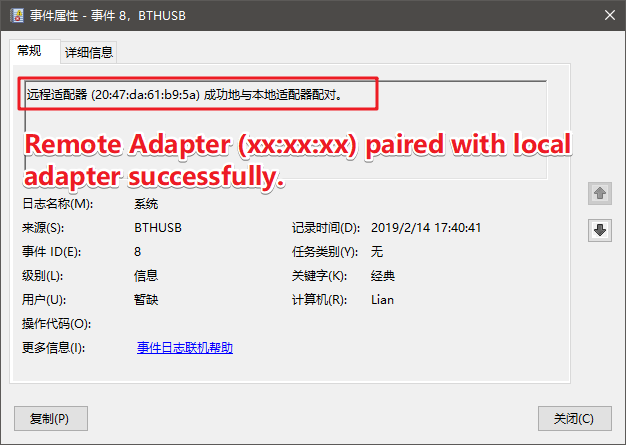
- From the filtered result you can check one by one to see if there is any event seems like "Adapter (xx:xx:xx:xx:xx:xx) paired with local adapter successful" (I'll attach the pic below)
- If you found event like that, means at least you got the chances to be stolen transferred file through Bluetooth.
Hope this helps and let me know if I can help you further!
' cx='32' cy='32' r='32' /%3E%3Ctext x='50%25' y='55%25' dominant-baseline='middle' text-anchor='middle' fill='%23FFF' %3EA%3C/text%3E%3C/svg%3E)
