Share via

Changing paper source when printing.

Anonymous
2019-03-23T20:30:54+00:00

When printing how do I change the paper source from rear tray to cassette and from cassette to rear tray?  I've tried over and over in different ways.  I was able to do it a couple times but it took so long that I don't even know what I did.

Windows for home | Windows 10 | Devices and drivers

Locked Question. This question was migrated from the Microsoft Support Community. You can vote on whether it's helpful, but you can't add comments or replies or follow the question.

0 comments No comments

6 answers

Sort by: Most helpful
  1. Anonymous
    2019-03-23T20:45:20+00:00

    This link should answer your question:

    https://ugp01.c-ij.com/ij/webmanual/PrinterDriv...

    Standard Disclaimer: This is a non-Microsoft website. The page appears to be providing accurate, safe information. Watch out for ads on the site that may advertise products frequently classified as a PUP (Potentially Unwanted Products). Thoroughly research any product advertised on the site before you decide to download and install it.

    Was this answer helpful?

    1 person found this answer helpful.
    0 comments No comments
  2. Anonymous
    2019-03-23T21:22:54+00:00

    Hi,

    I am Ganesh Gandhi, an Independent Advisor, 18 years experienced windows guide. I am here to work with you on this problem.

    Since you were able to do it a couple times but it took so long means you need to reinstall the printer to fix this issue.

    Kindly follow these steps:

    In Start, search 'Control panel'

    In Printers section, remove Canon - TR8520.

    If you have installation Media, you can use it.

    or

    Download latest driver for Canon - TR8520 from:

    https://www.usa.canon.com/internet/portal/us/ho...

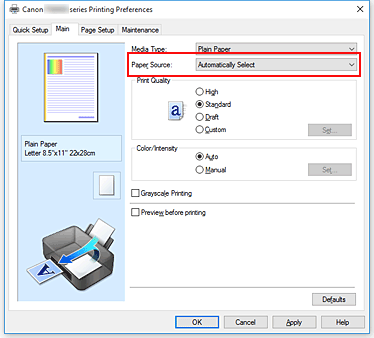
    As in your Manual,

    As usual you can select the paper source

    From the Paper Source list on the Main tab, select the paper source that matches your purpose.

    Automatically Select

    Based on the paper settings in the printer driver and the paper information registered on the printer, the printer automatically determines the paper source and feeds paper.

    Rear Tray

    Paper is always fed from the rear tray.

    Cassette

    Paper is always fed from the cassette.

    Do let me know if you require any further help on this. I will keep working with you until it's resolved.

    ______________________________________________

    Standard Disclaimer: There are links to non-Microsoft websites. The pages appear to be providing accurate, safe information with reference. Thoroughly research products advertised on the sites before you decide to download and install it. Watch out for ads on the sites that may advertise products frequently classified as a PUP (Potentially Unwanted Products).
    Was this answer helpful?

    0 comments No comments
  3. Anonymous
    2019-03-23T20:41:36+00:00

    Hello Linda,

    What is the manufacturer and model of your printer?

    Canon - TR8520

    Was this answer helpful?

    0 comments No comments
  4. DaveM121 880.8K Reputation points Independent Advisor
    2019-03-23T20:40:49+00:00

    Hi Linda

    That functionality is not provided by Windows, it is provided by the driver/software from the Printer manufacturer.

    What is the Make and exact Model No. of your Printer?

    Was this answer helpful?

    0 comments No comments
  5. Anonymous
    2019-03-23T20:39:33+00:00

    Hello Linda,

    What is the manufacturer and model of your printer?

    Was this answer helpful?

    0 comments No comments
