Share via

Annoying issue with Windows Photo Editor 10.0

Anonymous
2019-03-31T04:30:02+00:00

Hi,

I'm using the latest Windows 10 Home edition.  And Windows Photo Editor is the default "Opener" on my .jpg files.  I usually use its edit feature to crop my photo files from the camera.

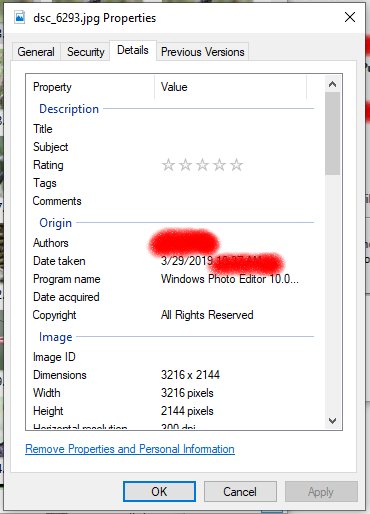
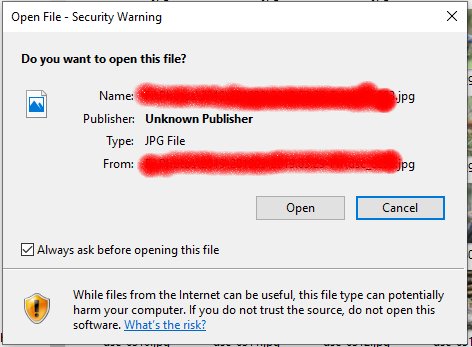
I don't have any problem to open the original photo file. But once I edit the file using Windows Photo Editor by cropping, and save it back to the original file name.  The jpg file becomes tainted as a security risk -- Now when I open the file with the same and default Windows Photo Editor, it gives a warning popup -- see attached (notice "Publisher: Unknown Publisher".  When I view the file's properties, it shows the program name is "Windows Photo Editor 10.0..." (It's a different value with the original jpg file from the camera) -- see 2nd attachment.

Why does Windows Photo Editor do this?

(It was acting like this before.  But after a recent Windows update, I started to have this problem).

Can we disable this insanity?

Thanks!
Windows for home | Windows 10 | Files, folders, and storage

Locked Question. This question was migrated from the Microsoft Support Community. You can vote on whether it's helpful, but you can't add comments or replies or follow the question.

0 comments No comments

11 answers

Sort by: Most helpful
  1. Anonymous
    2019-04-02T04:48:10+00:00

    Greg - I created a regular user account and tested a new photo file from the camera. Did some cropping and overwrote the original file.  Then opened it again -- No security warning popup!  So I guess my own user account got corrupt somehow...

    I really hate to reinstall Windows. God knows what else would happen... :(

    Was this answer helpful?

    0 comments No comments
  2. Anonymous
    2019-04-02T04:22:12+00:00

    HI

    Try Control Panel(small icons) >security and maintenance >Security and click on windows smart screen change settings. Turn it off. See if that helps.

    On my Windows 10 Home edition, there's no "windows smart screen change settings" under Control Panel\Security and Maintenance

    Was this answer helpful?

    0 comments No comments
  3. Anonymous
    2019-03-31T20:00:21+00:00

    I wonder if this relates to frequent User account corruption we see in Windows 10. Can you create a new Local Admin test account to see if the same thing happens? See here: http://www.howtogeek.com/226540/how-to-create-a...

    If not then you can run a Repair Install by installing the Media Creation Tool from this link choosing Download Tool Now, install the tool, open it and choose Upgrade this PC Now. http://windows.microsoft.com/en-us/windows-10/m.... This reinstalls WIndows while saving your files and apps in place; takes about an hour, resolves most problems.

    Was this answer helpful?

    0 comments No comments
  4. Anonymous
    2019-03-31T14:32:11+00:00

    HI

    Try Control Panel(small icons) >security and maintenance >Security and click on windows smart screen change settings. Turn it off. See if that helps.

    Was this answer helpful?

    0 comments No comments
  5. Anonymous
    2019-03-31T13:43:53+00:00

    It's built-in with Windows 10 Home, in fact, it won't even allow me to uninstall it.

    Was this answer helpful?

    0 comments No comments