Microsoft 365 and Office | SharePoint | For business | Windows
A group of Microsoft Products and technologies used for sharing and managing content, knowledge, and applications.

This browser is no longer supported.
Upgrade to Microsoft Edge to take advantage of the latest features, security updates, and technical support.
' cx='32' cy='32' r='32' /%3E%3Ctext x='50%25' y='55%25' dominant-baseline='middle' text-anchor='middle' fill='%23FFF' %3EA%3C/text%3E%3C/svg%3E)
When I visit our Microsoft 365 Business SharePoint online website, all I can see are "frequently used" and "favorite" SharePoint sites. So, I'm not able to find newly created SharePoint sites.
Where is a list of all SharePoint sites I'm a member of?
A group of Microsoft Products and technologies used for sharing and managing content, knowledge, and applications.
Since the UserVoice website has been shut-down, here are two hyperlinks to the corresponding proposals on the MS Feedback Portal website:
Answer accepted by question author
' cx='32' cy='32' r='32' /%3E%3Ctext x='50%25' y='55%25' dominant-baseline='middle' text-anchor='middle' fill='%23FFF' %3ECM%3C/text%3E%3C/svg%3E)
Hi @AxD ,
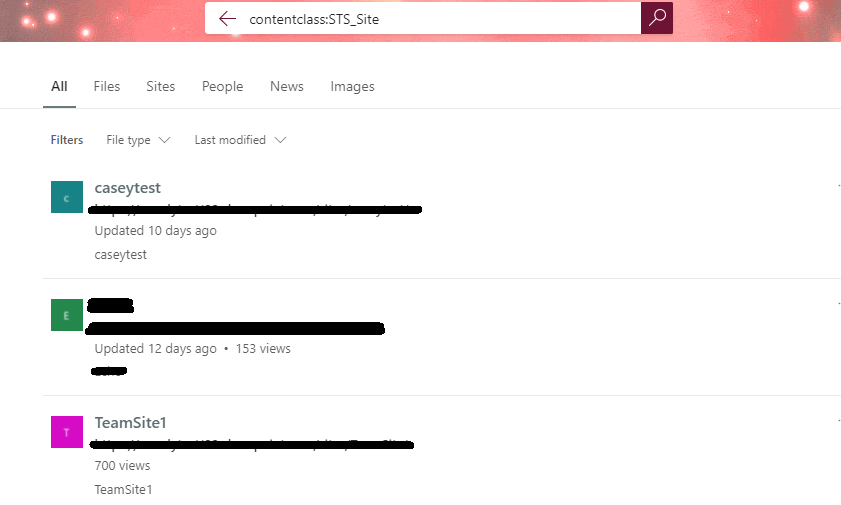
You could search "contentclass:STS_Site" in SharePoint online search box to list all the sites you have access to.
Note: Please click "Search the whole organization for contentclass:STS_Site" if it comes "We couldn't find any results on this site for contentclass:STS_Site".
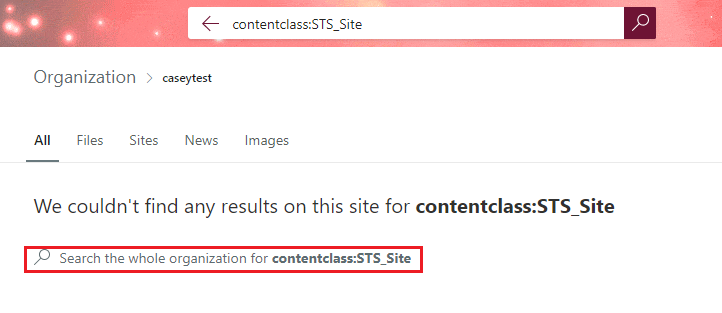
My search result:
If an Answer is helpful, please click "Accept Answer" and upvote it.
Note: Please follow the steps in our documentation to enable e-mail notifications if you want to receive the related email notification for this thread.
' cx='32' cy='32' r='32' /%3E%3Ctext x='50%25' y='55%25' dominant-baseline='middle' text-anchor='middle' fill='%23FFF' %3EPL%3C/text%3E%3C/svg%3E)
The answer is: they want you to access your sites through Teams
(not via the Sharepoint web interface)
It's nuts - all a sharepoint site is, is a Shared Drive (in Google Drive language). How they can fail to have a full site tree is amazing!
' cx='32' cy='32' r='32' /%3E%3Ctext x='50%25' y='55%25' dominant-baseline='middle' text-anchor='middle' fill='%23FFF' %3EC6%3C/text%3E%3C/svg%3E)
but even in teams you will not be able to see properly everything together in one list form. The same is with planner and with MS lists.
' cx='32' cy='32' r='32' /%3E%3Ctext x='50%25' y='55%25' dominant-baseline='middle' text-anchor='middle' fill='%23FFF' %3ERS%3C/text%3E%3C/svg%3E)
as a workaround, add a featured link to the start page
https://[domain].sharepoint.com/_layouts/15/sharepoint.aspx?q=contentclass%3ASTS_Site&v=search
' cx='32' cy='32' r='32' /%3E%3Ctext x='50%25' y='55%25' dominant-baseline='middle' text-anchor='middle' fill='%23FFF' %3EIR%3C/text%3E%3C/svg%3E)
This is the way. The accepted answer gives how to get it, but this is how you reasonably solve the problem MS made by not giving users access to this list of sites in the first place.
' cx='32' cy='32' r='32' /%3E%3Ctext x='50%25' y='55%25' dominant-baseline='middle' text-anchor='middle' fill='%23FFF' %3EPH%3C/text%3E%3C/svg%3E)
I try this way and it works perfectly! Thank you so much.
' cx='32' cy='32' r='32' /%3E%3Ctext x='50%25' y='55%25' dominant-baseline='middle' text-anchor='middle' fill='%23FFF' %3ELA%3C/text%3E%3C/svg%3E)
This is asinine honestly.
Thank you for your valuable reply.
So there isn't a button to click to see all sites? I feel this search query is rather cumbersome to remember.
Hi @AxD ,
In SharePoint online we can only see Frequent or Followed sites. There is no button to see all sites.
Hi @AxD ,
I'm checking how the things are going on about this issue. Is there any progress on this issue? You can accept the answer if it helps. It will help others who meet the similar question in this forum. Thank you for your understanding.
Hi Casey,
thank your for your reply. I accepted it as an answer.
Yet, I have voted for a corresponding proposal at UserVoice:
' cx='32' cy='32' r='32' /%3E%3Ctext x='50%25' y='55%25' dominant-baseline='middle' text-anchor='middle' fill='%23FFF' %3EBC%3C/text%3E%3C/svg%3E)
I'd say that there is a button to click to see all your sites. It's called "My Sites" and it has a globe-looking icon. The question is, why doesn't "My Sites" show my sites? What developer thinks it's acceptable to name a link "My Sites" and then not actually implementing the link to display my sites? It's utterly ridiculous.
Microsoft, please let the "My Sites" link display my sites! Eye roll!
' cx='32' cy='32' r='32' /%3E%3Ctext x='50%25' y='55%25' dominant-baseline='middle' text-anchor='middle' fill='%23FFF' %3EGW%3C/text%3E%3C/svg%3E)
Exactly. This is insanity!
How on earth am I supposed to get users to adopt Sharepoint when they can't even see the sites assigned to them
' cx='32' cy='32' r='32' /%3E%3Ctext x='50%25' y='55%25' dominant-baseline='middle' text-anchor='middle' fill='%23FFF' %3EW%3C/text%3E%3C/svg%3E)
Does anyone know the logic for this implementation? Not being able to view sites that one is a member of makes Sharepoint unusable for many at our organization, and previous organizations I have worked for. It seems like this would be a mandatory feature when the sharepoint page was developed so there must be some sort of legal reason behind this?
You can grab the url for the search including arguments for terms (maybe click on 'sites' up top first to simplify the visuals) and paste it into a featured link so your users will feel like they get this obviously necessary feature. I just called mine "All My Sites."