All video regardless of source, whether in browser or media player, whether streamed or local. I have been searching for hits of this issue for a while and seen a wide range of ideas, from changing power plan settings to swapping to the generic audio driver,
from modifying the registry to enable MSISupported under MessageSignaledInterruptProperties for the audio drivers to disabling cpu throttling in the bios (didn't do this one because I couldn't find the setting in particular).
Either way, nothing has changed this issue. As DPCLat and Latency Monitor (resplendence) have both informed me, I am continuing to have severe and repetitive latency issues on my desktop PC which become evident when attempting to watch any video, as the
audio pulls ahead of the picture. Attempting to skip backwards in a video causes it to freeze on a frame while the audio skips back and plays automatically, the video starting again up to a second or more later.
Currently my note was looking at the Highest Execution hit reported by Latency Monitor, an over one second time spent on ACPI.sys, or the ACPI Driver for NT. Searching for that pointed me towards this driver - I've seen other people online here and there
mentioning a SIMILAR driver (ACPI Compliant Control Method Battery) which disabling seems to improve latency issues, but I believe that is to do with laptop versions of windows 10 which have this handling, which is different for me as a PC user - that driver
doesn't appear in my drivers list at all, the Compliant System driver was the closest match I could find, so I decided to investigate on whether I can disable that and if I can, whether it will resolve my issues.
However if, as you say, disabling the driver will cause boot issues, and removing it will just cause it to be reinstalled on restart, I'm at a dead end here.
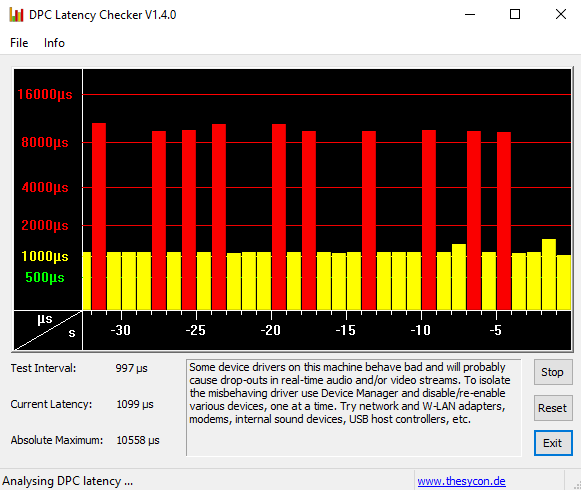
Here's a copy of my DPC Latency report, you can see I'm getting consistent very high latency spikes, but also my baseline is not that great either, I don't think I should be at a 1 millisecond (p sure that's the conversion) average.
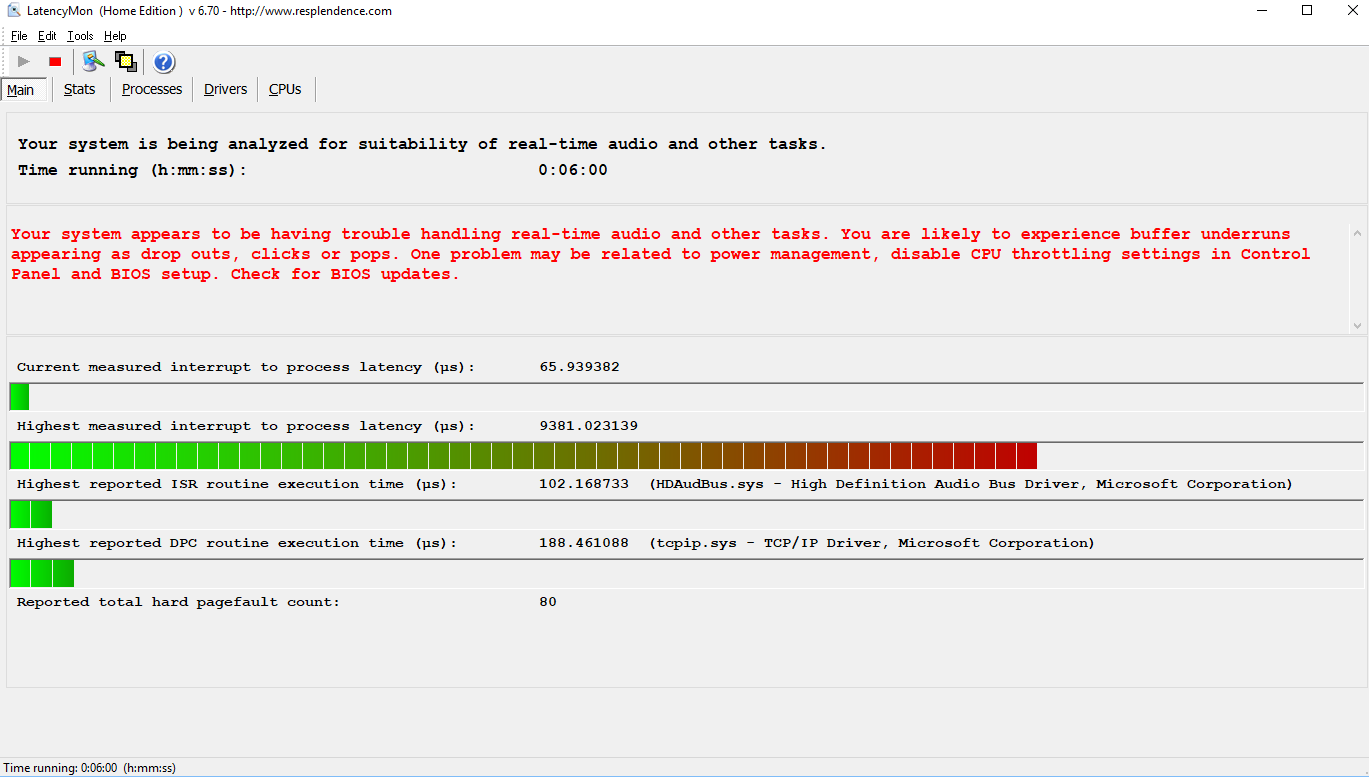
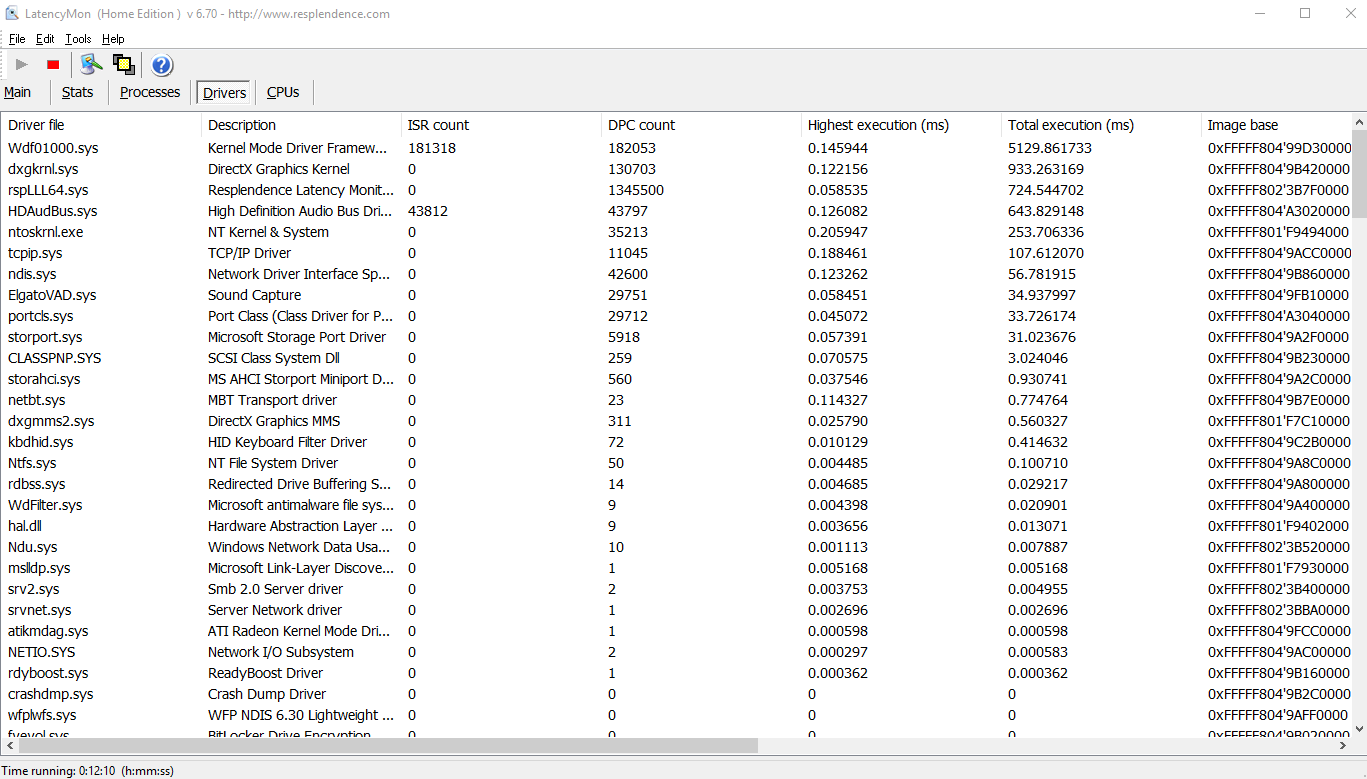
And here's the Latency Monitor reports. To the best of my awareness, wdf01000.sys having a high total execution is a symptom, not a cause, so I should be looking at what's causing it to act up not at it itself. The drivers after this point at the DirectX
Graphics Kernel, the Latency Monitor (which obviously won't be running most of the time), and then the High Definition Audio Bus Driver.
I am using the generic "High Definition Audio Device" driver in place of the Realtek driver as that was part of a recommended fix (That didn't work).
Notably, I did recently upgrade my desktop, changing out graphics card and motherboard while keeping hard drives, and the new graphics card is Radeon while the previous one was nvidia. If changing between these two has introduced instability, that could be
a secret cause. That said I did just today disable all nvidia services on my computer and restart it and I'm still having these issues, so I'm doubtful.
' cx='32' cy='32' r='32' /%3E%3Ctext x='50%25' y='55%25' dominant-baseline='middle' text-anchor='middle' fill='%23FFF' %3EA%3C/text%3E%3C/svg%3E)


